## Screenshot: Shakespeare Programming Language IDE Execution
### Overview
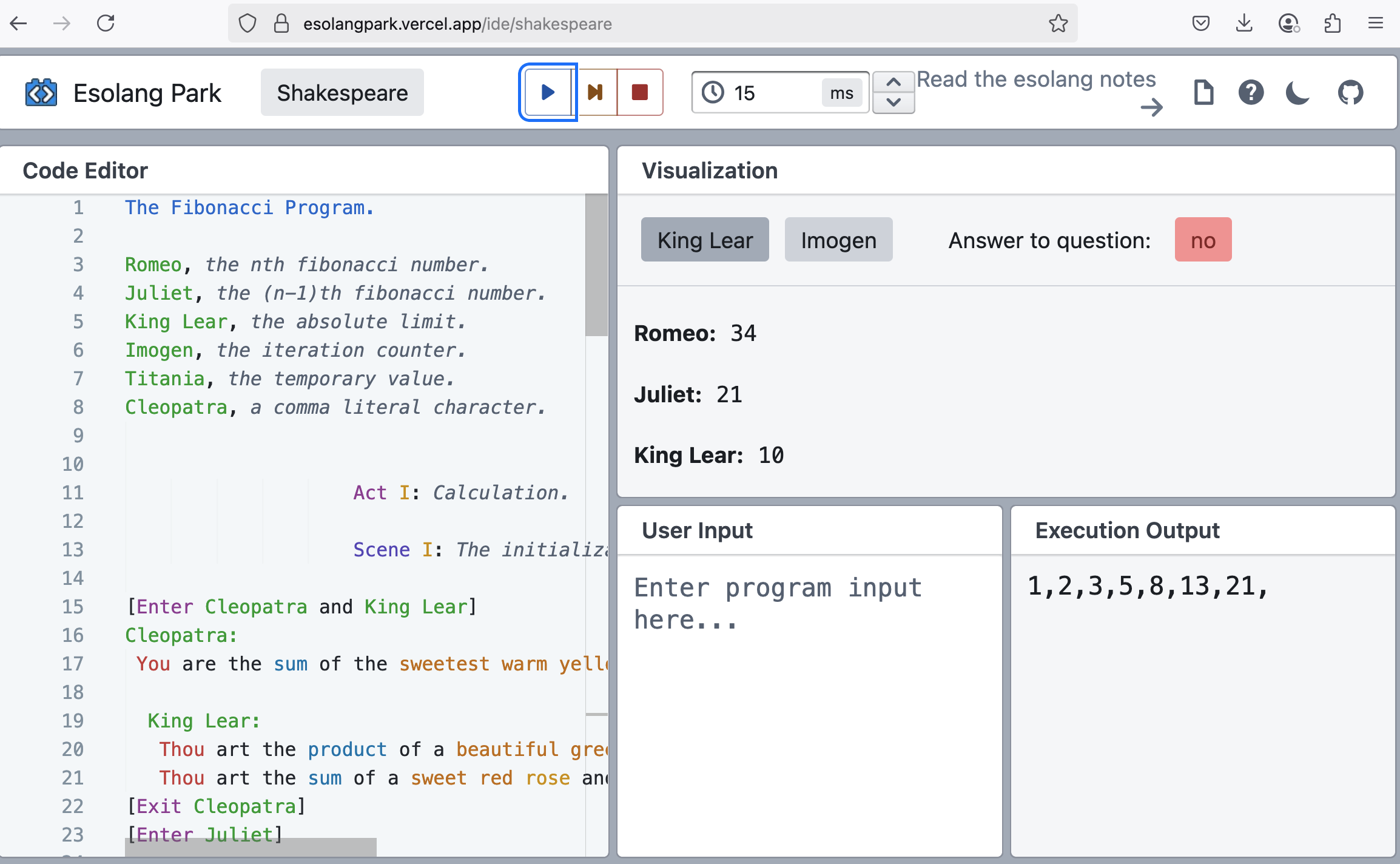
This image is a screenshot of a web-based Integrated Development Environment (IDE) for the esoteric programming language "Shakespeare," hosted on the "Esolang Park" platform. The interface shows a program titled "The Fibonacci Program." in mid-execution, displaying the code, the current state of variables, and the program's output.
### Components/Axes
The interface is divided into three primary regions:
1. **Header/Toolbar (Top):**
* **URL:** `esolangpark.vercel.app/ide/shakespeare`
* **Site Logo & Name:** "Esolang Park" (top-left).
* **Language Selector:** A button labeled "Shakespeare".
* **Execution Controls:** A blue "Play" button, a "Step" button (icon with a vertical line and arrow), and a red "Stop" button.
* **Timer:** A clock icon followed by the value `15` and the unit `ms`.
* **Navigation/Help:** A link labeled "Read the esolang notes" with an arrow, followed by icons for a document, a question mark (help), a moon (theme toggle), and GitHub.
2. **Code Editor (Left Panel):**
* **Title:** "Code Editor".
* **Content:** Lines of code written in the Shakespeare Programming Language. The code uses color syntax highlighting (character names in green, keywords in purple, other text in black/orange).
* **Visible Line Numbers:** 1 through 23.
3. **Visualization Panel (Right Panel):**
* **Title:** "Visualization".
* **Sub-sections:**
* **Variable State (Top):** Two buttons labeled "King Lear" and "Imogen". A label "Answer to question:" with a red button displaying "no". Below this, three variable-value pairs are listed.
* **User Input (Bottom-Left):** A text area with placeholder text "Enter program input here...".
* **Execution Output (Bottom-Right):** A text area displaying the program's output string.
### Detailed Analysis / Content Details
**A. Code Editor Content (Transcription of Visible Lines):**
```
1 The Fibonacci Program.
2
3 Romeo, the nth fibonacci number.
4 Juliet, the (n-1)th fibonacci number.
5 King Lear, the absolute limit.
6 Imogen, the iteration counter.
7 Titania, the temporary value.
8 Cleopatra, a comma literal character.
9
10
11 Act I: Calculation.
12
13 Scene I: The initialization.
14
15 [Enter Cleopatra and King Lear]
16 Cleopatra:
17 You are the sum of the sweetest warm yellow... [text cut off]
18
19 King Lear:
20 Thou art the product of a beautiful green... [text cut off]
21 Thou art the sum of a sweet red rose and... [text cut off]
22 [Exit Cleopatra]
23 [Enter Juliet]
```
*Note: Lines 17, 20, and 21 are truncated in the image.*
**B. Visualization Panel Data:**
* **Variable States:**
* `Romeo: 34`
* `Juliet: 21`
* `King Lear: 10`
* **User Input:** Empty (placeholder text only).
* **Execution Output:** `1,2,3,5,8,13,21,`
### Key Observations
1. **Program State:** The program is paused or has stopped execution. The variable values (`Romeo: 34`, `Juliet: 21`) correspond to consecutive Fibonacci numbers (21 is the 8th, 34 is the 9th if the sequence starts 1,1,2,3,5,8,13,21,34).
2. **Output Sequence:** The output `1,2,3,5,8,13,21,` is the Fibonacci sequence up to 21, with each number separated by a comma. The trailing comma suggests the program was interrupted before printing the next number (which would be 34, matching Romeo's current value).
3. **Limit Variable:** `King Lear` is set to `10`. Given the context, this likely represents the iteration limit or the index of the Fibonacci number to compute. The output shows 7 numbers, and the variables hold the 8th and 9th numbers, indicating the program may be near its limit.
4. **UI State:** The "Play" button is highlighted in blue, suggesting the program is ready to run or is paused. The "Answer to question: no" button is red, which may be a specific state or flag within the Shakespeare language execution model.
### Interpretation
This screenshot captures a debugging or demonstration session of a Shakespeare program designed to generate Fibonacci numbers. The Shakespeare Programming Language uses theatrical metaphors: characters represent variables, and dialogue between them performs operations (e.g., "You are the sum of..." assigns a value).
The data suggests the program has successfully computed and output the Fibonacci sequence up to 21. The internal state shows it has calculated the next number (34) and is holding the previous one (21). The limit variable (`King Lear: 10`) and the iteration counter (`Imogen`, though its value isn't displayed) control the loop. The program appears to be in a paused state, possibly after completing its main loop or awaiting further input. The empty user input field indicates no external data was provided for this run. The interface effectively visualizes the abstract state of an esoteric language, making its unconventional execution model more transparent.