## Screenshot: Archival Storage Search Interface
### Overview
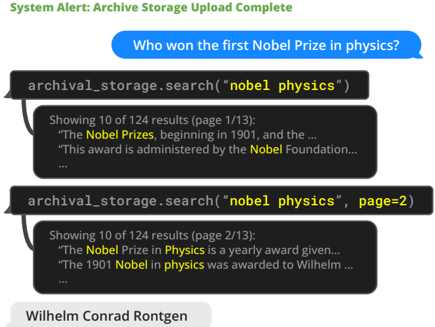
The image is a screenshot of a chat-based interface showing a system alert, a user query, and the results of an archival storage search. The interaction demonstrates a user asking a question and the system performing a keyword search within an archive, returning paginated results and a final answer.
### Components/Axes
The interface is composed of four distinct visual components, arranged vertically from top to bottom:
1. **System Alert Banner (Top):** A green text banner.
2. **User Query Bubble (Upper Middle):** A blue, right-aligned chat bubble.
3. **Search Results (Center):** Two dark gray, left-aligned chat bubbles containing search command syntax and results.
4. **Answer Box (Bottom):** A light gray, left-aligned box containing the final answer.
### Detailed Analysis
**Component 1: System Alert Banner**
* **Position:** Top of the frame.
* **Text:** "System Alert: Archive Storage Upload Complete"
* **Color:** Green text on a white background.
**Component 2: User Query Bubble**
* **Position:** Below the system alert, right-aligned.
* **Text:** "Who won the first Nobel Prize in physics?"
* **Style:** White text inside a blue bubble with a tail pointing right.
**Component 3: Search Results (First Result)**
* **Position:** Below the user query, left-aligned.
* **Content:**
* **Command Line:** `archival_storage.search("nobel physics")`
* The search terms `"nobel physics"` are highlighted in yellow.
* **Result Header:** "Showing 10 of 124 results (page 1/13):"
* **Result Snippets (Partial):**
* "The **Nobel Prizes**, beginning in 1901, and the ..."
* "This award is administered by the **Nobel Foundation**..."
* "..."
* **Note:** The terms "Nobel Prizes" and "Nobel Foundation" are bolded within the snippets.
**Component 4: Search Results (Second Result)**
* **Position:** Directly below the first search result, left-aligned.
* **Content:**
* **Command Line:** `archival_storage.search("nobel physics", page=2)`
* The search terms `"nobel physics"` and the parameter `page=2` are highlighted in yellow.
* **Result Header:** "Showing 10 of 124 results (page 2/13):"
* **Result Snippets (Partial):**
* "The **Nobel Prize in Physics** is a yearly award given..."
* "The 1901 **Nobel in physics** was awarded to Wilhelm ..."
* "..."
* **Note:** The terms "Nobel Prize in Physics" and "Nobel in physics" are bolded within the snippets.
**Component 5: Answer Box**
* **Position:** Bottom of the frame, left-aligned.
* **Text:** "Wilhelm Conrad Rontgen"
* **Style:** Black text on a light gray background, resembling a final output or answer field.
### Key Observations
1. **Search Functionality:** The system performs a keyword search (`"nobel physics"`) and returns paginated results (124 total, across 13 pages).
2. **Query Refinement:** The second search command demonstrates pagination by adding the parameter `page=2`.
3. **Information Retrieval:** The search snippets contain relevant historical information, with the second page's snippet directly mentioning the 1901 award and the winner's first name ("Wilhelm").
4. **Final Answer:** The interface concludes by displaying the full name "Wilhelm Conrad Rontgen" as the answer to the initial user query, synthesizing information from the search.
### Interpretation
This screenshot illustrates a **document retrieval and question-answering workflow**. The process follows a clear sequence:
1. **System State Notification:** The "Upload Complete" alert indicates the archive is ready for querying.
2. **User Intent:** A specific factual question is posed.
3. **Information Retrieval:** The system executes a keyword-based search against the archive. The bolded terms in the snippets show the system is matching the query keywords. The pagination shows the system is handling a large result set.
4. **Answer Synthesis:** The final answer box presents the synthesized result, likely extracted or confirmed from the retrieved documents (specifically, the snippet on page 2 mentioning "The 1901 Nobel in physics was awarded to Wilhelm...").
The interface acts as a **conversational agent over a structured data archive**. It doesn't just return raw documents; it performs a search and then presents a distilled answer, bridging the gap between a natural language query and a structured data store. The visual separation of the search commands, raw snippets, and final answer helps the user understand the system's process from query to result.