## Screenshot: Flight Selection Interface with Preferences Questionnaire
### Overview
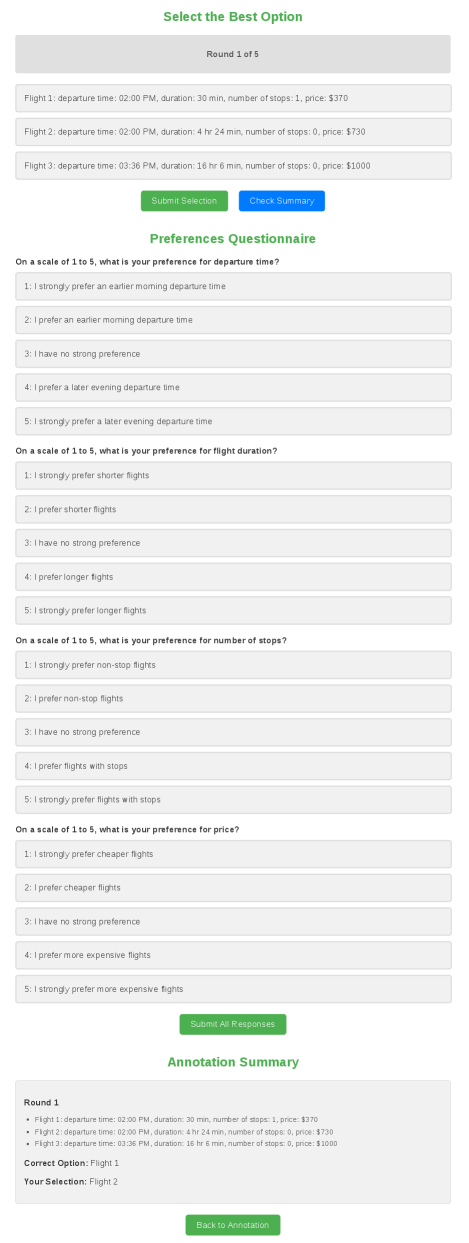
The image depicts a flight selection interface with a multi-step questionnaire. The interface includes flight options, preference questions, and an annotation summary. The design uses a clean layout with green and blue buttons for actions.
### Components/Axes
1. **Header Section**:
- Title: "Select the Best Option" (green text)
- Progress Indicator: "Round 1 of 5" (gray banner)
2. **Flight Options**:
- Three flight options listed in gray banners:
- **Flight 1**: Departure 02:00 PM, Duration 30 min, 1 stop, $370
- **Flight 2**: Departure 02:00 PM, Duration 4h24m, 0 stops, $730
- **Flight 3**: Departure 03:36 PM, Duration 16h6m, 0 stops, $1000
- Buttons: "Submit Selection" (green) and "Check Summary" (blue)
3. **Preferences Questionnaire**:
- Four questions with 1-5 Likert scales:
1. **Departure Time Preference**:
- 1: Strongly prefer earlier morning
- 2: Prefer earlier morning
- 3: No strong preference
- 4: Prefer later evening
- 5: Strongly prefer later evening
2. **Flight Duration Preference**:
- 1: Strongly prefer shorter flights
- 2: Prefer shorter flights
- 3: No strong preference
- 4: Prefer longer flights
- 5: Strongly prefer longer flights
3. **Number of Stops Preference**:
- 1: Strongly prefer non-stop flights
- 2: Prefer non-stop flights
- 3: No strong preference
- 4: Prefer flights with stops
- 5: Strongly prefer flights with stops
4. **Price Preference**:
- 1: Strongly prefer cheaper flights
- 2: Prefer cheaper flights
- 3: No strong preference
- 4: Prefer more expensive flights
- 5: Strongly prefer more expensive flights
4. **Annotation Summary**:
- Header: "Annotation Summary" (green text)
- Content:
- **Round 1**:
- Flight 1: 02:00 PM, 30 min, 1 stop, $370
- Flight 2: 02:00 PM, 4h24m, 0 stops, $730
- Flight 3: 03:36 PM, 16h6m, 0 stops, $1000
- **Correct Option**: Flight 1
- **Your Selection**: Flight 2
- Button: "Back to Annotation" (green)
### Detailed Analysis
- **Flight Options**:
- Flight 1 is the cheapest ($370) but has 1 stop and shortest duration.
- Flight 2 is mid-priced ($730) with no stops but longer duration.
- Flight 3 is the most expensive ($1000) with no stops and longest duration.
- **Questionnaire Structure**:
- All questions use a 1-5 scale with clear preference gradients.
- Questions cover time, duration, stops, and price preferences.
- **Annotation Summary**:
- Highlights the discrepancy between the "correct" option (Flight 1) and the user's selection (Flight 2).
### Key Observations
1. **Price vs. Convenience Tradeoff**:
- Flight 1 is the most economical but least convenient (1 stop).
- Flight 2 balances cost and convenience (no stops, mid-duration).
- Flight 3 prioritizes convenience (no stops) at the highest cost.
2. **User Preference Conflict**:
- The user selected Flight 2 despite Flight 1 being cheaper and shorter.
- This suggests the user may prioritize non-stop flights over cost.
3. **Questionnaire Design**:
- Clear Likert scales allow granular preference capture.
- Questions are logically ordered (time → duration → stops → price).
### Interpretation
The interface appears designed to optimize flight selection based on user preferences. However, the user's choice of Flight 2 over the cheaper Flight 1 indicates a potential misalignment between the "correct" option (cost-effective) and the user's actual priorities (non-stop flights). This could reflect:
- A design flaw if the "correct" option is algorithmically determined without considering user preferences.
- A need for better user education about tradeoffs between cost, time, and convenience.
- An opportunity to refine the questionnaire to better align selections with user values.
The interface effectively structures data but may benefit from dynamic recommendations that adapt to user preferences rather than a static "correct" option.