# Technical Document Extraction: Data Analysis Workflow Diagram
## 1. Component Isolation
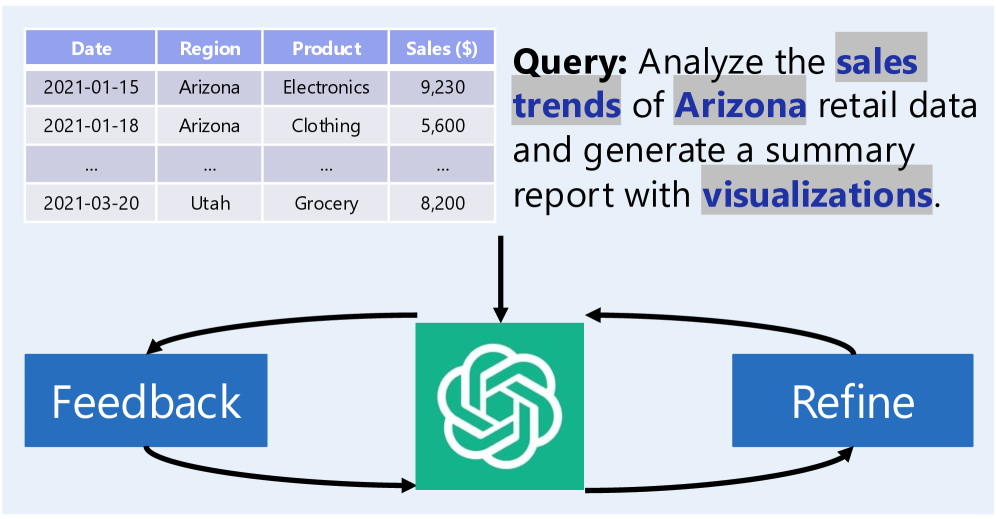
The image is a conceptual diagram illustrating a data analysis workflow involving a Large Language Model (LLM). It is segmented into three primary regions:
* **Top-Left (Input Data):** A structured data table.
* **Top-Right (User Input):** A natural language query with highlighted keywords.
* **Bottom (Processing Loop):** A central AI processor (OpenAI logo) connected to iterative feedback loops.
---
## 2. Data Table Extraction (Top-Left)
The image contains a sample dataset representing retail sales.
| Date | Region | Product | Sales ($) |
| :--- | :--- | :--- | :--- |
| 2021-01-15 | Arizona | Electronics | 9,230 |
| 2021-01-18 | Arizona | Clothing | 5,600 |
| ... | ... | ... | ... |
| 2021-03-20 | Utah | Grocery | 8,200 |
---
## 3. Query Transcription (Top-Right)
The text represents a user prompt. Specific keywords are highlighted with a grey background and blue font, indicating entities or actions of interest to the system.
**Full Text:**
"**Query:** Analyze the **sales trends** of **Arizona** retail data and generate a summary report with **visualizations**."
**Highlighted Keywords:**
* sales trends
* Arizona
* visualizations
---
## 4. Process Flow and Diagram Components (Bottom)
The bottom section describes an iterative refinement process.
### Central Component
* **Icon:** The OpenAI logo (green square with a white stylized floral/hexagonal symbol).
* **Function:** Acts as the central processing engine that receives the data table and the query.
### Iterative Loops
There are two primary feedback mechanisms represented by blue rectangular blocks and curved black arrows:
1. **Feedback Loop (Left):**
* **Label:** "Feedback"
* **Flow:** An arrow points from the central AI icon to the "Feedback" block, and another arrow points from the "Feedback" block back to the AI icon. This indicates a continuous loop of evaluating the output.
2. **Refine Loop (Right):**
* **Label:** "Refine"
* **Flow:** An arrow points from the central AI icon to the "Refine" block, and another arrow points from the "Refine" block back to the AI icon. This indicates the process of improving or narrowing down the results based on the feedback.
---
## 5. Summary of Information
This image depicts a **Human-in-the-loop (HITL) or Automated Iterative Analysis** system.
1. **Input:** Structured tabular data and a specific natural language request (Query).
2. **Processing:** The AI interprets the query, focusing on specific parameters (Arizona, sales trends).
3. **Optimization:** The system does not produce a static result but enters a cycle of **Feedback** and **Refinement** to ensure the final "summary report with visualizations" meets the user's requirements.