## Table: User Task Instructions and Required Abilities
### Overview
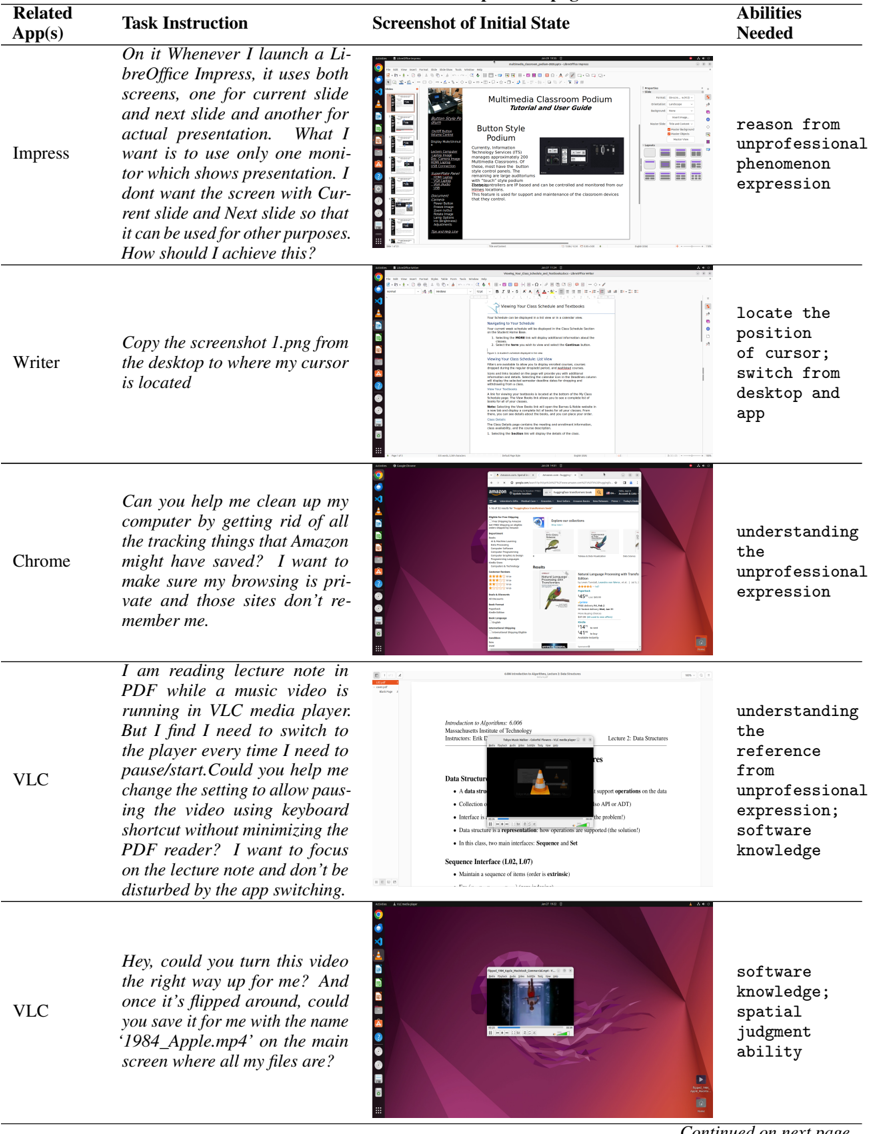
The table presents a structured comparison of user tasks across different applications, detailing task instructions, initial state screenshots, and required abilities. Each row corresponds to a specific app (e.g., Impress, Writer, Chrome, VLC) and outlines user challenges and technical demands.
---
### Components/Axes
| **Header** | **Content** |
|--------------------------|-----------------------------------------------------------------------------|
| **Related App(s)** | Lists the application(s) involved in the task. |
| **Task Instruction** | Describes the user's goal or problem to be solved. |
| **Screenshot of Initial State** | Visual representation of the app's interface at task initiation. |
| **Abilities Needed** | Technical or cognitive skills required to complete the task. |
---
### Detailed Analysis
#### Row 1: **Impress**
- **Task Instruction**:
*"On it Whenever I launch a LibreOffice Impress, it uses both screens, one for current slide and next slide and another for actual presentation. What I want is to use only one monitor which shows presentation. I don’t want the screen with Current slide and Next slide so that it can be used for other purposes. How should I achieve this?"*
- **Screenshot of Initial State**:
A presentation interface with multiple slides visible across two monitors.
- **Abilities Needed**:
`reason from unprofessional phenomenon expression`
#### Row 2: **Writer**
- **Task Instruction**:
*"Copy the screenshot 1.png from the desktop to where my cursor is located."*
- **Screenshot of Initial State**:
A text document interface with a blank document open.
- **Abilities Needed**:
`locate the position of cursor; switch from desktop and app`
#### Row 3: **Chrome**
- **Task Instruction**:
*"Can you help me clean up my computer by getting rid of all the tracking things that Amazon might have saved? I want to make sure my browsing is private and those sites don’t re-member me."*
- **Screenshot of Initial State**:
A browser window open to an Amazon product page.
- **Abilities Needed**:
`understanding the unprofessional expression`
#### Row 4: **VLC (First Entry)**
- **Task Instruction**:
*"I am reading lecture notes in PDF while a music video is running in VLC media player. But I find I need to switch to the player every time I need to pause/start. Could you help me change the setting to allow pausing the video using keyboard shortcut without minimizing the PDF reader? I want to focus on the lecture note and don’t be disturbed by the app switching."*
- **Screenshot of Initial State**:
A PDF reader overlapping with a VLC media player window.
- **Abilities Needed**:
`understanding the reference from unprofessional expression; software knowledge`
#### Row 5: **VLC (Second Entry)**
- **Task Instruction**:
*"Hey, could you turn this video the right way up for me? And once it’s flipped around, could you save it for me with the name ‘1984_Apple.mp4’ on the main screen where all my files are?"*
- **Screenshot of Initial State**:
A video player interface with a vertically oriented video.
- **Abilities Needed**:
`software knowledge; spatial judgment ability`
---
### Key Observations
1. **Task Complexity**: Tasks range from simple file operations (Writer) to advanced software manipulation (VLC).
2. **Abilities Required**:
- **Cognitive**: Reasoning, understanding ambiguous instructions.
- **Technical**: Cursor control, keyboard shortcuts, software settings.
- **Spatial**: Judging orientation and positioning (VLC video flipping).
3. **User Frustration**: Multiple entries highlight issues with app behavior (e.g., multi-monitor confusion, tracking data, video orientation).
---
### Interpretation
The table illustrates the intersection of user intent and technical barriers across applications. For example:
- **Impress** and **VLC** tasks emphasize the need for users to navigate non-intuitive interfaces or workflows.
- **Chrome** and **Writer** highlight privacy concerns and basic file management challenges.
- The repeated mention of "unprofessional expression" and "software knowledge" suggests a gap between user expectations and app design, particularly in handling ambiguous instructions or advanced features.
This data could inform UX improvements, such as clearer tutorials, context-aware shortcuts, or better multi-monitor support.