## Diagram & Photograph: Robotic Arm Manipulation Setup
### Overview
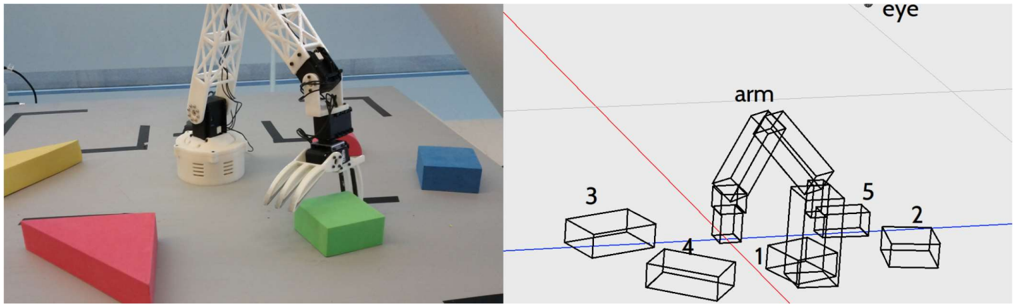
The image is a composite of two panels. The left panel is a photograph showing a physical robotic arm with a multi-fingered gripper positioned over a workspace containing several colored geometric blocks. The right panel is a corresponding wireframe diagram or simulation view of the same scene, labeling key components and numbering the blocks. The overall purpose appears to be illustrating a robotic manipulation task, likely for research or documentation in robotics, computer vision, or simulation.
### Components/Axes
**Left Panel (Photograph):**
* **Subject:** A white, articulated robotic arm with black joints and a white, three-fingered gripper.
* **Workspace:** A light gray table surface.
* **Objects:**
* A **red triangular prism** (left foreground).
* A **yellow rectangular block** (left background).
* A **green rectangular block** (center, directly under the gripper).
* A **blue rectangular block** (right background).
* **Background:** A light blue wall or partition. Black tape marks are visible on the table surface, likely for calibration or positioning.
**Right Panel (Diagram):**
* **Type:** A 3D wireframe or schematic representation.
* **Labels:**
* `eye`: Positioned in the top-right corner, indicating a camera or sensor viewpoint.
* `arm`: Labels the wireframe model of the robotic arm.
* **Coordinate System:** A red line (likely the X-axis) and a blue line (likely the Y-axis) intersect near the base of the arm, defining a ground plane.
* **Numbered Components (Blocks):** Five wireframe rectangular prisms are labeled with numbers:
* `1`: Positioned directly under the gripper of the wireframe arm.
* `2`: Positioned to the right of the arm.
* `3`: Positioned to the left and slightly behind the arm.
* `4`: Positioned in the left foreground.
* `5`: Positioned behind and to the right of the arm's base.
### Detailed Analysis
**Spatial Correspondence & Grounding:**
The diagram is a direct spatial mapping of the photograph. By cross-referencing positions:
* **Block `1` (Diagram)** corresponds to the **green block (Photo)**. It is the immediate target of the gripper.
* **Block `2` (Diagram)** corresponds to the **blue block (Photo)**.
* **Block `3` (Diagram)** corresponds to the **yellow block (Photo)**.
* **Block `4` (Diagram)** corresponds to the **red triangular prism (Photo)**. Note: The diagram represents it as a rectangular prism, simplifying its geometry.
* **Block `5` (Diagram)** has no direct, clearly visible counterpart in the photograph's field of view. It may represent an object outside the camera's frame or a planned future position.
**Component Isolation:**
* **Header/Viewpoint:** The label `eye` in the diagram's top-right establishes the virtual camera's perspective, which aligns with the photographic viewpoint.
* **Main Subject (Arm):** Both panels show the arm in the same pose: base fixed, elbow joint bent, wrist oriented downward with the gripper open and poised above Block `1`/Green block.
* **Footer/Workspace:** The blocks are scattered on the plane defined by the red/blue axes in the diagram, matching their placement on the table in the photo.
### Key Observations
1. **Task State:** The system is captured in a pre-grasp state. The gripper is open and aligned directly above the green block (`1`), suggesting it is the next object to be manipulated.
2. **Model Simplification:** The diagram simplifies the scene for computational purposes. The complex geometry of the gripper and the triangular prism are reduced to basic wireframe shapes (a box for the prism).
3. **Numbering Logic:** The block numbering (`1`-`5`) does not follow a simple spatial order (e.g., left-to-right). This may indicate a task sequence, object identification IDs, or priority order for a manipulation plan.
4. **Sensor Perspective:** The `eye` label explicitly defines the origin of the visual data, crucial for algorithms that use this view for perception and planning.
### Interpretation
This image pair demonstrates the core loop of a robotic perception and manipulation system. The **photograph** represents the real-world state captured by a camera (the `eye`). The **diagram** represents the system's internal, abstracted world model—a simplified, geometric representation used for planning and control.
The key relationship is the **correspondence** between the real objects (colored blocks) and their model instances (numbered wireframes). The system must accurately perceive the real world to update this model. The arm's pose in both panels shows the model is synchronized with reality and is being used to execute a plan (grasping block `1`).
The presence of block `5` in the model but not clearly in the photo is a critical detail. It could indicate:
* A **perception error** (a ghost object).
* An object **occluded** from the current camera view.
* A **planned future state** or a **virtual target** for the arm to move an object to.
This setup is fundamental to research in areas like sim-to-real transfer, visual servoing, and task and motion planning (TAMP), where a robot must reason about both physical constraints and abstract goals within a modeled environment.