## Composite Image: Robot Arm and Simulation
### Overview
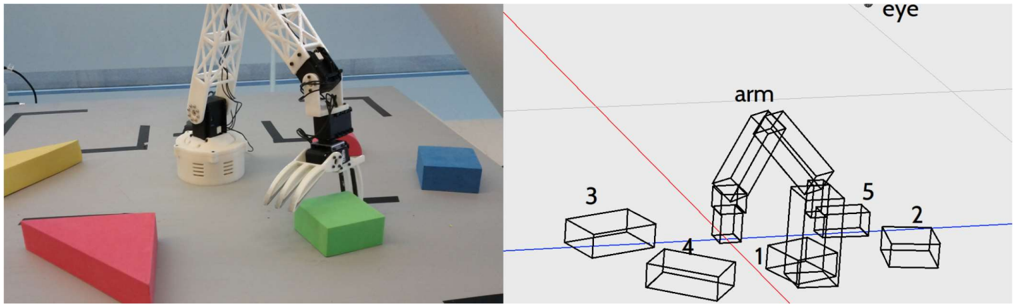
The image is a composite showing a real-world robotic arm interacting with colored blocks on the left, and a wireframe simulation of the same scene on the right. The simulation includes labels for the arm and blocks.
### Components/Axes
**Left Side (Real World):**
* **Robot Arm:** A white robotic arm with a three-fingered gripper.
* **Colored Blocks:** A green cube being held by the gripper, a blue cube nearby, a yellow triangular prism, and a red triangular prism.
* **Surface:** A gray surface with black lines marking a path or grid.
**Right Side (Simulation):**
* **Wireframe Arm:** A wireframe representation of the robotic arm, labeled "arm" above it.
* **Wireframe Blocks:** Wireframe representations of the blocks, numbered 1 through 5.
* **Coordinate System:** A 3D coordinate system indicated by red and blue lines.
* **Label:** The word "eye" is present in the top right corner.
### Detailed Analysis or Content Details
**Left Side (Real World):**
* The robot arm is positioned above a green cube, which it is holding with its gripper.
* A blue cube is located to the right of the green cube.
* A yellow triangular prism is located to the left of the robot arm.
* A red triangular prism is located in the bottom left corner of the image.
**Right Side (Simulation):**
* The wireframe arm is positioned similarly to the real arm on the left.
* The wireframe blocks are numbered as follows:
* Block 1: Located directly below the arm.
* Block 2: Located to the right of the arm.
* Block 3: Located to the left of the arm.
* Block 4: Located between blocks 1 and 3.
* Block 5: Located between blocks 1 and 2.
### Key Observations
* The simulation appears to be a simplified, wireframe representation of the real-world scene.
* The numbering of the blocks in the simulation does not directly correspond to the colors of the blocks in the real world.
### Interpretation
The image likely demonstrates the use of simulation for robot control or planning. The real-world scene shows the robot arm interacting with objects, while the simulation provides a simplified model that can be used for tasks such as path planning, collision avoidance, or visual servoing. The simulation allows for testing and development in a controlled environment before deploying the robot in the real world.