# Technical Document Extraction: ADP-MA Interface
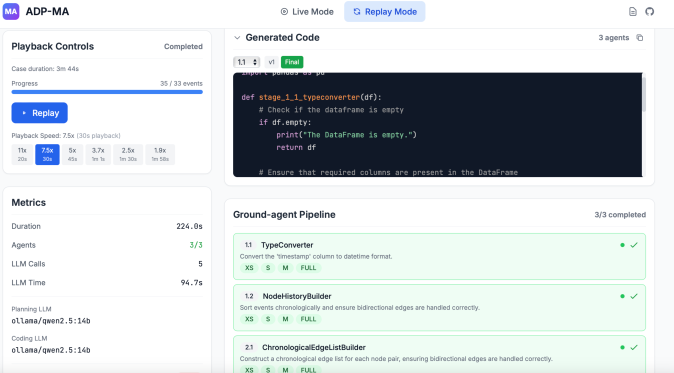
This document provides a comprehensive extraction of the data and structural components of the ADP-MA software interface as shown in the provided image.
## 1. Header Navigation
* **Application Name:** ADP-MA (Logo: Purple square with "MA" in white).
* **Mode Selection:**
* **Live Mode:** Inactive (indicated by grey text/icon).
* **Replay Mode:** Active (indicated by blue background and "refresh" icon).
* **Utility Icons:** Document icon and GitHub logo (top right).
---
## 2. Left Sidebar (Control & Metrics)
### Region: Playback Controls
* **Status:** Completed
* **Case duration:** 3m 44s
* **Progress Bar:** Full blue bar.
* **Progress Value:** 35 / 33 events (Note: Indicates over-completion or additional system events).
* **Action Button:** Blue button labeled "Replay" with a play icon.
* **Playback Speed Selection:**
* Current Selection: **7.5x** (30s playback) - Highlighted in blue.
* Other Options: 11x (20s), 5x (45s), 3.7x (1m 1s), 2.5x (1m 30s), 1.9x (1m 58s).
### Region: Metrics
* **Duration:** 224.0s
* **Agents:** 3/3 (Displayed in green)
* **LLM Calls:** 5
* **LLM Time:** 94.7s
* **Planning LLM:** `ollama/qwen2.5:14b`
* **Coding LLM:** `ollama/qwen2.5:14b`
---
## 3. Main Content Area (Code & Pipeline)
### Region: Generated Code
* **Header Info:** 3 agents; Copy icon present.
* **Version Control:** Dropdown set to `1.1`, version `v1`, and a green tag labeled `Final`.
* **Code Block Transcription (Python):**
```python
import pandas as pd
def stage_1_1_typeconverter(df):
# Check if the dataframe is empty
if df.empty:
print("The DataFrame is empty.")
return df
# Ensure that required columns are present in the DataFrame
```
### Region: Ground-agent Pipeline
* **Status:** 3/3 completed
| Component | Description | Size Tags | Status |
| :--- | :--- | :--- | :--- |
| **1.1: TypeConverter** | Convert the 'timestamp' column to datetime format. | XS, S, M, **FULL** | Complete (Green) |
| **1.2: NodeHistoryBuilder** | Sort events chronologically and ensure bidirectional edges are handled correctly. | XS, S, M, **FULL** | Complete (Green) |
| **2.1: ChronologicalEdgeListBuilder** | Construct a chronological edge list for each node pair, ensuring bidirectional edges are handled correctly. | XS, S, M, **FULL** | Complete (Green) |
---
## 4. Technical Summary & Flow
The image depicts a post-execution "Replay Mode" of an automated data processing pipeline.
1. **Input/Configuration:** The system utilized the `qwen2.5:14b` model via Ollama for both planning and coding tasks.
2. **Execution Flow:** The "Ground-agent Pipeline" shows a sequential flow starting from data type conversion (`TypeConverter`), moving to history building (`NodeHistoryBuilder`), and concluding with edge list construction (`ChronologicalEdgeListBuilder`).
3. **Output:** The "Generated Code" section shows the Python implementation produced by the agents for the selected step (1.1).
4. **Performance:** The entire process took 224 seconds, with nearly half that time (94.7s) spent on 5 distinct LLM calls.