## Table: Software Task Instructions and Required Abilities
### Overview
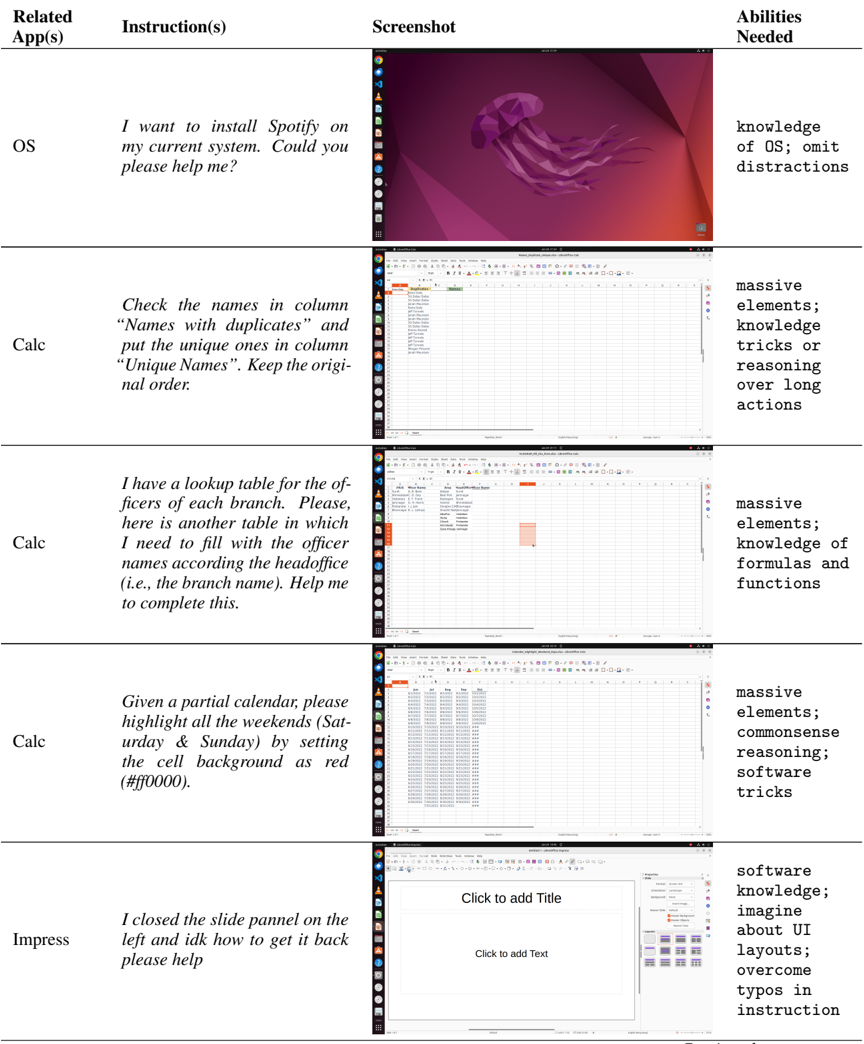
The image displays a structured table with five rows, each detailing a software-related task, its instruction, a corresponding screenshot, and the abilities required to complete it. The table is organized into four columns: **Related App(s)**, **Instruction(s)**, **Screenshot**, and **Abilities Needed**.
---
### Components/Axes
1. **Related App(s)**
- OS (Operating System)
- Calc (Spreadsheet Software, three entries)
- Impress (Presentation Software)
2. **Instruction(s)**
- Text-based tasks for software operations (e.g., installation, data manipulation, calendar formatting, UI recovery).
3. **Screenshot**
- Visual representations of software interfaces (e.g., desktop screens, spreadsheets, calendars, presentation editors).
4. **Abilities Needed**
- Technical skills or cognitive requirements (e.g., OS knowledge, formula expertise, UI design).
---
### Detailed Analysis
#### Row 1: OS
- **Instruction**: "I want to install Spotify on my current system. Could you please help me?"
- **Screenshot**: Desktop interface with a purple jellyfish wallpaper and taskbar icons (e.g., browser, file manager).
- **Abilities Needed**: `knowledge of OS; omit distractions`
#### Row 2: Calc (First Entry)
- **Instruction**: "Check the names in column 'Names with duplicates' and put the unique ones in column 'Unique Names'. Keep the original order."
- **Screenshot**: Spreadsheet with a list of names in a column, highlighting duplicates.
- **Abilities Needed**: `massive elements; knowledge tricks or reasoning over long actions`
#### Row 3: Calc (Second Entry)
- **Instruction**: "I have a lookup table for the officers of each branch. Please fill the other table with officer names according to the head office (i.e., the branch name). Help me to complete this."
- **Screenshot**: Spreadsheet with two tables: one with branch names and another with officer names.
- **Abilities Needed**: `massive elements; knowledge of formulas and functions`
#### Row 4: Calc (Third Entry)
- **Instruction**: "Given a partial calendar, please highlight all the weekends (Saturday & Sunday) by setting the cell background as red (#ff0000)."
- **Screenshot**: Calendar interface with red-highlighted weekends.
- **Abilities Needed**: `massive elements; commonsense reasoning; software tricks`
#### Row 5: Impress
- **Instruction**: "I closed the slide panel on the left and idk how to get it back. Please help."
- **Screenshot**: Presentation software interface with a blank slide and toolbar.
- **Abilities Needed**: `software knowledge; imagine about UI layouts; overcome typos in instruction`
---
### Key Observations
1. **Task Complexity**:
- Tasks range from basic software navigation (Impress) to advanced data manipulation (Calc).
- Abilities required escalate with task complexity (e.g., "massive elements" for large datasets).
2. **Screenshot Content**:
- Screenshots visually reinforce the task (e.g., red-highlighted weekends in the calendar).
- UI elements (e.g., taskbar, toolbar) are consistent with the described software.
3. **Abilities Alignment**:
- OS tasks emphasize system knowledge and focus.
- Calc tasks require formula expertise and handling large datasets.
- Impress tasks focus on UI recovery and design intuition.
---
### Interpretation
- **Software-Specific Skills**: Each row highlights the unique expertise required for different software (e.g., OS for system management, Calc for data analysis, Impress for presentation design).
- **Cognitive Demands**: Tasks involving large datasets (Calc) demand reasoning and formula mastery, while UI-related tasks (Impress) require spatial and design intuition.
- **User Challenges**: The inclusion of "omit distractions" (OS) and "overcome typos" (Impress) suggests common user pain points in software workflows.
This table serves as a guide for troubleshooting software tasks, emphasizing the interplay between technical skills and cognitive strategies.