# Technical Document Extraction: Software Task Analysis Table
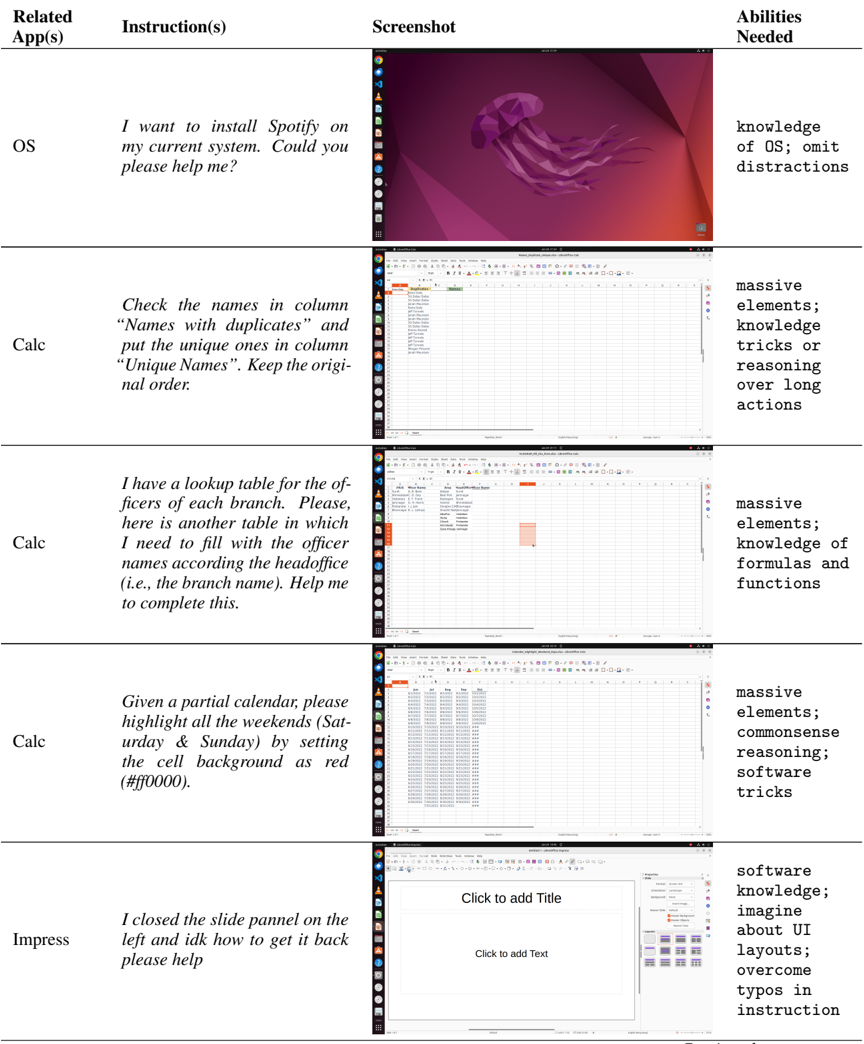
This document provides a detailed extraction of the information contained in the provided image, which appears to be a research or technical table outlining various user instructions for software tasks, accompanying screenshots, and the cognitive/technical abilities required to complete them.
## Table Structure Overview
The image is organized into a table with four primary columns:
1. **Related App(s)**: The software environment or application.
2. **Instruction(s)**: The user's request or task description.
3. **Screenshot**: A visual representation of the software state.
4. **Abilities Needed**: The specific skills or reasoning required to fulfill the instruction.
---
## Data Extraction by Row
| Related App(s) | Instruction(s) | Screenshot Analysis | Abilities Needed |
| :--- | :--- | :--- | :--- |
| OS | "I want to install Spotify on my current system. Could you please help me?" | **Environment:** Ubuntu Linux (indicated by the "Jammy Jellyfish" default wallpaper and the GNOME desktop environment).<br>**UI Components:** A vertical dock on the left containing icons for Firefox, Thunderbird, Files, Software Center, Help, and other system utilities. The top bar shows the date/time and system status icons. | knowledge of OS; omit distractions |
| Calc (LibreOffice Calc) | "Check the names in column 'Names with duplicates' and put the unique ones in column 'Unique Names'. Keep the original order." | **UI Components:** A spreadsheet interface. Column A is titled "Names with duplicates" and contains a list of names (e.g., "Brave Body", "Jeff Tunnels", "Jeff Tunnels"). Column B is titled "Unique Names" and is currently empty.<br>**File Name:** `Names_duplicates_unique.ods` (visible in the window title bar). | massive elements; knowledge tricks or reasoning over long actions |
| Calc (LibreOffice Calc) | "I have a lookup table for the officers of each branch. Please, here is another table in which I need to fill with the officer names according to the headoffice (i.e., the branch name). Help me to complete this." | **UI Components:** Spreadsheet interface showing two distinct data areas.<br>**Data Content:** A small table on the left with columns for "ID", "Officer Name", and "Area". A second table/area is being prepared to map these names based on "HeadOffice/Branch Name".<br>**File Name:** `vlookup_v2_v3_form.ods` (visible in the window title bar). | massive elements; knowledge of formulas and functions |
| Calc (LibreOffice Calc) | "Given a partial calendar, please highlight all the weekends (Saturday & Sunday) by setting the cell background as red (#ff0000)." | **UI Components:** Spreadsheet interface displaying a grid of dates organized by month columns (Jan, Feb, Aug, Sep).<br>**Visual State:** The dates are listed vertically under each month header. No cells are currently highlighted.<br>**File Name:** `calendar_highlight_weekend_days.ods` (visible in the window title bar). | massive elements; commonsense reasoning; software tricks |
| Impress (LibreOffice Impress) | "I closed the slide pannel on the left and idk how to get it back please help" | **UI Components:** A presentation slide editor. The main workspace shows a blank slide with "Click to add Title" and "Click to add Text" placeholders. The right sidebar (Properties/Layouts) is visible, but the left-hand "Slides" thumbnail pane is missing.<br>**Note:** The instruction contains a typo ("pannel" instead of "panel"). | software knowledge; imagine about UI layouts; overcome typos in instruction |
---
## Summary of Technical Requirements
Across all tasks, the "Abilities Needed" column highlights a recurring need for:
* **Handling "Massive Elements":** Dealing with large datasets in spreadsheets.
* **Domain Knowledge:** Understanding specific software features (VLOOKUP, conditional formatting, OS installation).
* **Robustness:** The ability to interpret user intent despite typos or non-technical language.
* **Spatial/UI Awareness:** Understanding the layout of a GUI to restore missing components.