\n
## Diagram: Image Generation Logic
### Overview
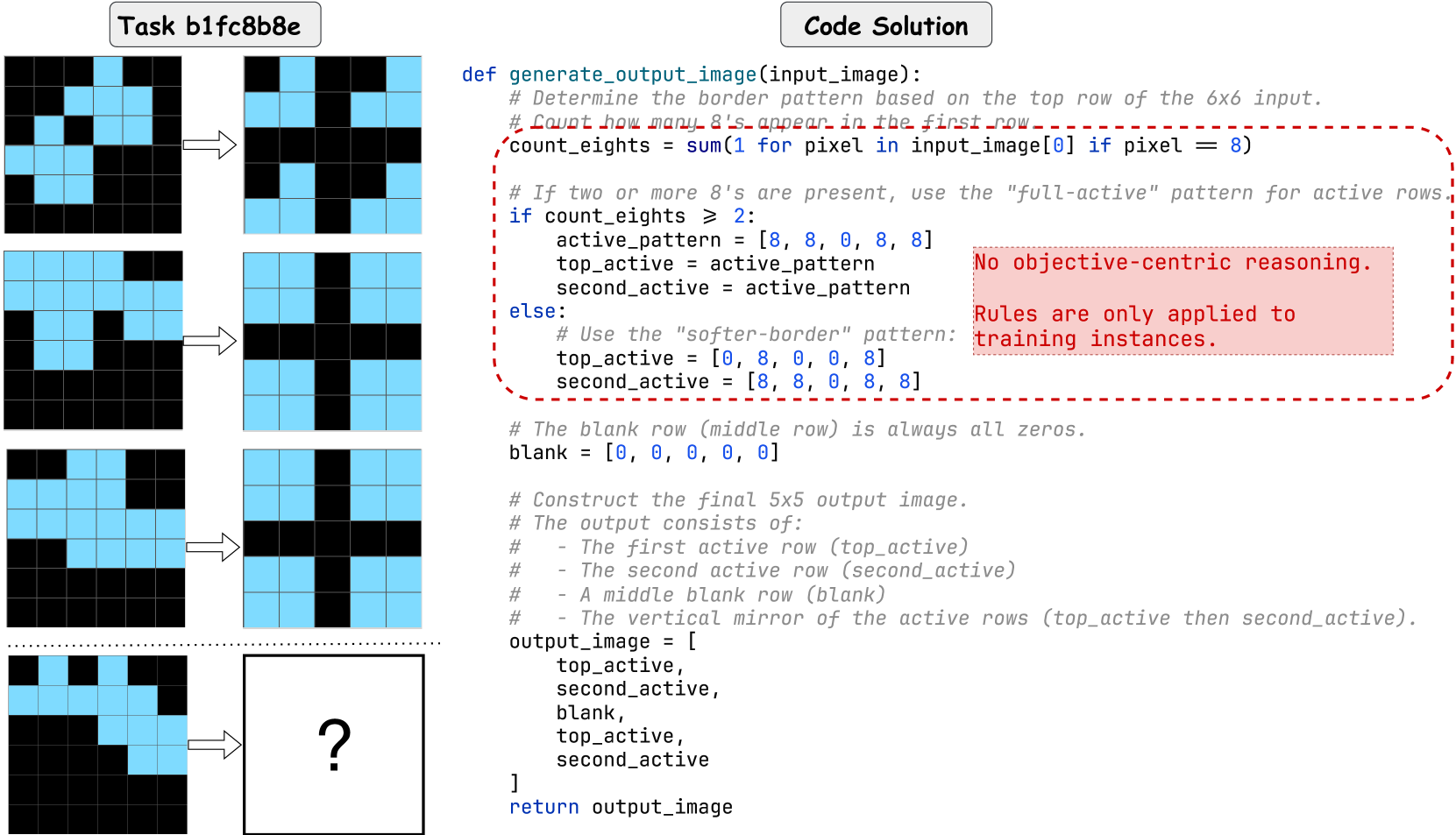
The image presents a diagram illustrating the logic for generating a 5x5 output image based on a 6x6 input image. The logic centers around analyzing the first row of the input image to determine a border pattern, then constructing the output image using this pattern and a blank middle row. The right side of the image contains Python code implementing this logic, with annotations highlighting key decision points.
### Components/Axes
The diagram is divided into three main sections:
1. **Input Images (Left):** Shows two 6x6 input images, one with a pattern and one with a question mark indicating an unknown input.
2. **Arrows:** Illustrate the flow of data from the input image to the output image.
3. **Code Solution (Right):** Python code with comments explaining the image generation process.
The code includes the following key variables and concepts:
* `input_image`: The 6x6 input image.
* `count_eights`: The number of 8s in the first row of the input image.
* `active_pattern`: The border pattern to use when `count_eights` is greater than or equal to 2.
* `top_active`: The first active row of the output image.
* `second_active`: The second active row of the output image.
* `blank`: The middle row of the output image, always filled with zeros.
* `output_image`: The final 5x5 output image.
### Detailed Analysis or Content Details
The Python code defines a function `generate_output_image(input_image)` that performs the following steps:
1. **Count Eights:** Counts the number of pixels with the value 8 in the first row of the input image.
2. **Determine Border Pattern:**
* If `count_eights` is greater than or equal to 2, the `active_pattern` is set to `[8, 8, 8, 8, 8]`. `top_active` and `second_active` are both assigned this pattern.
* Otherwise, the `top_active` is set to `[0, 8, 0, 8, 0]` and `second_active` is set to `[8, 0, 8, 0, 8]`.
3. **Create Blank Row:** The `blank` row is defined as `[0, 0, 0, 0, 0]`.
4. **Construct Output Image:** The `output_image` is constructed as a list of lists, consisting of `top_active`, `second_active`, `blank`, `top_active`, and `second_active`.
5. **Return Output Image:** The function returns the `output_image`.
The first input image shows a 6x6 grid with a pattern of 8s and 0s. The first row contains five 8s. The second input image has a question mark, indicating an unknown input.
### Key Observations
* The logic is based on a simple rule: the presence of two or more 8s in the first row of the input image determines whether to use a "full-active" or "softer-border" pattern.
* The output image is always 5x5, regardless of the input image size.
* The middle row of the output image is always a row of zeros.
* The output image is constructed by vertically mirroring the active rows.
* The annotations "No objective-centric reasoning" and "Rules are only applied to training instances" suggest this logic is part of a larger system designed to mimic human-like pattern recognition without necessarily understanding the underlying meaning.
### Interpretation
The diagram illustrates a rule-based system for image generation. The system analyzes a simple feature (the number of 8s in the first row) and uses this feature to select a border pattern. The output image is then constructed using this pattern and a blank middle row. The annotations suggest that this system is not designed to understand the meaning of the images, but rather to mimic a pattern-recognition process. This could be part of a larger machine learning system trained on a dataset of images. The question mark in the second input image highlights the system's ability to handle unseen inputs based on the defined rules. The system demonstrates a basic form of conditional logic and pattern replication. The use of 8s and 0s suggests a binary representation of information, potentially related to pixel values in a grayscale image.