\n
## Diagram: GitHub Agent Workflow
### Overview
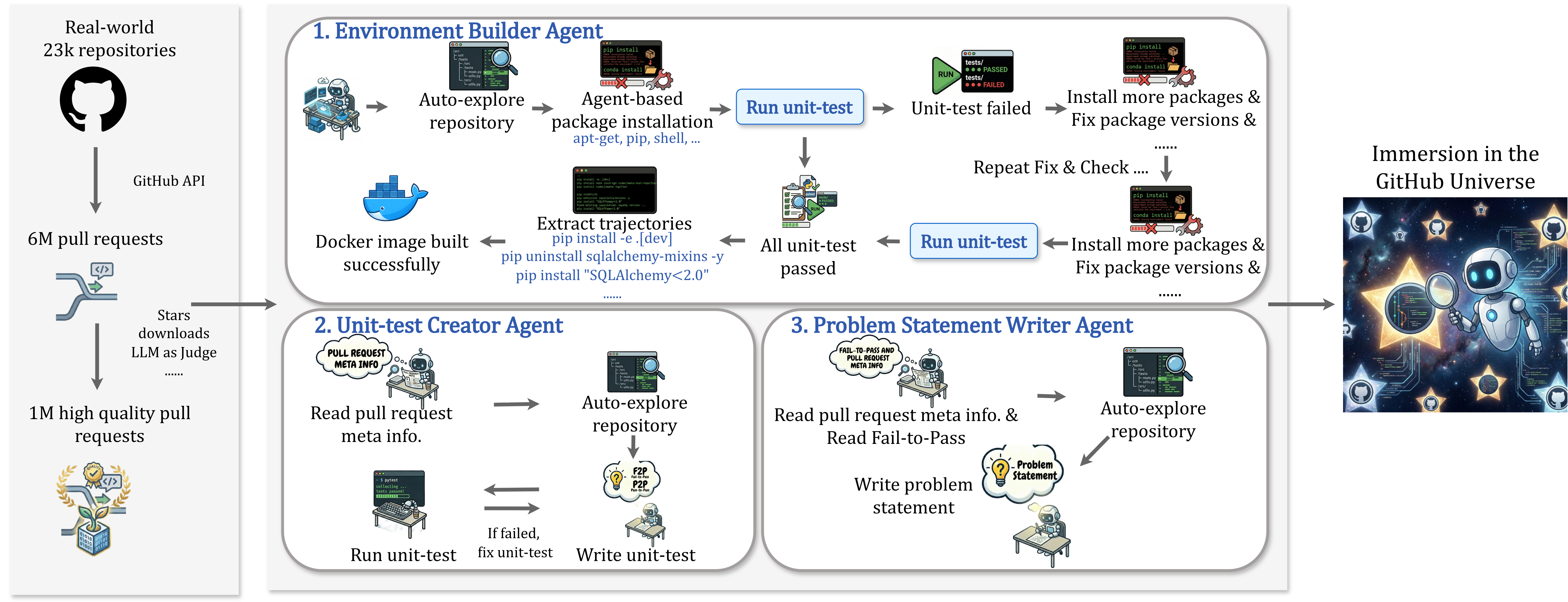
The image depicts a diagram illustrating the workflow of three agents interacting with the GitHub ecosystem. The agents are: Environment Builder, Unit-test Creator, and Problem Statement Writer. The diagram shows the data sources feeding into the agents (GitHub API, pull requests, etc.) and the processes each agent undertakes. The right side of the image shows an illustrative depiction of "Immersion in the GitHub Universe" with robot-like figures.
### Components/Axes
The diagram is divided into three main sections, each representing an agent. Each section contains a series of interconnected boxes representing steps in the agent's process. Arrows indicate the flow of data and control between these steps.
* **Data Sources (Left Side):**
* GitHub API (labeled with "Real-world 23k repositories")
* 6M pull requests
* Stars/downloads (labeled with "LLM as judge")
* 1M high quality pull requests
* **Agent 1: Environment Builder Agent:**
* Auto-explore repository
* Agent-based package installation (apt-get, pip, shell…)
* Docker image built successfully
* Extract trajectories (pip install -e .)
* Run unit-test
* Unit-test failed
* Install more packages & Fix package versions
* Repeat Fix & Check
* Run unit-test
* All unit-test passed
* Install more packages & Fix package versions
* **Agent 2: Unit-test Creator Agent:**
* Read pull request meta info.
* Auto-explore repository
* If failed, fix unit-test
* Write unit-test
* Run unit-test
* **Agent 3: Problem Statement Writer Agent:**
* Read pull request meta info. & Read Fail-to-Pass
* Write problem statement
* Auto-explore repository
* **Immersion in the GitHub Universe (Right Side):** A visual representation of the agents operating within the GitHub ecosystem.
### Detailed Analysis or Content Details
**Agent 1: Environment Builder Agent**
This agent begins by auto-exploring a repository. It then performs agent-based package installation using tools like apt-get, pip, and shell. A Docker image is built successfully. Trajectories are extracted using `pip install -e .` and `pip uninstall sqlalchemy-mixins -y` and `pip install "SQLAlchemy<2.0"`. The agent then runs unit tests. If the tests fail, it installs more packages and fixes package versions, repeating this process until all unit tests pass.
**Agent 2: Unit-test Creator Agent**
This agent starts by reading pull request meta information. It then auto-explores the repository. If unit tests fail, it attempts to fix them and then writes new unit tests. Finally, it runs the unit tests.
**Agent 3: Problem Statement Writer Agent**
This agent reads pull request meta information and Fail-to-Pass data. It then writes a problem statement and auto-explores the repository.
**Data Flow:**
The diagram shows a clear flow of data from the GitHub API and pull requests to the agents. The agents then process this data and iterate through various steps to achieve their respective goals. The dashed lines indicate iterative processes (e.g., "Repeat Fix & Check" in the Environment Builder Agent).
### Key Observations
* The Environment Builder Agent has a more complex workflow with iterative steps for fixing and checking package versions.
* All three agents involve auto-exploration of the repository as a key step.
* The diagram emphasizes the use of unit tests as a critical component in both the Environment Builder and Unit-test Creator agents.
* The "Immersion in the GitHub Universe" illustration suggests the agents are designed to operate seamlessly within the GitHub ecosystem.
### Interpretation
The diagram illustrates a system for automating tasks related to software development within the GitHub environment. The three agents represent different aspects of this automation: setting up the development environment, creating unit tests, and defining problem statements. The iterative nature of the Environment Builder Agent suggests a robust approach to dependency management and ensuring a stable development environment. The use of LLMs as a judge (indicated by the "Stars/downloads" label) suggests a mechanism for evaluating the quality of the generated unit tests and problem statements. The overall system appears to be designed to improve the efficiency and reliability of software development on GitHub. The illustration on the right side emphasizes the integration of these agents into the broader GitHub ecosystem. The diagram doesn't provide specific numerical data, but rather a conceptual overview of the workflow. It suggests a system that leverages automation and machine learning to streamline the software development process.