TECHNICAL ASSET FINGERPRINT
78d346bbeefdd6abfc31ce57
Click to view fullscreen
Press ESC or click to close
FOUND IN PAPERS
EXPERT: healer-alpha-free VERSION 1
RUNTIME: free/openrouter/healer-alpha
INTEL_VERIFIED
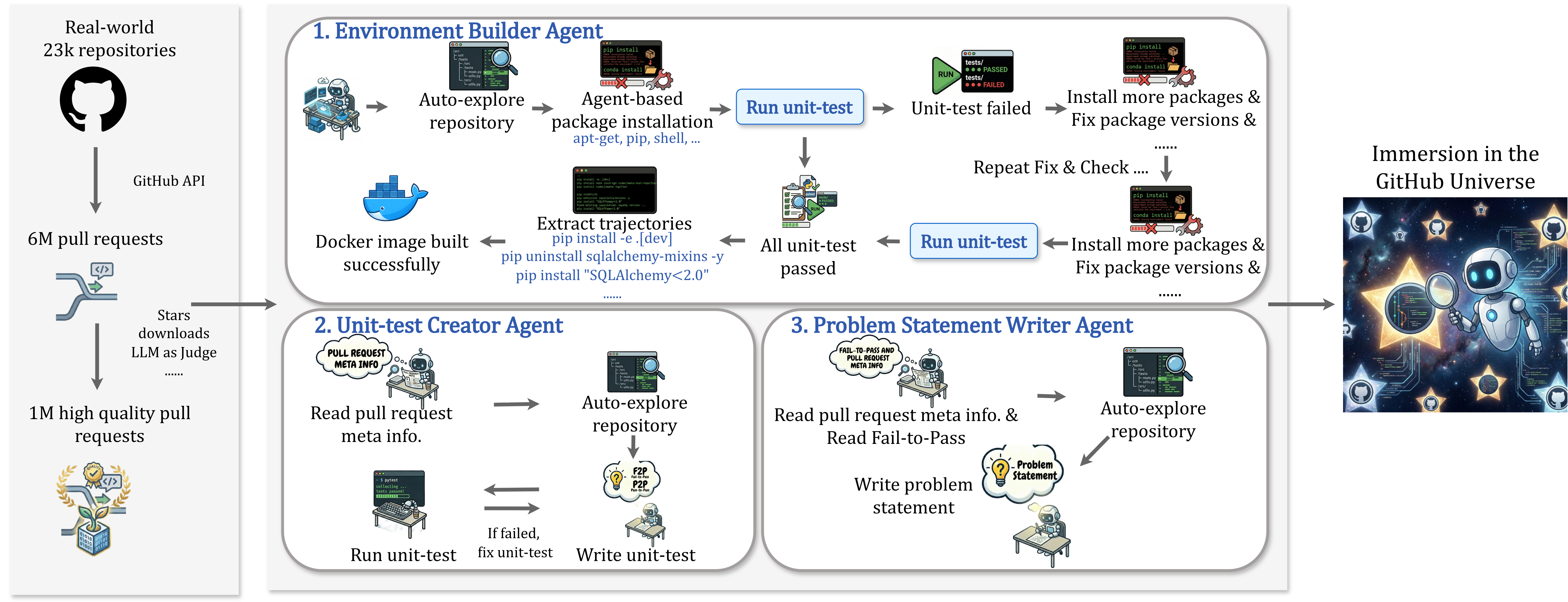
## Diagram: Automated GitHub Repository Processing Pipeline
### Overview
This image is a technical flowchart illustrating an automated system for processing real-world GitHub repositories and pull requests using specialized AI agents. The pipeline sources data from GitHub, filters it, and then uses three distinct agents to build environments, create unit tests, and write problem statements, ultimately leading to an "Immersion in the GitHub Universe."
### Components/Flow
The diagram is organized into three main vertical sections, flowing from left to right.
**1. Left Panel: Data Sourcing & Filtering**
* **Top Element:** A GitHub logo (Octocat) labeled "Real-world 23k repositories."
* **Flow Arrow:** Points down, labeled "GitHub API."
* **Middle Element:** An icon representing pull requests, labeled "6M pull requests."
* **Flow Arrow:** Points down, labeled "Stars downloads LLM as Judge ......"
* **Bottom Element:** A badge/award icon, labeled "1M high quality pull requests."
* **Connection:** A thick arrow points from this panel to the central panel, indicating the filtered data is the input for the agent system.
**2. Central Panel: Agent Workflows**
This panel contains three rounded rectangular boxes, each describing an agent's process.
* **Box 1: "1. Environment Builder Agent" (Top)**
* **Process Flow (Left to Right):**
1. Icon of a robot at a computer: "Auto-explore repository."
2. Arrow to an icon of a terminal with `pip install`/`conda install`: "Agent-based package installation apt-get, pip, shell, ..."
3. Arrow to a blue button: "Run unit-test."
4. Arrow to a test result icon showing "PASSED" and "FAILED": "Unit-test failed."
5. Arrow to a terminal icon: "Install more packages & Fix package versions & ......"
6. Arrow loops back to "Run unit-test" with the label "Repeat Fix & Check ...."
* **Success Path (Downward from "Run unit-test"):**
1. Arrow down to a clipboard icon: "All unit-test passed."
2. Arrow left to a terminal showing commands like `pip install -e.[dev]`, `pip uninstall sqlalchemy-mixins -y`, `pip install "SQLAlchemy<2.0"`: "Extract trajectories."
3. Arrow left to a Docker whale icon: "Docker image built successfully."
* **Box 2: "2. Unit-test Creator Agent" (Bottom Left)**
* **Process Flow:**
1. Icon of a robot reading a document labeled "PULL REQUEST META INFO": "Read pull request meta info."
2. Arrow right to a robot exploring a codebase: "Auto-explore repository."
3. Arrow down to a lightbulb icon labeled "F2P P2P": "Write unit-test."
4. Arrow left to a robot at a computer running tests: "Run unit-test."
5. Arrow labeled "If failed, fix unit-test" points back to the "Write unit-test" step.
* **Box 3: "3. Problem Statement Writer Agent" (Bottom Right)**
* **Process Flow:**
1. Icon of a robot reading a document labeled "FAIL-TO-PASS AND PULL REQUEST META INFO": "Read pull request meta info. & Read Fail-to-Pass."
2. Arrow right to a robot exploring a codebase: "Auto-explore repository."
3. Arrow down to a lightbulb icon labeled "Problem Statement": "Write problem statement."
**3. Right Panel: Output/Theme**
* **Element:** A stylized image of a robot astronaut in space surrounded by GitHub logos and stars.
* **Label:** "Immersion in the GitHub Universe."
* **Connection:** A thick arrow points from the central panel to this image, indicating the final outcome or context of the processed data.
### Detailed Analysis
* **Data Scale:** The pipeline begins with a large corpus: 23,000 repositories yielding 6 million pull requests, which are filtered down to 1 million "high quality" pull requests using metrics like stars, downloads, and an LLM-as-a-judge evaluation.
* **Agent 1 (Environment Builder) Logic:** This agent follows a trial-and-error loop. It attempts to set up a runnable environment by installing packages, runs tests, and if they fail, iteratively installs more packages or fixes versions until all tests pass. The successful outcome is a built Docker image and a log of installation commands ("trajectories").
* **Agent 2 (Unit-test Creator) Logic:** This agent focuses on the pull request itself. It reads the PR's metadata, explores the code, and writes a unit test intended to validate the change. It has an internal loop to run and fix its own test until it works.
* **Agent 3 (Problem Statement Writer) Logic:** This agent synthesizes information. It reads both the PR metadata and the "Fail-to-Pass" (F2P) information (likely the state before and after the PR's fix), explores the code, and generates a natural language problem statement describing the issue the PR addresses.
* **Spatial Relationships:** The three agent boxes are arranged with the Environment Builder spanning the top, and the other two side-by-side below it. The flow arrows clearly show sequential steps within each agent and the overall left-to-right progression of the entire pipeline.
### Key Observations
1. **Iterative Problem-Solving:** Both the Environment Builder and Unit-test Creator agents employ iterative loops (fix-and-retry), mimicking a human developer's debugging process.
2. **Specialization:** Each agent has a distinct, non-overlapping responsibility: environment setup, test creation, and documentation (problem statement).
3. **Input Specificity:** The Unit-test Creator and Problem Statement Writer agents require specific inputs from the pull request ("meta info," "Fail-to-Pass"), indicating they operate on granular, change-level data.
4. **Output Artifacts:** The pipeline produces concrete artifacts: a Docker environment, unit tests, and problem statements, which could be used to create a benchmark dataset for training or evaluating AI models on real-world software engineering tasks.
### Interpretation
This diagram outlines a sophisticated data engineering pipeline designed to transform raw, unstructured GitHub activity into a structured, machine-readable dataset. The core innovation is using specialized AI agents to automate the laborious tasks of environment configuration, test generation, and issue description—tasks that are typically manual and require deep code understanding.
The system's goal appears to be the creation of a large-scale, high-fidelity benchmark or training set (the "Immersion in the GitHub Universe") for AI models that aim to solve real programming problems. By starting with 1M high-quality PRs and generating paired data (code change + environment + test + problem description), it addresses a key gap in AI for software engineering: the lack of realistic, executable contexts. The "Peircean" reading suggests this is not just data collection, but an attempt to capture the full *context* and *process* of software development, moving beyond static code snippets to dynamic, testable scenarios. The emphasis on "trajectories" (installation logs) is particularly notable, as it records the *path* to a working environment, which is valuable knowledge often lost in traditional datasets.
DECODING INTELLIGENCE...