## Diagram: Full-Proof vs. Step-Proof Strategies
### Overview
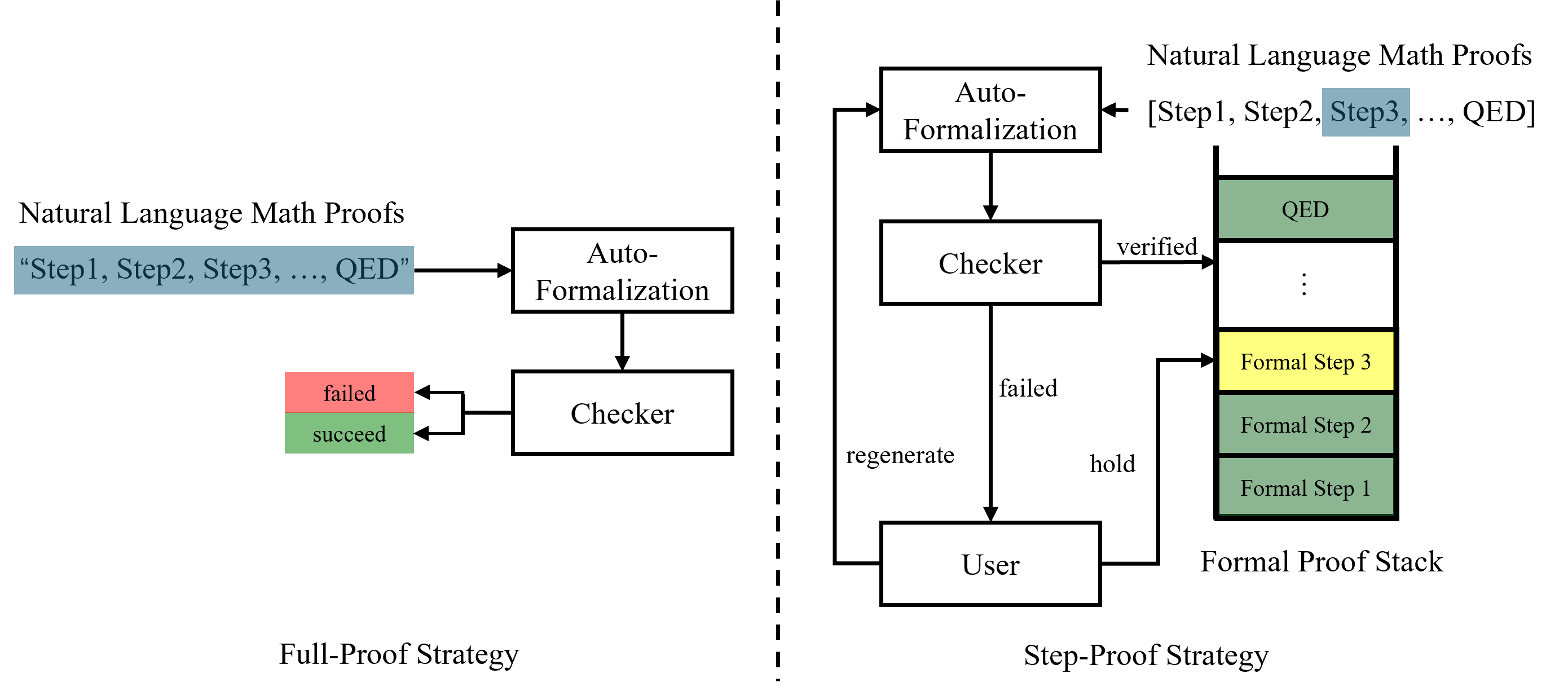
The image presents two diagrams illustrating different strategies for mathematical proof verification: a "Full-Proof Strategy" on the left and a "Step-Proof Strategy" on the right. Both strategies involve converting natural language math proofs into a formal representation and then checking their validity. The Step-Proof strategy includes a user interaction loop.
### Components/Axes
**Full-Proof Strategy (Left Side):**
* **Natural Language Math Proofs:** Labeled as "Step1, Step2, Step3, ..., QED" with a blue background.
* **Auto-Formalization:** A rectangular box representing the process of converting natural language proofs into a formal representation.
* **Checker:** A rectangular box representing the process of verifying the formal proof.
* **Failed:** A red rectangle indicating a failed verification.
* **Succeed:** A green rectangle indicating a successful verification.
**Step-Proof Strategy (Right Side):**
* **Natural Language Math Proofs:** Labeled as "[Step1, Step2, Step3, ..., QED]" with a blue background.
* **Auto-Formalization:** A rectangular box representing the process of converting natural language proofs into a formal representation.
* **Checker:** A rectangular box representing the process of verifying the formal proof.
* **User:** A rectangular box representing user interaction.
* **Formal Proof Stack:** A stack of blocks representing the formal proof steps. The top block is labeled "QED" and is green. The third block from the top is labeled "Formal Step 3" and is yellow. The bottom two blocks are labeled "Formal Step 1" and "Formal Step 2" and are green.
* **Verified:** An arrow from the Checker to the Formal Proof Stack.
* **Failed:** An arrow from the Checker to the User.
* **Regenerate:** An arrow from the User to the Auto-Formalization.
* **Hold:** An arrow from the User to the Checker.
### Detailed Analysis or ### Content Details
**Full-Proof Strategy:**
1. Natural Language Math Proofs are fed into the Auto-Formalization process.
2. The output of Auto-Formalization is passed to the Checker.
3. The Checker either outputs "failed" (red) or "succeed" (green).
**Step-Proof Strategy:**
1. Natural Language Math Proofs are fed into the Auto-Formalization process.
2. The output of Auto-Formalization is passed to the Checker.
3. If the Checker verifies a step, it is added to the Formal Proof Stack.
4. If the Checker fails, the User can either regenerate the proof or hold the current state.
5. The process continues until the Formal Proof Stack reaches "QED".
### Key Observations
* The Full-Proof Strategy is a linear process, while the Step-Proof Strategy involves a loop with user interaction.
* The Formal Proof Stack in the Step-Proof Strategy visually represents the progress of the proof.
* The colors (red and green) indicate success or failure in the Full-Proof Strategy.
### Interpretation
The diagrams illustrate two different approaches to automated proof verification. The Full-Proof Strategy attempts to verify the entire proof at once, while the Step-Proof Strategy breaks the proof into smaller steps and allows for user intervention if a step fails. The Step-Proof Strategy is likely more robust and adaptable, as it allows for human guidance in cases where the automated checker is unable to verify a step. The use of a "Formal Proof Stack" in the Step-Proof Strategy provides a visual representation of the proof's progress, which can be helpful for both the user and the system.