## GUI: Neuro AI Testing Platform
### Overview
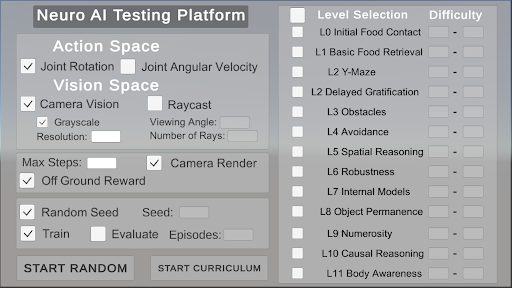
The image is a screenshot of a GUI for a "Neuro AI Testing Platform". It features sections for configuring the action space, vision space, reward system, training parameters, and level selection. The interface allows users to define various aspects of the AI's environment and training regime.
### Components/Axes
* **Title:** Neuro AI Testing Platform
* **Action Space:**
* Joint Rotation (Checkbox: Selected)
* Joint Angular Velocity (Checkbox: Unselected)
* **Vision Space:**
* Camera Vision (Checkbox: Selected)
* Grayscale (Checkbox: Selected)
* Resolution: (Text Input Field)
* Raycast (Checkbox: Unselected)
* Viewing Angle: (Text Input Field)
* Number of Rays: (Text Input Field)
* **Reward:**
* Max Steps: (Text Input Field)
* Camera Render (Checkbox: Selected)
* Off Ground Reward (Checkbox: Selected)
* **Training:**
* Random Seed (Checkbox: Selected)
* Seed: (Text Input Field)
* Train (Checkbox: Selected)
* Evaluate (Checkbox: Unselected)
* Episodes: (Text Input Field)
* **Level Selection:**
* Level Selection (Header)
* Difficulty (Header)
* L0 Initial Food Contact (Checkbox: Unselected, Difficulty: Text Input Field with "-")
* L1 Basic Food Retrieval (Checkbox: Unselected, Difficulty: Text Input Field with "-")
* L2 Y-Maze (Checkbox: Unselected, Difficulty: Text Input Field with "-")
* L2 Delayed Gratification (Checkbox: Unselected, Difficulty: Text Input Field with "-")
* L3 Obstacles (Checkbox: Unselected, Difficulty: Text Input Field with "-")
* L4 Avoidance (Checkbox: Unselected, Difficulty: Text Input Field with "-")
* L5 Spatial Reasoning (Checkbox: Unselected, Difficulty: Text Input Field with "-")
* L6 Robustness (Checkbox: Unselected, Difficulty: Text Input Field with "-")
* L7 Internal Models (Checkbox: Unselected, Difficulty: Text Input Field with "-")
* L8 Object Permanence (Checkbox: Unselected, Difficulty: Text Input Field with "-")
* L9 Numerosity (Checkbox: Unselected, Difficulty: Text Input Field with "-")
* L10 Causal Reasoning (Checkbox: Unselected, Difficulty: Text Input Field with "-")
* L11 Body Awareness (Checkbox: Unselected, Difficulty: Text Input Field with "-")
* **Buttons:**
* START RANDOM
* START CURRICULUM
### Detailed Analysis or ### Content Details
The GUI is structured into distinct sections, each controlling a specific aspect of the AI testing environment.
* **Action Space:** The AI can control its "Joint Rotation". "Joint Angular Velocity" is an available option but is currently unselected.
* **Vision Space:** The AI uses "Camera Vision" and processes it in "Grayscale". Parameters like "Resolution", "Viewing Angle", and "Number of Rays" can be configured, but the values are not specified in the provided image.
* **Reward:** The AI receives a reward for being "Off Ground". The "Camera Render" option is enabled. The "Max Steps" parameter is configurable.
* **Training:** The training process uses a "Random Seed". The "Train" option is enabled, while "Evaluate" is disabled. The number of "Episodes" can be specified.
* **Level Selection:** A series of levels (L0 to L11) are listed, each with a checkbox for selection and a field to specify the difficulty. None of the levels are currently selected. The difficulty for each level is set to "-".
### Key Observations
* The GUI provides a comprehensive set of options for configuring an AI testing environment.
* The user has selected "Joint Rotation" for the action space and "Camera Vision" with "Grayscale" for the vision space.
* The AI receives a reward for being "Off Ground".
* The training process is configured to use a random seed and is currently set to train.
* No specific levels are selected for training.
### Interpretation
The "Neuro AI Testing Platform" GUI allows researchers and developers to set up and run experiments for training AI agents. The configuration options cover a range of aspects, from the agent's action and perception capabilities to the reward structure and training regime. The level selection feature suggests a curriculum learning approach, where the AI is gradually exposed to more complex tasks. The current configuration indicates a setup focused on joint rotation control, grayscale camera vision, and a reward for being off the ground, with the training process enabled but no specific levels selected.