\n
## Screenshot: Neuro AI Testing Platform Interface
### Overview
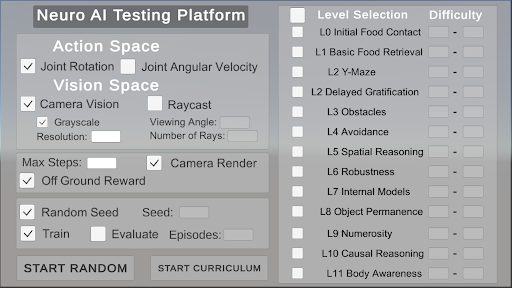
The image is a screenshot of a user interface for a "Neuro AI Testing Platform". It appears to be a configuration panel allowing users to set parameters for training and evaluating artificial intelligence agents. The interface is divided into sections for Action Space, Vision Space, general settings (Max Steps, Reward), and Level Selection. It features checkboxes, input fields, and buttons for controlling the simulation environment.
### Components/Axes
The interface is structured into the following sections:
* **Header:** "Neuro AI Testing Platform"
* **Action Space:** Contains checkboxes for "Joint Rotation" and "Joint Angular Velocity".
* **Vision Space:** Contains checkboxes for "Camera Vision" and "Raycast". Sub-options include "Grayscale" (checkbox), "Resolution" (input field), "Viewing Angle" (input field), and "Number of Rays" (input field).
* **Max Steps:** Contains a checkbox for "Off Ground Reward" and a checkbox for "Camera Render".
* **Random Seed:** Contains a checkbox for "Random Seed" and an input field labeled "Seed:".
* **Train/Evaluate:** Contains checkboxes for "Train" and "Evaluate", and an input field labeled "Episodes:".
* **Buttons:** "START RANDOM" and "START CURRICULUM".
* **Level Selection:** A list of levels labeled "L0" through "L11", each with a checkbox. The levels are:
* L0 Initial Food Contact
* L1 Basic Food Retrieval
* L2 Y-Maze
* L2 Delayed Gratification
* L3 Obstacles
* L4 Avoidance
* L5 Spatial Reasoning
* L6 Robustness
* L7 Internal Models
* L8 Object Permanence
* L9 Numerosity
* L10 Causal Reasoning
* L11 Body Awareness
* **Difficulty:** A column of sliders next to the Level Selection list.
### Detailed Analysis or Content Details
The interface presents a series of configurable options.
* **Action Space:** Both "Joint Rotation" and "Joint Angular Velocity" are unchecked by default.
* **Vision Space:** "Camera Vision" is checked, while "Raycast" is unchecked. "Grayscale" is unchecked. The "Resolution", "Viewing Angle", and "Number of Rays" input fields are empty.
* **Max Steps:** "Off Ground Reward" is checked, and "Camera Render" is checked.
* **Random Seed:** "Random Seed" is checked. The "Seed:" input field is empty.
* **Train/Evaluate:** "Train" and "Evaluate" are checked. The "Episodes:" input field is empty.
* **Level Selection:** All levels (L0-L11) are unchecked by default. The difficulty sliders are all set to their minimum value.
* **Buttons:** The buttons "START RANDOM" and "START CURRICULUM" are present.
### Key Observations
The interface is designed for controlling a simulation environment. The options allow for customization of the agent's action space, sensory input (vision), training parameters, and the complexity of the environment (level selection). The presence of both "Train" and "Evaluate" checkboxes suggests the platform supports both training and testing of AI agents. The "START RANDOM" and "START CURRICULUM" buttons indicate different approaches to training – random exploration versus a pre-defined curriculum.
### Interpretation
This interface is likely part of a larger system for developing and testing reinforcement learning agents. The configurable options allow researchers to experiment with different settings and observe their impact on agent performance. The level selection provides a way to gradually increase the complexity of the task, potentially following a curriculum learning approach. The "Neuro AI Testing Platform" name suggests a focus on neural network-based AI. The interface is relatively simple and straightforward, suggesting it is intended for users with some familiarity with reinforcement learning concepts. The empty input fields indicate that the user has not yet configured the simulation. The checked boxes for "Camera Vision", "Off Ground Reward", "Random Seed", "Train", and "Evaluate" suggest a default configuration that utilizes camera input, provides a reward for staying off the ground, uses a random seed for reproducibility, and initiates both training and evaluation. The levels listed suggest a progression of tasks designed to test various aspects of intelligence, from basic food retrieval to more complex reasoning abilities like causality and body awareness.