## Screenshot: Neuro AI Testing Platform Interface
### Overview
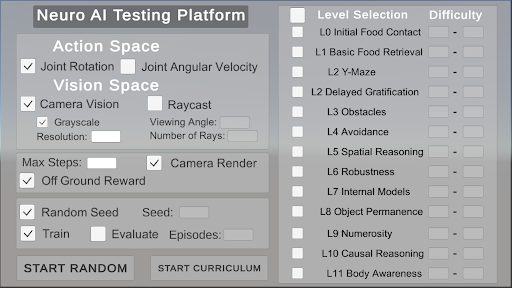
The image depicts a configuration interface for a Neuro AI Testing Platform, featuring two primary sections: a **Settings Panel** on the left and a **Level Selection Panel** on the right. The interface includes checkboxes, input fields, and buttons for configuring AI testing parameters and selecting simulation levels.
---
### Components/Axes
#### Left Panel (Settings)
1. **Action Space**
- **Joint Rotation**: Checked (✓)
- **Joint Angular Velocity**: Unchecked (⬜)
2. **Vision Space**
- **Camera Vision**: Checked (✓)
- **Raycast**: Unchecked (⬜)
- **Grayscale**: Checked (✓)
- **Resolution**: Empty input field
- **Viewing Angle**: Empty input field
- **Number of Rays**: Empty input field
3. **General Parameters**
- **Max Steps**: Empty input field
- **Camera Render**: Checked (✓)
- **Off Ground Reward**: Checked (✓)
- **Random Seed**: Checked (✓), with an empty "Seed" field
- **Train**: Checked (✓)
- **Evaluate**: Unchecked (⬜)
- **Episodes**: Empty input field
#### Right Panel (Level Selection)
1. **Level Selection**
- **L0 Initial Food Contact**
- **L1 Basic Food Retrieval**
- **L2 Y-Maze**
- **L2 Delayed Gratification**
- **L3 Obstacles**
- **L4 Avoidance**
- **L5 Spatial Reasoning**
- **L6 Robustness**
- **L7 Internal Models**
- **L8 Object Permanence**
- **L9 Numerosity**
- **L10 Causal Reasoning**
- **L11 Body Awareness**
- All levels have unchecked checkboxes (⬜).
2. **Difficulty**
- Dropdown menu with a placeholder value ("-"), indicating no selection.
#### Buttons
- **Start Random** (bottom-left)
- **Start Curriculum** (bottom-center)
---
### Detailed Analysis
- **Action Space**: Joint Rotation is enabled, but Joint Angular Velocity is disabled, suggesting the AI will control rotational movement but not angular speed.
- **Vision Space**: Camera Vision is active with Grayscale enabled, but Raycast is disabled. Resolution, Viewing Angle, and Number of Rays are unspecified, leaving these parameters undefined.
- **General Parameters**:
- Max Steps and Episodes are unset, implying no predefined limits for simulation steps or training episodes.
- Off Ground Reward and Camera Render are enabled, indicating penalties for leaving the ground and active camera rendering during testing.
- **Level Selection**: All levels (L0–L11) are unselected, and no difficulty is chosen, suggesting the interface is in a pre-configuration state.
---
### Key Observations
1. **Unspecified Parameters**: Critical fields like Resolution, Viewing Angle, and Max Steps are empty, which could lead to undefined behavior during testing.
2. **Checkbox Consistency**: All checkboxes in the Level Selection Panel are unchecked, indicating no levels are currently active.
3. **Dropdown Ambiguity**: The Difficulty dropdown shows a placeholder ("-"), implying no difficulty level is assigned.
---
### Interpretation
This interface is designed for configuring AI training and testing scenarios. The **Action Space** and **Vision Space** settings define the AI's interaction with its environment (e.g., movement constraints and sensory input). The **Level Selection** panel allows incremental testing of AI capabilities across increasing complexity (L0–L11). However, the absence of selected levels and unspecified parameters (e.g., Resolution, Max Steps) suggests the platform is in an initial setup phase. The **Start Random** and **Start Curriculum** buttons likely initiate training or testing workflows, but their behavior depends on the configured parameters. The interface emphasizes modularity, enabling users to isolate specific skills (e.g., spatial reasoning, object permanence) for targeted AI evaluation.