# Technical Document: Sequence Diagram for Train Booking System
## 1. Overview
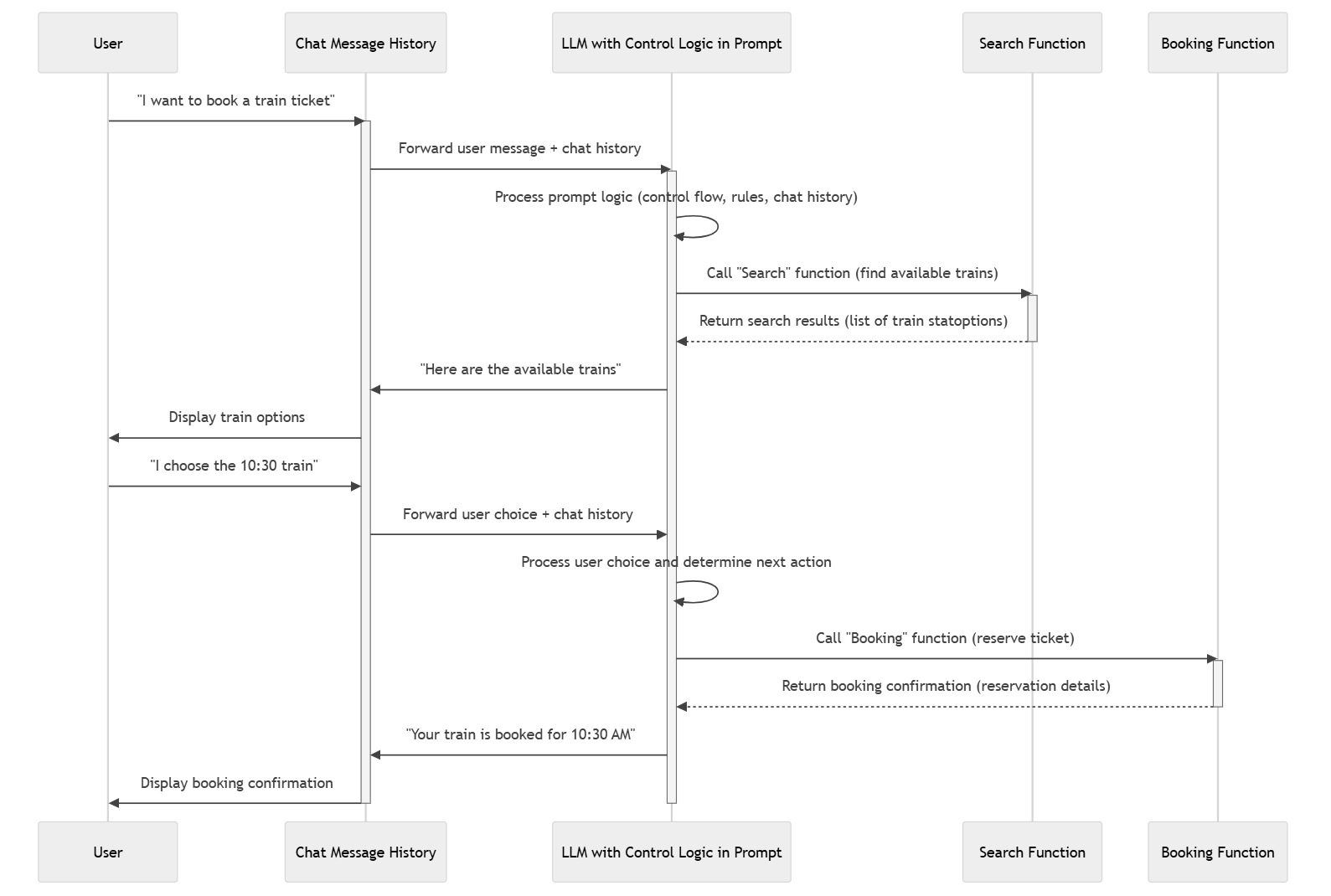
This image is a **UML Sequence Diagram** illustrating the interaction between a user, a chat history management system, a Large Language Model (LLM) with embedded control logic, and external functional modules (Search and Booking). The diagram tracks the flow of information from an initial user request to a final booking confirmation.
## 2. System Components (Lifelines)
The diagram features five distinct entities, represented by vertical lifelines with headers at the top and footers at the bottom:
1. **User**: The human actor initiating requests and receiving displays.
2. **Chat Message History**: The database or service responsible for storing and retrieving the conversation context.
3. **LLM with Control Logic in Prompt**: The central processing unit that interprets natural language, manages state, and decides which functions to call.
4. **Search Function**: An external service used to find available train options.
5. **Booking Function**: An external service used to finalize a reservation.
---
## 3. Process Flow and Message Exchange
The sequence is divided into two primary phases: the **Search Phase** and the **Booking Phase**.
### Phase 1: Search and Selection
1. **User → Chat Message History**: The user sends the message: `"I want to book a train ticket"`.
2. **Chat Message History → LLM with Control Logic in Prompt**: The history service forwards the user message along with the existing chat history.
3. **LLM Internal Action**: The LLM performs a self-looping action: `Process prompt logic (control flow, rules, chat history)`.
4. **LLM → Search Function**: The LLM triggers a call: `Call "Search" function (find available trains)`.
5. **Search Function → LLM**: The function returns data via a dashed line: `Return search results (list of train options)`.
6. **LLM → Chat Message History**: The LLM sends the response: `"Here are the available trains"`.
7. **Chat Message History → User**: The system displays the options to the user: `Display train options`.
### Phase 2: Selection and Confirmation
8. **User → Chat Message History**: The user provides a specific choice: `"I choose the 10:30 train"`.
9. **Chat Message History → LLM with Control Logic in Prompt**: The history service forwards the user choice and the updated chat history.
10. **LLM Internal Action**: The LLM performs a self-looping action: `Process user choice and determine next action`.
11. **LLM → Booking Function**: The LLM triggers a call: `Call "Booking" function (reserve ticket)`.
12. **Booking Function → LLM**: The function returns confirmation via a dashed line: `Return booking confirmation (reservation details)`.
13. **LLM → Chat Message History**: The LLM sends the final message: `"Your train is booked for 10:30 AM"`.
14. **Chat Message History → User**: The system provides the final output: `Display booking confirmation`.
---
## 4. Technical Notations and Visual Cues
* **Activation Bars**: Vertical rectangles on the lifelines indicate when a specific component is active or processing a request. The **LLM** lifeline has the longest continuous activation bar, indicating it maintains state throughout the transaction.
* **Synchronous Messages**: Solid lines with filled arrowheads represent synchronous calls.
* **Return Messages**: Dashed lines with open arrowheads represent the return of data from a function call.
* **Self-Message**: U-shaped arrows on the LLM lifeline represent internal logic processing.
## 5. Text Extraction Summary
| Category | Extracted Text |
| :--- | :--- |
| **Lifelines** | User, Chat Message History, LLM with Control Logic in Prompt, Search Function, Booking Function |
| **User Inputs** | "I want to book a train ticket", "I choose the 10:30 train" |
| **System Outputs** | "Here are the available trains", "Your train is booked for 10:30 AM" |
| **Internal Logic** | Process prompt logic (control flow, rules, chat history), Process user choice and determine next action |
| **Function Calls** | Call "Search" function (find available trains), Call "Booking" function (reserve ticket) |
| **Function Returns** | Return search results (list of train options), Return booking confirmation (reservation details) |
| **UI Actions** | Display train options, Display booking confirmation |
**Language Declaration:** All text in this image is in **English**. No other languages were detected.