TECHNICAL ASSET FINGERPRINT
7d237ae648d2931af88666eb
Click to view fullscreen
Press ESC or click to close
FOUND IN PAPERS
EXPERT: gemini-3.1-pro-preview VERSION 1
RUNTIME: gemini/gemini-3.1-pro-preview
INTEL_VERIFIED
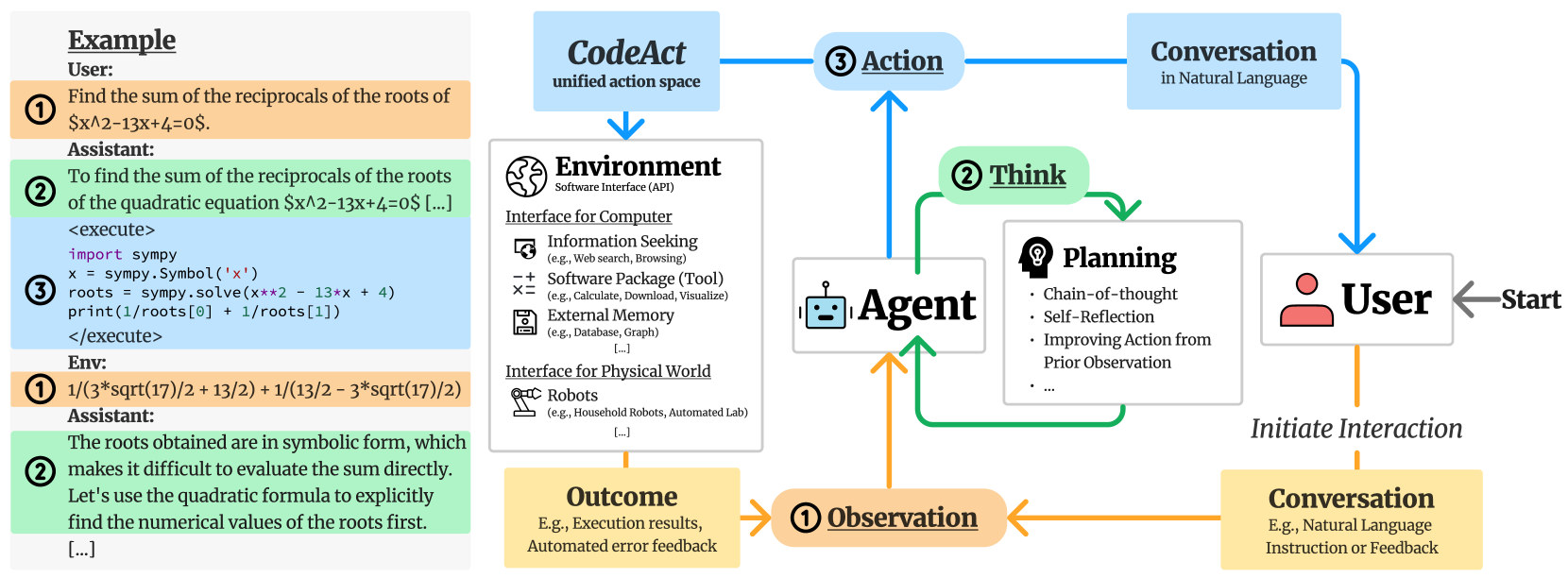
## Diagram: CodeAct Agent Architecture and Interaction Loop
### Overview
This image is a technical diagram illustrating the architecture and workflow of an AI agent system, specifically highlighting a concept called "CodeAct." The image is divided into two distinct spatial regions: a left panel providing a concrete, color-coded text example of an interaction, and a right panel showing the abstract flowchart of the agent's cognitive and operational loop.
**Language Declaration:** All text present in this image is in English.
### Components and Legend Mapping
The diagram utilizes a strict color and number-coding system to link the abstract flowchart (right) with the concrete example (left).
* **Orange / Number (1) / "Observation":** Represents inputs to the agent. This includes initial user prompts and feedback/results from the environment.
* **Green / Number (2) / "Think":** Represents the agent's internal reasoning, planning, and self-reflection processes.
* **Blue / Number (3) / "Action":** Represents the agent's outputs, which are split into executing code ("CodeAct") or responding to the user ("Conversation").
### Content Details
#### Part 1: The Example Panel (Left Side)
This section is a vertical, top-to-bottom transcription of a multi-turn interaction, color-coded to match the diagram on the right.
* **Header:** <u>**Example**</u>
* **Turn 1 (Orange Background, Circled '1'):**
* *Speaker:* User:
* *Text:* "Find the sum of the reciprocals of the roots of $x^2-13x+4=0$."
* **Turn 2 (Green Background, Circled '2'):**
* *Speaker:* Assistant:
* *Text:* "To find the sum of the reciprocals of the roots of the quadratic equation $x^2-13x+4=0$ [...]"
* **Turn 3 (Blue Background, Circled '3'):**
* *Code Block:*
```python
<execute>
import sympy
x = sympy.Symbol('x')
roots = sympy.solve(x**2 - 13*x + 4)
print(1/roots[0] + 1/roots[1])
</execute>
```
* **Turn 4 (Orange Background, Circled '1'):**
* *Speaker:* Env:
* *Text:* `1/(3*sqrt(17)/2 + 13/2) + 1/(13/2 - 3*sqrt(17)/2)`
* **Turn 5 (Green Background, Circled '2'):**
* *Speaker:* Assistant:
* *Text:* "The roots obtained are in symbolic form, which makes it difficult to evaluate the sum directly. Let's use the quadratic formula to explicitly find the numerical values of the roots first. [...]"
#### Part 2: The Architecture Diagram (Right Side)
This section is a flowchart demonstrating the cyclical nature of the agent.
**1. Initiation (Right edge to Bottom Right):**
* A grey arrow labeled "**Start**" points leftward to a white box containing a red user icon and the text "**User**".
* An orange dashed line labeled "*Initiate Interaction*" points downward from the User to a yellow box labeled "**Conversation**" (Subtext: "E.g., Natural Language Instruction or Feedback").
**2. The Observation Phase (Bottom Center):**
* An orange arrow points left from the "Conversation" box to a rounded orange pill labeled "**(1) <u>Observation</u>**".
* Another orange arrow points right from a yellow box labeled "**Outcome**" (Subtext: "E.g., Execution results, Automated error feedback") into the same "(1) Observation" pill.
* An orange arrow points upward from "(1) Observation" into the central Agent node.
**3. The Agent and Thinking Phase (Center):**
* **Central Node:** A white box containing a blue robot face icon and the text "**Agent**".
* **Thinking Loop:** Green arrows form a clockwise loop originating from and returning to the Agent.
* The top of the loop passes through a rounded green pill labeled "**(2) <u>Think</u>**".
* Inside the loop is a white box labeled "**Planning**" (with a head/lightbulb icon). It contains bullet points:
* Chain-of-thought
* Self-Reflection
* Improving Action from Prior Observation
* ...
**4. The Action Phase (Top Center to Top Edges):**
* A blue arrow points upward from the Agent to a rounded blue pill labeled "**(3) <u>Action</u>**".
* The flow splits into two blue branches:
* **Right Branch:** Points to a light blue box labeled "**Conversation**" (Subtext: "in Natural Language"). A blue arrow then points downward from this box back to the "**User**" node.
* **Left Branch:** Points to a light blue box labeled "**CodeAct**" (Subtext: "unified action space"). A blue arrow points downward from this box to the Environment node.
**5. The Environment Phase (Center Left):**
* A large white box with a globe icon labeled "**Environment**" (Subtext: "Software Interface (API)"). It is divided into two sub-sections:
* <u>**Interface for Computer**</u>
* [Screen/Magnifying Glass Icon] **Information Seeking** (e.g., Web search, Browsing)
* [-+=x Icon] **Software Package (Tool)** (e.g., Calculate, Download, Visualize)
* [Floppy Disk Icon] **External Memory** (e.g., Database, Graph)
* [...]
* <u>**Interface for Physical World**</u>
* [Robotic Arm Icon] **Robots** (e.g., Household Robots, Automated Lab)
* [...]
* An orange arrow points downward from the Environment box to the yellow "**Outcome**" box, completing the system loop.
### Key Observations
* **Perfect Mapping:** The numbers and colors in the left-hand example perfectly map to the flowchart on the right. The user's math prompt is an Orange (1) Observation. The LLM's text reasoning is a Green (2) Think. The Python code generation is a Blue (3) Action (specifically, the CodeAct branch). The Python output is another Orange (1) Observation. The LLM's realization that the output is symbolic is another Green (2) Think.
* **Unified Action Space:** The diagram explicitly positions "CodeAct" as a "unified action space." Instead of having separate, hardcoded API calls for web searching, calculating, or database querying, the agent writes code (as seen in the example) to interact with the "Environment."
* **Cyclical Error Correction:** The example demonstrates the "Self-Reflection" and "Improving Action from Prior Observation" mentioned in the Planning box. The agent wrote code, received an unhelpful symbolic output from the environment, and immediately entered a new "Think" phase to adjust its strategy.
### Interpretation
This document outlines a paradigm shift in how Large Language Model (LLM) agents interact with tools. Traditionally, agents might use specific JSON-formatted tool calls (e.g., `{"tool": "calculator", "equation": "..."}`).
This diagram proposes the **CodeAct** framework. The core thesis is that an agent's primary method of interacting with the world (the "Environment") should be through writing and executing executable code (like Python).
By doing so, the agent gains a "unified action space." It doesn't need a custom-built calculator tool; it just imports `sympy`. It doesn't need a custom web-scraper tool; it can write a Python script using `requests`. The flowchart shows that the agent is trapped in a continuous loop of Observing (reading user prompts or code terminal outputs), Thinking (planning the next step), and Acting (talking to the user or writing code). The left-hand example serves as empirical proof of the flowchart's logic, showing the agent successfully navigating a mathematical problem by writing code, evaluating the terminal output, and realizing it needs to change its mathematical approach based on that output.
DECODING INTELLIGENCE...