TECHNICAL ASSET FINGERPRINT
7d237ae648d2931af88666eb
Click to view fullscreen
Press ESC or click to close
FOUND IN PAPERS
EXPERT: healer-alpha-free VERSION 1
RUNTIME: free/openrouter/healer-alpha
INTEL_VERIFIED
## System Architecture Diagram: AI Agent Interaction Workflow
### Overview
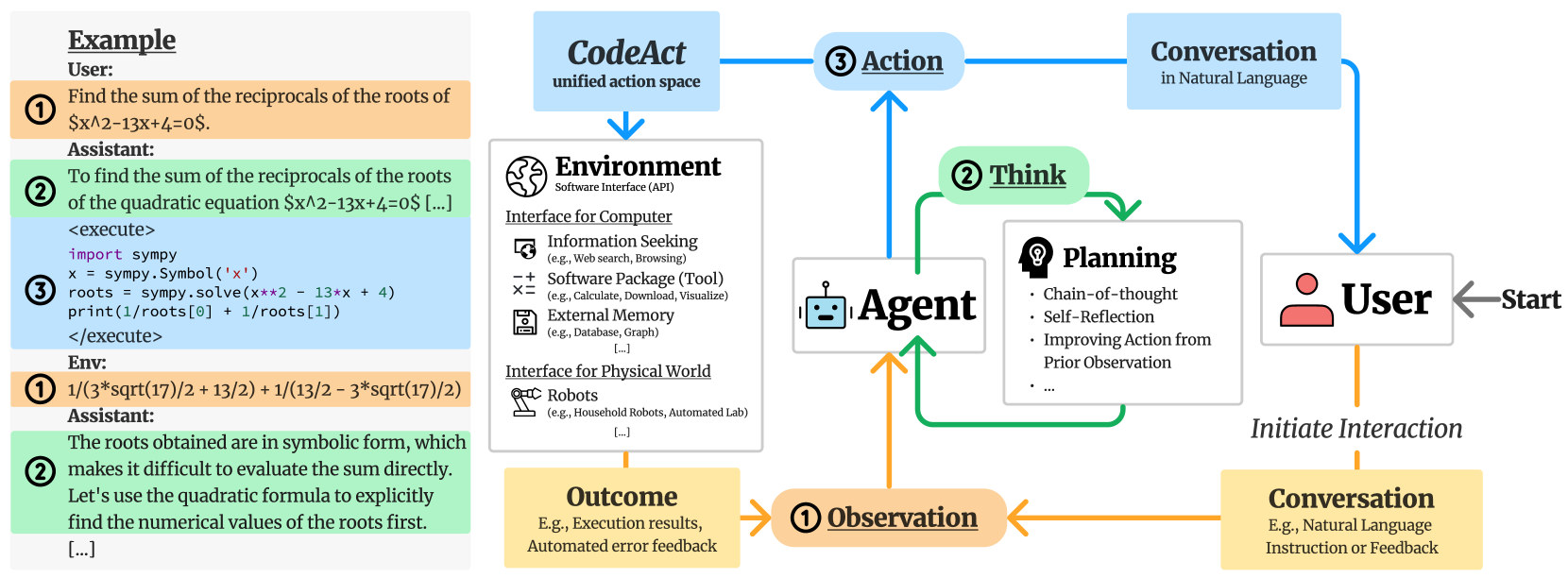
The image is a technical diagram illustrating the workflow and components of an AI agent system that interacts with users, executes code, and operates within a software environment. It is divided into two main sections: a left panel showing a concrete example of a user-assistant interaction, and a right panel depicting the abstract system architecture and information flow.
### Components/Axes
The diagram is not a chart with axes but a flowchart with labeled components and directional arrows indicating process flow.
**Left Panel - Example Interaction:**
* **Header:** "Example"
* **User Query (Orange Box, labeled ①):** "Find the sum of the reciprocals of the roots of $x^2-13x+4=0$."
* **Assistant Response (Green Box, labeled ②):** "To find the sum of the reciprocals of the roots of the quadratic equation $x^2-13x+4=0$ [...]"
* **Code Execution Block (Blue Box, labeled ③):** Contains Python code using the `sympy` library to solve the equation.
* Code: `<execute> import sympy; x = sympy.Symbol('x'); roots = sympy.solve(x**2 - 13*x + 4); print(1/roots[0] + 1/roots[1]) </execute>`
* **Environment Output (Orange Box, labeled ①):** "1/(3*sqrt(17)/2 + 13/2) + 1/(13/2 - 3*sqrt(17)/2)"
* **Assistant Follow-up (Green Box, labeled ②):** "The roots obtained are in symbolic form, which makes it difficult to evaluate the sum directly. Let's use the quadratic formula to explicitly find the numerical values of the roots first. [...]"
**Right Panel - System Architecture:**
* **Central Component - Agent:** A robot icon labeled "**Agent**".
* **User Component:** A person icon labeled "**User**" with an arrow labeled "Start" pointing to it.
* **Environment Component:** A box labeled "**Environment**" with subtitle "Software Interface (API)". It lists two interfaces:
* **Interface for Computer:** Includes "Information Seeking (e.g., Web search, Browsing)", "Software Package (Tool) (e.g., Calculate, Download, Visualize)", "External Memory (e.g., Database, Graph) [...]".
* **Interface for Physical World:** Includes "Robots (e.g., Household Robots, Automated Lab) [...]".
* **Planning Component:** A box labeled "**Planning**" with a lightbulb icon. It lists: "Chain-of-thought", "Self-Reflection", "Improving Action from Prior Observation", "...".
* **Action Component:** A blue box labeled "**③ Action**".
* **Observation Component:** An orange box labeled "**① Observation**".
* **Think Component:** A green box labeled "**② Think**".
* **CodeAct Component:** A blue box labeled "**CodeAct**" with subtitle "unified action space".
* **Conversation Components:**
* Top-right: A blue box labeled "**Conversation**" with subtitle "in Natural Language".
* Bottom-right: A yellow box labeled "**Conversation**" with subtitle "E.g., Natural Language Instruction or Feedback".
* **Outcome Component:** A yellow box labeled "**Outcome**" with subtitle "E.g., Execution results, Automated error feedback".
* **Flow Labels:** "Initiate Interaction" (arrow from User to bottom Conversation box).
### Detailed Analysis
The diagram maps a cyclical, three-stage process (① Observation, ② Think, ③ Action) for an AI Agent.
1. **Initiation:** The process starts with the **User**. The user can "Initiate Interaction" via a **Conversation** (bottom-right yellow box), providing natural language instructions or feedback.
2. **Observation (①):** The Agent receives an **Observation**. This observation can come from two sources:
* Directly from the User's conversation.
* From the **Outcome** of a previous action (e.g., execution results or error feedback from the Environment).
3. **Think (②):** The Agent engages in a **Think** phase, which involves **Planning**. The planning process includes chain-of-thought reasoning, self-reflection, and improving future actions based on prior observations.
4. **Action (③):** The Agent performs an **Action**. This action is executed through the **CodeAct** "unified action space," which interfaces with the **Environment**.
5. **Environment Interaction:** The **Environment** (Software API) provides the tools for the action. It offers interfaces for both computer-based tasks (information seeking, software tools, external memory) and physical world interaction (robots).
6. **Outcome & Loop:** The action produces an **Outcome** (e.g., results, errors), which feeds back as a new **Observation** for the Agent, closing the loop. Concurrently, the Agent can also engage in a direct **Conversation** (top-right blue box) with the User in natural language.
The **Example** panel on the left concretely demonstrates this loop: User query (Observation) -> Assistant reasoning (Think) -> Code execution (Action via CodeAct) -> Environment result (Outcome/Observation) -> Assistant follow-up (Think).
### Key Observations
* **Dual Conversation Channels:** The system distinguishes between initiating conversations (bottom-right, for instructions/feedback) and ongoing conversational interaction (top-right, for natural language dialogue).
* **Code as a Unified Action Space:** The "CodeAct" component is highlighted as the central mechanism for translating the Agent's decisions into executable actions within the Environment.
* **Reflective Planning:** The Planning component explicitly includes "Self-Reflection" and "Improving Action from Prior Observation," indicating a system designed for iterative learning and correction.
* **Hybrid Environment:** The Environment is designed to interface with both digital software tools and physical world actuators (robots), suggesting a broad application scope.
* **Error Integration:** The "Outcome" box explicitly includes "Automated error feedback," which is crucial for the Agent's learning and planning cycle.
### Interpretation
This diagram outlines a sophisticated framework for an autonomous or semi-autonomous AI agent. The core innovation appears to be the **CodeAct** paradigm, which unifies the agent's action space around code generation and execution. This allows the agent to leverage the vast capabilities of existing software tools and APIs (the Environment) in a structured way.
The workflow emphasizes a **closed-loop, iterative process** of observation, reasoning, and action. The inclusion of self-reflective planning suggests the system is designed not just to execute tasks, but to evaluate its own performance and adapt its strategy, moving towards more robust and reliable AI behavior.
The separation of the "Environment" into computer and physical world interfaces indicates the architecture is intended to be general-purpose, capable of tasks ranging from data analysis and web search (as in the example) to potentially controlling robotic systems. The example provided—a mathematical problem solved via symbolic code execution—serves as a clear proof-of-concept for how the abstract components interact in a practical scenario.
In essence, the diagram depicts an AI agent that doesn't just generate text, but *acts* by writing and executing code within a structured environment, learning from the outcomes, and communicating its process in natural language. This represents a shift from conversational AI towards **embodied, tool-using AI** with a defined operational loop.
DECODING INTELLIGENCE...