## Diagram: AI Model Evaluation Across Academic Domains
### Overview
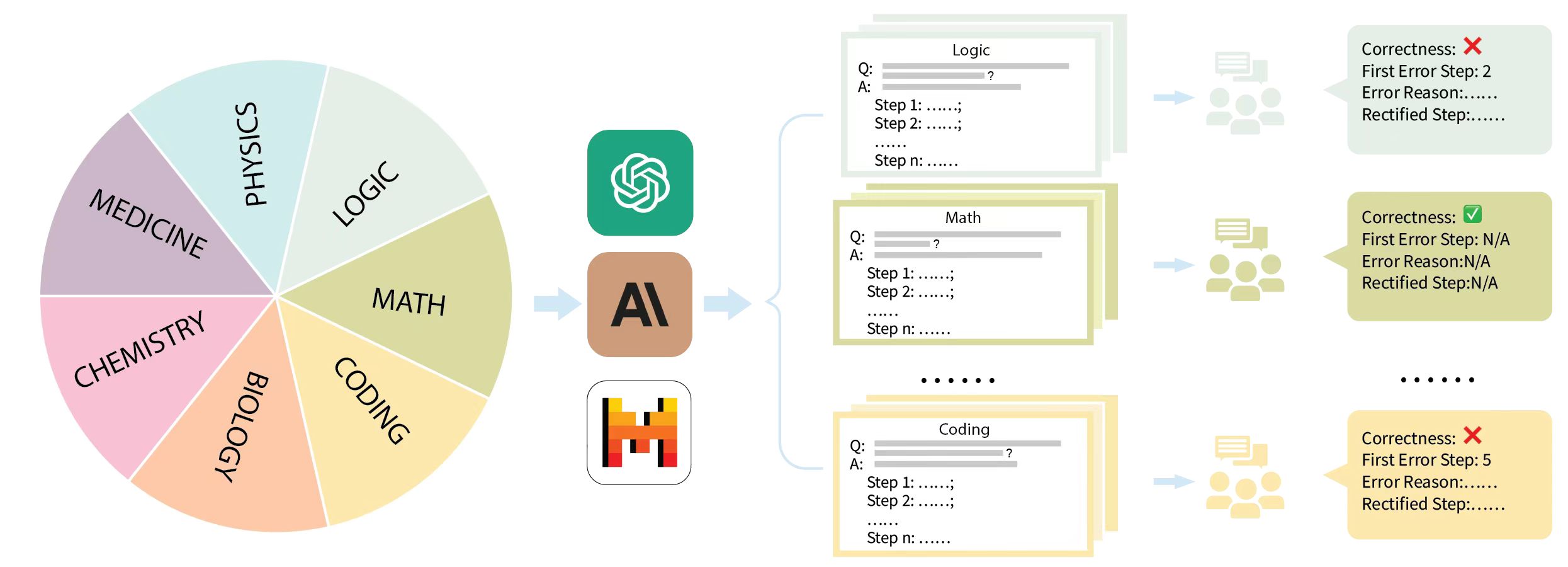
The image is a conceptual diagram illustrating a workflow for evaluating and improving AI models across multiple academic disciplines. It depicts a process where domain knowledge is fed into AI models, which generate step-by-step solutions to problems, followed by human evaluation and feedback for error correction.
### Components/Axes
The diagram is organized into three main vertical sections, flowing from left to right:
1. **Left Section (Input Domains):** A large pie chart divided into seven colored segments, each representing an academic field.
* **Labels (clockwise from top-left):** PHYSICS (light blue), LOGIC (pale green), MATH (olive green), CODING (light orange), BIOLOGY (peach), CHEMISTRY (pink), MEDICINE (lavender).
* **Spatial Grounding:** The pie chart occupies the left third of the image. The labels are placed within their respective colored segments.
2. **Center Section (AI Models):** Three distinct AI model icons arranged vertically, connected by light blue arrows from the pie chart and pointing towards the right section.
* **Top Icon:** A green square with a white, intricate, knot-like symbol (resembling the OpenAI logo).
* **Middle Icon:** A brown square with the letters "AI" in black.
* **Bottom Icon:** A white square with a stylized, pixelated "H" in orange, yellow, and red (resembling the Hugging Face logo).
3. **Right Section (Evaluation & Feedback):** This section shows a parallel process for three example domains (Logic, Math, Coding), with ellipses (`......`) indicating the process repeats for others.
* **For each domain, there are two components:**
* **A. Problem/Solution Card:** A rectangular card with a colored header and border.
* **Header:** The domain name (e.g., "Logic").
* **Content:** A structured Q&A format:
* `Q:` followed by a gray placeholder bar and a question mark `?`.
* `A:` followed by a gray placeholder bar.
* A list of steps: `Step 1: ......;`, `Step 2: ......;`, `......`, `Step n: ......`.
* **B. Feedback Box:** A colored box connected to the card by an arrow, containing evaluation results.
* **Fields:**
* `Correctness:` followed by a symbol (❌ for incorrect, ✅ for correct).
* `First Error Step:` (e.g., "2", "N/A", "5").
* `Error Reason:` (e.g., "......", "N/A").
* `Rectified Step:` (e.g., "......", "N/A").
* **Spatial Grounding & Color Matching:**
* The **Logic** card (top) has a pale green header/border. Its feedback box is also pale green and shows `Correctness: ❌`.
* The **Math** card (middle) has an olive green header/border. Its feedback box is olive green and shows `Correctness: ✅`.
* The **Coding** card (bottom) has a light orange header/border. Its feedback box is light orange and shows `Correctness: ❌`.
* Between the cards and feedback boxes, there are small, faint icons of people with speech bubbles, symbolizing human evaluators.
### Detailed Analysis
The diagram outlines a clear, multi-stage pipeline:
1. **Domain Input:** Knowledge or problems from seven academic domains (Medicine, Physics, Logic, Math, Coding, Biology, Chemistry) serve as the input source.
2. **AI Processing:** This input is processed by one or more AI models (represented by the three central icons).
3. **Solution Generation:** For a given domain (e.g., Logic), the AI generates a structured, step-by-step solution to a question (`Q:`).
4. **Human Evaluation:** Human evaluators (implied by the people icons) assess the AI's solution.
5. **Feedback & Correction:** The evaluation produces a structured feedback report detailing correctness, the step where the first error occurred (if any), the reason for the error, and a rectified version of that step. This feedback loop is designed for iterative model improvement.
### Key Observations
* **Selective Correctness:** In the examples shown, only the Math solution is marked as fully correct (`✅`, `First Error Step: N/A`). The Logic and Coding solutions contain errors, identified at Step 2 and Step 5, respectively.
* **Structured Error Analysis:** The feedback format is consistent and granular, focusing on identifying the *first* error step, which is crucial for efficient debugging and training.
* **Visual Coding:** Colors are used systematically to link each domain's problem card to its corresponding feedback box, ensuring clarity in the parallel workflows.
* **Scalability:** The use of ellipses (`......`) in both the step lists and between the domain examples indicates this is a scalable framework applicable to many problems and domains beyond the three shown.
### Interpretation
This diagram represents a **human-in-the-loop framework for benchmarking and improving AI reasoning capabilities**. It moves beyond simple right/wrong assessment to a diagnostic approach.
* **What it demonstrates:** The process is designed to create high-quality training data. By pinpointing the exact step where an AI's reasoning fails and providing a correction, the system generates targeted examples for fine-tuning models. This is more effective than training on just final answers.
* **Relationship between elements:** The flow is linear but implies a cycle: Domains → AI Generation → Human Evaluation → Feedback. This feedback is presumably used to retrain the AI models (the central icons), creating a closed loop for continuous improvement. The variety of domains suggests the goal is to develop a generalist AI with robust reasoning skills across STEM and professional fields.
* **Notable implication:** The inclusion of "Medicine" and "Coding" alongside pure sciences like "Physics" and "Math" indicates an ambition to apply this rigorous, step-wise evaluation to practical, high-stakes fields where explainable and correct reasoning is critical. The framework treats all domains with the same analytical rigor.