## Diagram: LLM-based QA Agent Workflow
### Overview
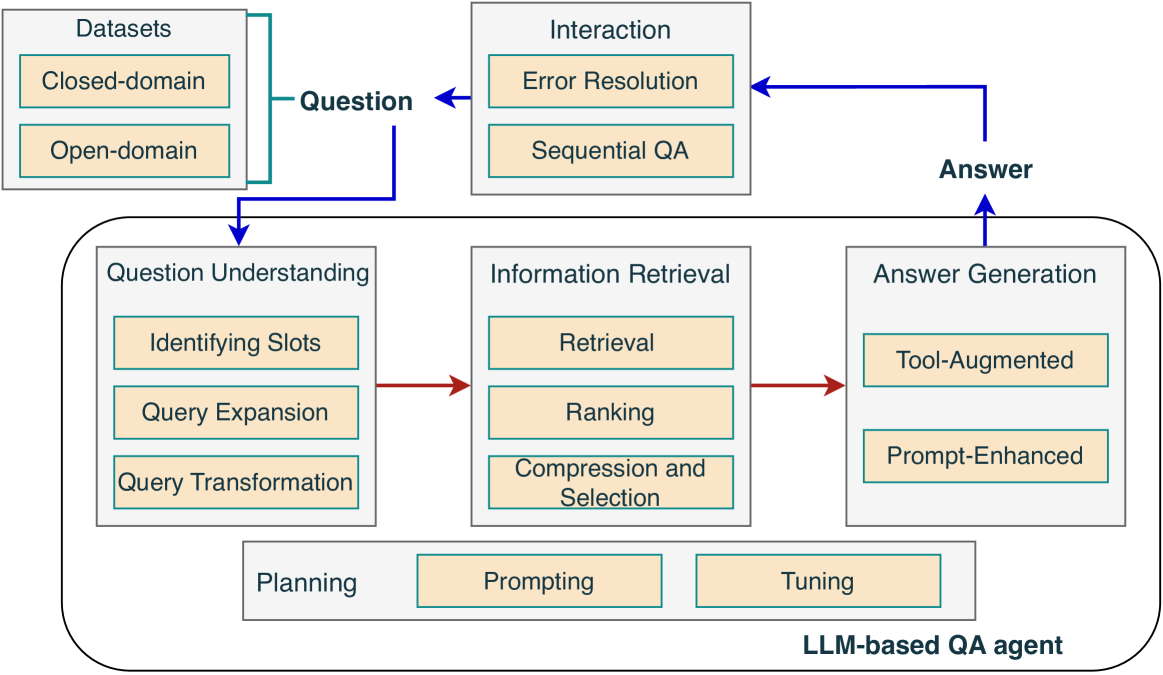
The image is a diagram illustrating the workflow of an LLM-based Question Answering (QA) agent. It shows the different stages involved, from receiving a question to generating an answer, and highlights the interaction between various components.
### Components/Axes
The diagram consists of several rectangular boxes representing different modules or processes. These boxes are connected by arrows indicating the flow of information.
* **Datasets:** Located at the top-left, contains two sub-categories:
* Closed-domain
* Open-domain
* **Question:** A label with an arrow pointing from the Datasets to the Question Understanding module.
* **Interaction:** Located at the top-center, contains two sub-categories:
* Error Resolution
* Sequential QA
* **Answer:** A label with an arrow pointing from the Answer Generation module to the Interaction module.
* **LLM-based QA agent:** A large rounded rectangle encompassing the core components of the QA agent.
* **Question Understanding:** Located on the left side of the LLM-based QA agent, contains three sub-categories:
* Identifying Slots
* Query Expansion
* Query Transformation
* **Information Retrieval:** Located in the center of the LLM-based QA agent, contains three sub-categories:
* Retrieval
* Ranking
* Compression and Selection
* **Answer Generation:** Located on the right side of the LLM-based QA agent, contains two sub-categories:
* Tool-Augmented
* Prompt-Enhanced
* **Planning, Prompting, Tuning:** Located at the bottom of the LLM-based QA agent.
### Detailed Analysis
The workflow starts with a question originating from either a "Closed-domain" or "Open-domain" dataset. This question is then processed by the "Question Understanding" module, which involves "Identifying Slots," "Query Expansion," and "Query Transformation." The output of this module is fed into the "Information Retrieval" module, which performs "Retrieval," "Ranking," and "Compression and Selection" to find relevant information. Finally, the "Answer Generation" module, using "Tool-Augmented" and "Prompt-Enhanced" techniques, generates an answer. The answer is then passed to the "Interaction" module, which handles "Error Resolution" and "Sequential QA." The "Planning," "Prompting," and "Tuning" modules likely influence the overall process within the LLM-based QA agent.
The arrows indicate the flow of information:
* A blue arrow goes from the "Datasets" to the "Question Understanding" module, labeled "Question".
* A red arrow goes from the "Question Understanding" module to the "Information Retrieval" module.
* A red arrow goes from the "Information Retrieval" module to the "Answer Generation" module.
* A blue arrow goes from the "Answer Generation" module to the "Interaction" module, labeled "Answer".
* A blue arrow goes from the "Interaction" module back to the "Question" input.
### Key Observations
* The diagram illustrates a cyclical process, with the "Interaction" module potentially feeding back into the "Question" input for iterative question answering.
* The "LLM-based QA agent" encompasses the core components of the QA system, highlighting the role of the LLM in question understanding, information retrieval, and answer generation.
* The diagram emphasizes the importance of both data (Datasets) and interaction (Interaction) in the QA process.
### Interpretation
The diagram provides a high-level overview of the architecture and workflow of an LLM-based QA agent. It demonstrates how a question is processed through various stages, from understanding the question to retrieving relevant information and generating an answer. The cyclical nature of the diagram suggests an iterative process, where the agent can refine its answer based on user interaction and feedback. The inclusion of "Planning," "Prompting," and "Tuning" modules indicates the importance of optimizing the LLM for specific QA tasks. The separation of datasets into "Closed-domain" and "Open-domain" suggests that the agent may employ different strategies depending on the scope of the question.