## Diagrams: Comparison of Three Problem-Solving Frameworks
### Overview
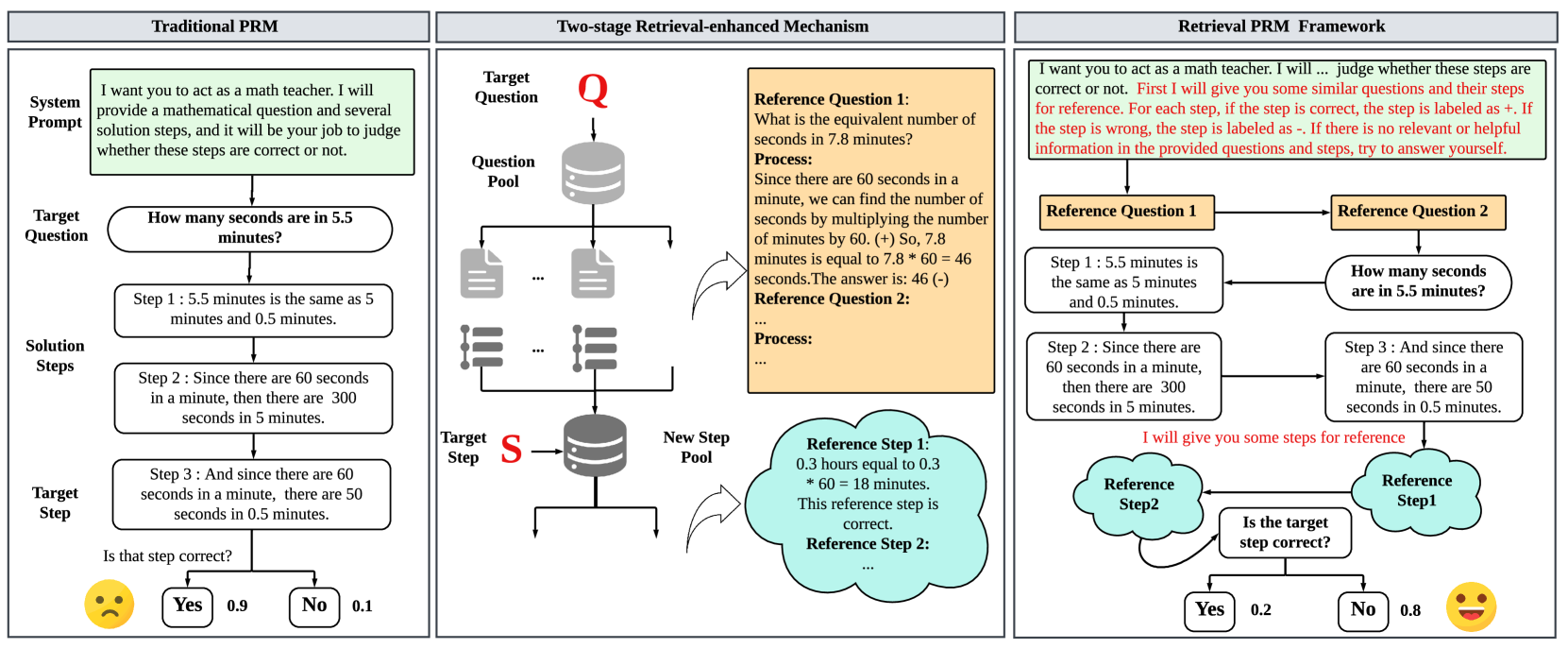
This image presents a comparative analysis of three distinct problem-solving frameworks: "Traditional PRM," "Two-stage Retrieval-enhanced Mechanism," and "Retrieval PRM Framework." Each framework outlines a process for addressing a target question, likely in a mathematical context, by providing a system prompt, a target question, and a series of solution steps. The diagrams illustrate the flow of information and decision-making within each framework, highlighting differences in their approach to problem-solving and verification.
### Components/Axes
The image is divided into three main vertical sections, each representing one of the frameworks. Within each section, the following common elements are observed:
* **System Prompt:** A text box at the top, defining the role of the system and the task.
* **Target Question:** A rounded rectangle containing the specific question to be solved.
* **Solution Steps:** A series of rounded rectangles detailing the steps taken to solve the problem.
* **Target Step/Verification:** A final step or decision point, often accompanied by a question and a binary outcome (Yes/No) with associated probabilities.
**Framework 1: Traditional PRM**
* **System Prompt:** A green text box containing the text: "I want you to act as a math teacher. I will provide a mathematical question and several solution steps, and it will be your job to judge whether these steps are correct or not."
* **Target Question:** A rounded rectangle with the text: "How many seconds are in 5.5 minutes?"
* **Solution Steps:**
* Step 1: A rounded rectangle with the text: "Step 1: 5.5 minutes is the same as 5 minutes and 0.5 minutes."
* Step 2: A rounded rectangle with the text: "Step 2: Since there are 60 seconds in a minute, then there are 300 seconds in 5 minutes."
* Step 3: A rounded rectangle with the text: "Step 3: And since there are 60 seconds in a minute, there are 50 seconds in 0.5 minutes."
* **Target Step/Verification:**
* A question: "Is that step correct?"
* Two branches labeled "Yes" and "No."
* Associated values: "Yes" has a value of "0.9," and "No" has a value of "0.1."
* A sad yellow emoji is positioned to the left of the "Yes/No" branches.
**Framework 2: Two-stage Retrieval-enhanced Mechanism**
* **Target Question:** Labeled "Q" with an arrow pointing down to a database icon.
* **Question Pool:** Represented by a database icon, with arrows pointing to multiple document icons (representing retrieved questions).
* **Reference Question 1:** An orange text box containing:
* "Reference Question 1:"
* "What is the equivalent number of seconds in 7.8 minutes?"
* "Process:"
* "Since there are 60 seconds in a minute, we can find the number of seconds by multiplying the number of minutes by 60. (+) So, 7.8 minutes is equal to 7.8 * 60 = 46 seconds. The answer is: 46 (-)"
* "Reference Question 2:"
* "Process:"
* "..."
* **Document Icons:** Multiple document icons with ellipses (...) indicating a pool of questions.
* **List Icons:** Multiple list icons with ellipses (...) indicating a pool of solution steps.
* **Target Step:** Labeled "S" with an arrow pointing to a database icon labeled "New Step Pool."
* **New Step Pool:** A database icon representing a pool of new steps.
* **Reference Step 1:** A light blue cloud shape containing:
* "Reference Step 1:"
* "0.3 hours equal to 0.3"
* "* 60 = 18 minutes."
* "This reference step is correct."
* "Reference Step 2:"
* "..."
* **Arrows:** Indicate the flow from the target question to the question pool, then to retrieved documents and lists, and finally to the target step and new step pool. A curved arrow connects the document/list icons to the "Reference Question 1" text box.
**Framework 3: Retrieval PRM Framework**
* **System Prompt:** A green text box containing the text: "I want you to act as a math teacher. I will ... judge whether these steps are correct or not. First I will give you some similar questions and their steps for reference. For each step, if the step is correct, the step is labeled as +. If the step is wrong, the step is labeled as -. If there is no relevant or helpful information in the provided questions and steps, try to answer yourself."
* **Reference Question 1:** An orange text box.
* **Reference Question 2:** An orange text box. An arrow connects "Reference Question 1" to "Reference Question 2."
* **Target Question:** A rounded rectangle with the text: "How many seconds are in 5.5 minutes?" An arrow points from "Reference Question 2" to this target question.
* **Solution Steps:**
* Step 1: A rounded rectangle with the text: "Step 1: 5.5 minutes is the same as 5 minutes and 0.5 minutes." An arrow connects this to "Reference Question 1."
* Step 2: A rounded rectangle with the text: "Step 2: Since there are 60 seconds in a minute, then there are 300 seconds in 5 minutes." An arrow connects this to "Step 1."
* Step 3: A rounded rectangle with the text: "Step 3: And since there are 60 seconds in a minute, there are 50 seconds in 0.5 minutes." An arrow connects this to "Step 2."
* **Reference Steps:** Two light blue cloud shapes labeled "Reference Step2" and "Reference Step1." Arrows connect "Step 3" to "Reference Step1" and "Reference Step2" to "Step 3."
* **Verification:**
* A question: "Is the target step correct?"
* Two branches labeled "Yes" and "No."
* Associated values: "Yes" has a value of "0.2," and "No" has a value of "0.8."
* A happy yellow emoji is positioned to the right of the "Yes/No" branches.
* **Textual Annotation:** A red text annotation below "Step 3" and above the "Reference Step2" cloud reads: "I will give you some steps for reference."
### Detailed Analysis or Content Details
**Framework 1: Traditional PRM**
This framework presents a direct, step-by-step approach to solving the target question. The solution steps provided are:
1. Decomposition of 5.5 minutes into 5 minutes and 0.5 minutes.
2. Calculation of seconds in 5 minutes (300 seconds).
3. Calculation of seconds in 0.5 minutes (50 seconds).
The final step involves a binary judgment ("Is that step correct?") with a high probability of "Yes" (0.9) and a low probability of "No" (0.1), indicated by a sad emoji. This suggests a confidence in the correctness of the provided steps, with a slight uncertainty.
**Framework 2: Two-stage Retrieval-enhanced Mechanism**
This framework introduces a retrieval mechanism.
* The "Target Question" is processed, leading to a "Question Pool."
* From the "Question Pool," relevant questions are retrieved, exemplified by "Reference Question 1" (calculating seconds in 7.8 minutes). This reference question includes a detailed process and an answer (46 seconds).
* The process then moves to a "Target Step" which is stored in a "New Step Pool."
* A "Reference Step 1" is shown, which is deemed "correct." This step appears to be an example of a correct step within the system.
The diagram implies a process of retrieving relevant questions and steps to aid in solving the target question. The connection between retrieved documents/lists and the "Reference Question 1" text box suggests that the retrieved items inform the understanding or generation of reference questions.
**Framework 3: Retrieval PRM Framework**
This framework combines retrieval with a more explicit system prompt for judging correctness.
* The "System Prompt" clearly defines how steps will be labeled (+ for correct, - for wrong).
* "Reference Question 1" and "Reference Question 2" are provided, with "Reference Question 1" being linked to "Step 1" of the target problem.
* The "Target Question" is "How many seconds are in 5.5 minutes?"
* The "Solution Steps" (Step 1, Step 2, Step 3) are presented sequentially, with arrows indicating their dependency.
* "Reference Step1" and "Reference Step2" are provided as examples. The annotation "I will give you some steps for reference" clarifies their purpose.
* The verification stage ("Is the target step correct?") has a high probability of "No" (0.8) and a low probability of "Yes" (0.2), indicated by a happy emoji. This is a significant contrast to Framework 1 and suggests that the provided steps for the target question are likely incorrect or that the framework is designed to be more critical.
### Key Observations
* **Varying Confidence in Solution Steps:** Framework 1 shows high confidence (0.9 Yes) in the correctness of its solution steps, while Framework 3 shows low confidence (0.2 Yes, 0.8 No).
* **Role of Reference Information:** Framework 2 and 3 explicitly utilize "Reference Questions" and "Reference Steps" to aid in problem-solving or verification, whereas Framework 1 does not show this.
* **Complexity of Mechanisms:** Framework 2 and 3 appear to be more complex, involving retrieval mechanisms and explicit guidance on step evaluation.
* **Emoji Usage:** Framework 1 uses a sad emoji with a high "Yes" probability, which is counter-intuitive. Framework 3 uses a happy emoji with a high "No" probability, which is also counter-intuitive if the emoji is meant to represent the outcome of the step. It's more likely the emoji represents the system's sentiment towards the outcome.
### Interpretation
These diagrams illustrate different approaches to a problem-solving task, likely within a Natural Language Processing or AI context, where a system is tasked with evaluating mathematical steps.
* **Traditional PRM (Framework 1)** represents a baseline or a simpler model. It directly presents a problem and its solution steps, then asks for a judgment. The high probability of "Yes" suggests either the steps are indeed correct and the system is confident, or it's a simplified representation where the system is expected to agree. The sad emoji with a high "Yes" probability is peculiar and might indicate a misunderstanding of emoji sentiment or a specific convention within this framework.
* **Two-stage Retrieval-enhanced Mechanism (Framework 2)** introduces the concept of retrieving relevant information (questions and steps) from a pool. This suggests a more sophisticated approach where the system leverages external knowledge to assist in solving the target problem. The diagram highlights the flow of information from the target question to retrieval and then to the generation or evaluation of steps.
* **Retrieval PRM Framework (Framework 3)** builds upon the retrieval idea and provides a more detailed system prompt for evaluation. The critical difference here is the low confidence in the correctness of the provided steps (0.2 Yes, 0.8 No). This suggests that this framework is designed to be more discerning or that the example steps provided for the target question are intentionally flawed to demonstrate the framework's ability to identify errors. The happy emoji with a high "No" probability could signify that the system is pleased to have identified an incorrect step, aligning with its role of judging correctness.
In essence, the diagrams demonstrate an evolution from a direct, less informed approach (Framework 1) to more advanced, retrieval-augmented, and critically evaluative methods (Frameworks 2 and 3). Framework 3, in particular, seems to emphasize the system's role in identifying errors, as indicated by the high probability of "No" for the target step. The comparison highlights the trade-offs between simplicity and the sophistication of leveraging external knowledge and detailed evaluation criteria for problem-solving.