# Technical Diagram Analysis: LLM-Powered Conversation System
## Diagram Overview
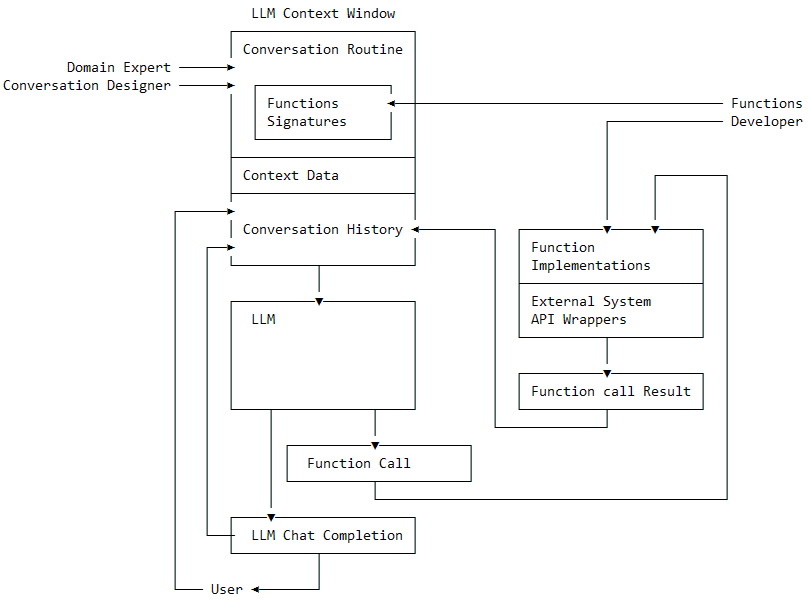
This flowchart illustrates the architecture of an LLM (Large Language Model)-powered conversation system, detailing interactions between domain experts, developers, and the LLM itself. The system emphasizes context management, function integration, and iterative conversation history.
---
## Key Components & Flow
### 1. **Input Roles**
- **Domain Expert**
- Provides domain-specific knowledge to the system.
- **Conversation Designer**
- Defines conversation routines and contextual rules.
### 2. **LLM Context Window**
A central processing unit containing:
- **Conversation Routine**
- Predefined dialogue patterns and response strategies.
- **Functions Signatures**
- Interface definitions for external functions (e.g., API endpoints).
- **Context Data**
- Real-time user inputs and session metadata.
- **Conversation History**
- Chronological record of prior interactions.
### 3. **LLM Processing**
- **LLM**
- Core language model that:
- Processes inputs from the Context Window.
- Generates responses or triggers function calls.
- **Function Call**
- Invokes external tools/APIs when needed (e.g., database queries, calculations).
### 4. **Function Execution**
- **Functions Developer**
- Implements function logic (e.g., `Function Implementations`).
- **External System API Wrappers**
- Bridges the LLM to third-party systems (e.g., payment gateways, CRMs).
- **Function Call Result**
- Returns processed data to the LLM for integration into responses.
### 5. **Output Loop**
- **LLM Chat Completion**
- Final response generated by the LLM, incorporating function results.
- **User**
- Receives the completion and may continue the conversation.
---
## Flow Diagram