## Diagram: Robotic Task Interpretation Interface
### Overview
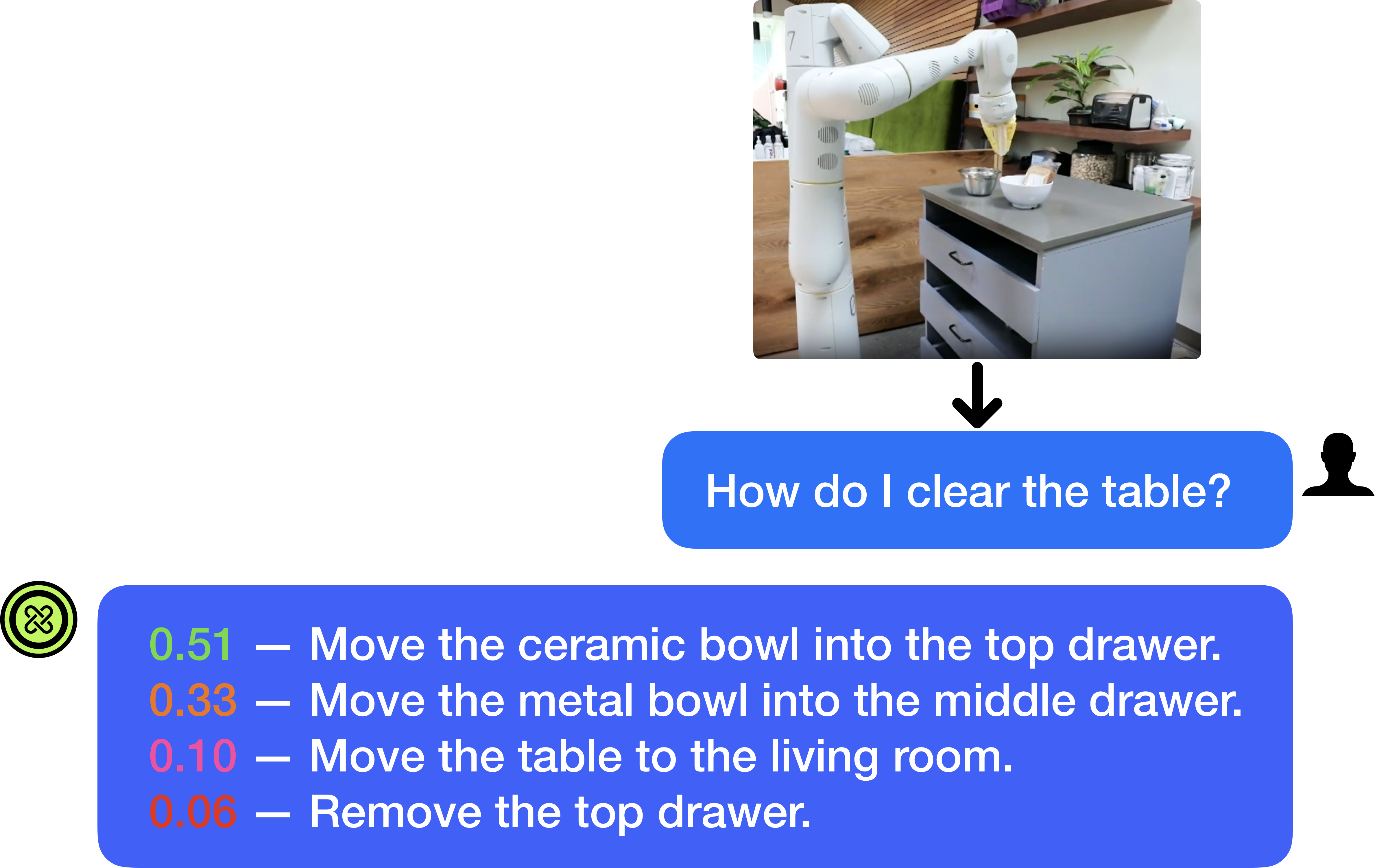
The image is a diagram or screenshot illustrating a human-robot interaction scenario. It depicts a robotic arm in a kitchen environment, a user's natural language query about clearing a table, and the system's generated response consisting of a ranked list of possible actions with associated confidence scores. The layout is structured to show the flow from visual context to user query to system output.
### Components/Axes
The image is composed of three primary visual components arranged vertically:
1. **Top Component (Photographic Context):** A rectangular photograph positioned in the upper-right quadrant. It shows a white, multi-jointed robotic arm mounted next to a kitchen counter. On the counter are two bowls (one white ceramic, one smaller metal) and a drawer unit with three drawers (top, middle, bottom). The background includes wooden shelves with various kitchen items and a plant.
2. **Middle Component (User Query):** A blue, rounded rectangular speech bubble centered horizontally below the photograph. A black arrow points downward from the photo to this bubble. To the right of the bubble is a black silhouette icon of a person's head and shoulders.
3. **Bottom Component (System Response):** A larger blue, rounded rectangular speech bubble spanning most of the width below the user query. On its left edge is a green circular icon containing a white, stylized knot or infinity-like symbol. Inside the bubble is a list of four text lines.
### Detailed Analysis
**Textual Content Extraction:**
* **User Query (Middle Bubble):**
* Text: "How do I clear the table?"
* Language: English.
* **System Response (Bottom Bubble):** The response lists four potential actions, each prefixed by a numerical confidence score displayed in a distinct color.
1. **Line 1:**
* Confidence Score: `0.51` (displayed in green text)
* Action: "Move the ceramic bowl into the top drawer."
2. **Line 2:**
* Confidence Score: `0.33` (displayed in orange text)
* Action: "Move the metal bowl into the middle drawer."
3. **Line 3:**
* Confidence Score: `0.10` (displayed in red text)
* Action: "Move the table to the living room."
4. **Line 4:**
* Confidence Score: `0.06` (displayed in red text)
* Action: "Remove the top drawer."
**Spatial Grounding & Element Relationships:**
* The photograph provides the visual context for the query. The robotic arm is positioned near the counter with the bowls and drawers, which are the objects referenced in the top two system actions.
* The black arrow creates a direct visual flow from the environmental context (photo) to the user's question about that environment.
* The confidence scores are color-coded (green, orange, red), likely indicating a gradient from high to low confidence or from plausible to implausible actions.
* The system's response is directly linked to the user's query by its position below it and the shared blue bubble styling.
### Key Observations
1. **Action Ranking:** The system provides a ranked list of actions, with the highest confidence action (`0.51`) being the most contextually relevant to the visual scene (moving a bowl that is clearly visible on the counter).
2. **Contextual Relevance vs. Literal Interpretation:** The top two actions (`0.51` and `0.33`) are specific, object-oriented tasks that align with the visible scene. The third action (`0.10`) is a literal but impractical interpretation of "clear the table" (moving the entire table). The fourth action (`0.06`) is a tangential action involving a drawer, which is present but not directly related to "clearing."
3. **Confidence Correlation:** There is a clear correlation between the logical relevance of the action to the visual context and its assigned confidence score. The scores decrease as the actions become less directly related to the objects on the countertop.
4. **Interface Design:** The diagram uses a clean, chat-like interface metaphor (speech bubbles, user icon) to represent the interaction between a human and an AI/robotic system.
### Interpretation
This diagram demonstrates the operation of a **multimodal AI system** for robotic planning. The system integrates visual perception (understanding the scene in the photograph) with natural language understanding (interpreting the user's query "How do I clear the table?").
* **What the data suggests:** The system does not output a single command but a **probability distribution over possible interpretations** of the user's intent. The confidence scores (`0.51`, `0.33`, `0.10`, `0.06`) represent the system's estimated likelihood that each action fulfills the user's goal, given the visual context.
* **How elements relate:** The photograph is the primary input for the system's scene understanding. The user's text query is the secondary input. The system's output (the ranked list) is a synthesis of these two modalities, showing how it grounds the abstract language command in the specific physical environment it perceives.
* **Notable patterns and anomalies:** The most notable pattern is the sharp drop in confidence after the first two context-appropriate actions. This suggests the system has a strong prior for object-manipulation tasks in this setting. The inclusion of the low-confidence, illogical actions (`0.10`, `0.06`) is significant; it reveals the system's reasoning process by showing alternative, less likely interpretations it considered. This transparency is crucial for debugging and trust in human-robot interaction.
* **Underlying mechanism:** The color-coding of the scores (green for high, red for low) provides an immediate visual cue for action plausibility. The system appears to be performing **affordance-based reasoning**—identifying which objects in the scene (bowls, drawers) can be acted upon to achieve the high-level goal of "clearing."