\n
## Diagram: Complex Instruction Decomposition
### Overview
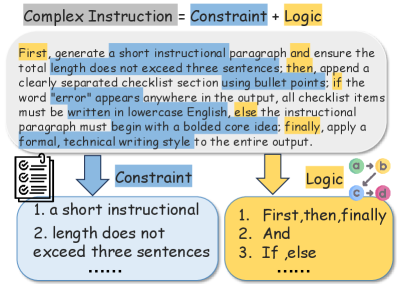
This diagram visually represents the decomposition of a "Complex Instruction" into its constituent parts: "Constraint" and "Logic". It illustrates a process for generating a short instructional paragraph, followed by a checklist, with conditional formatting based on the presence of the word "error" in the output. The diagram uses a flowchart-like structure with color-coding to differentiate components and flow.
### Components/Axes
The diagram consists of three main sections: a header containing the core equation, a central section illustrating the flow between "Constraint" and "Logic", and two lower boxes detailing the specifics of each component.
* **Header:** "Complex Instruction = Constraint + Logic"
* **Central Flow:**
* Arrow pointing from "Constraint" (blue) to a rounded rectangle containing text.
* Arrow pointing from "Logic" (yellow) to the same rounded rectangle.
* **Constraint Box:**
* Title: "Constraint"
* List:
1. "a short instructional"
2. "length does not exceed three sentences"
3. "......"
* **Logic Box:**
* Title: "Logic"
* List:
1. "First, then, finally"
2. "And"
3. "If, else"
4. "......"
* **Instructional Paragraph Text (in rounded rectangle):** "First, generate a short instructional paragraph and ensure the total length does not exceed three sentences; then, append a clearly separated checklist section using bullet points; if the word “error” appears anywhere in the output, all checklist items must be written in lowercase English, else the instructional paragraph must begin with a bolded core idea; finally, apply a formal, technical writing style to the entire output."
### Detailed Analysis or Content Details
The diagram outlines a procedural process. The "Constraint" box defines limitations on the output (paragraph length, checklist format). The "Logic" box specifies the sequence of actions (first, then, finally) and a conditional statement (if/else). The central rounded rectangle contains the complete instruction, which combines the constraints and logic.
The instructional paragraph itself is approximately 50 words long. It details the steps to be taken, including length constraints, checklist appending, conditional formatting, and writing style.
### Key Observations
The diagram emphasizes a structured approach to instruction generation. The use of color-coding (blue for constraints, yellow for logic) aids in visual understanding. The "......" in both the Constraint and Logic boxes suggests that the lists are not exhaustive. The conditional formatting rule based on the presence of "error" indicates a quality control mechanism.
### Interpretation
The diagram illustrates a system for generating instructions that are both concise and well-formatted. The separation of "Constraint" and "Logic" suggests a modular design, where the constraints can be modified without affecting the underlying logic, and vice versa. The conditional formatting rule highlights the importance of error handling and provides a mechanism for adjusting the output based on the presence of errors. The overall design promotes clarity, consistency, and quality in instruction generation. The diagram is a meta-instruction, describing how to create instructions. It's a self-referential system.