## Flowchart: Complex Instruction Construction Framework
### Overview
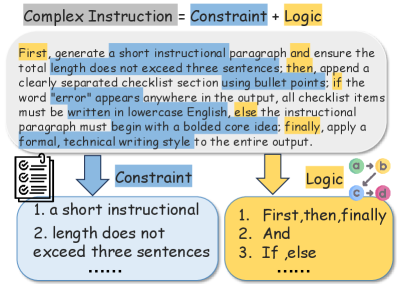
The image depicts a flowchart illustrating the process of constructing a "Complex Instruction" by combining **Constraints** and **Logic**. The diagram uses color-coded sections (blue for constraints, yellow for logic, gray for the title) and directional arrows to show the relationship between components.
### Components/Axes
- **Title**: "Complex Instruction = Constraint + Logic" (gray background, top-center).
- **Constraint Section**:
- Sub-components:
1. "a short instructional" (blue background).
2. "length does not exceed three sentences" (blue background).
- **Logic Section**:
- Sub-components:
1. "First, then, finally" (yellow background).
2. "And" (yellow background).
3. "If, else" (yellow background).
- **Legend**:
- Blue = Constraints.
- Yellow = Logic.
- Gray = Title.
- **Arrows**:
- Blue arrow from title to Constraint section.
- Yellow arrow from title to Logic section.
- Blue arrow from Constraint section to "1. a short instructional...".
- Yellow arrow from Logic section to "1. First, then, finally...".
### Detailed Analysis
- **Constraints**:
- Focus on structural requirements: brevity (≤3 sentences) and formal tone.
- Emphasizes checklist formatting (bullet points) and error handling (lowercase "error").
- **Logic**:
- Sequential steps ("First, then, finally") and conditional branching ("If, else").
- Highlights iterative refinement ("apply a formal, technical writing style").
- **Color Coding**:
- Blue (constraints) and yellow (logic) are consistently applied to text blocks and arrows.
- Gray title acts as a neutral header.
### Key Observations
1. **Modular Design**: Constraints and logic are treated as independent yet interdependent components.
2. **Hierarchical Flow**: The title anchors the diagram, with arrows guiding the viewer from high-level concepts to specific rules.
3. **Error Handling**: Explicit instruction to write "error" in lowercase ensures consistency in outputs.
4. **Formality**: The final step mandates a "formal, technical writing style," aligning with the diagram’s purpose.
### Interpretation
This flowchart serves as a template for generating structured technical instructions. By separating constraints (formatting rules) and logic (sequencing/conditionals), it ensures outputs are both concise and logically coherent. The color coding aids in rapid identification of components, critical for technical documentation where clarity is paramount. The emphasis on error handling and iterative refinement suggests an iterative design process, prioritizing precision over brevity.
## Notes
- No numerical data or trends are present; the diagram focuses on procedural logic.
- All textual elements are transcribed verbatim, with colors cross-referenced against the legend for accuracy.
- Spatial grounding confirms the title’s central placement and the directional flow of arrows.