## Diagram: New Dynamic Huffman Block vs Stored Block Structure
### Overview
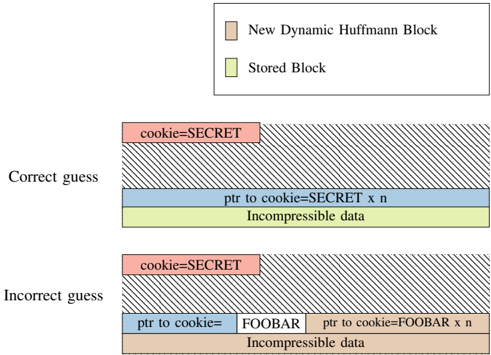
The diagram illustrates the structural differences between a "New Dynamic Huffman Block" (pink) and a "Stored Block" (green) in a data compression system. It compares two scenarios: a "Correct guess" (efficient storage) and an "Incorrect guess" (inefficient storage with added overhead).
### Components/Axes
- **Legend**:
- Pink: New Dynamic Huffman Block
- Green: Stored Block
- **Sections**:
- **Correct guess**:
- Pink block labeled `cookie=SECRET`
- Blue block labeled `ptr to cookie=SECRET x n`
- Green block labeled `Incompressible data`
- **Incorrect guess**:
- Pink block labeled `cookie=SECRET`
- Blue block labeled `ptr to cookie=FOOBAR`
- White block labeled `FOOBAR`
- Pink block labeled `ptr to cookie=FOOBAR x n`
- Green block labeled `Incompressible data`
### Detailed Analysis
- **Correct guess**:
- The pink `cookie=SECRET` block is directly linked to a blue pointer (`ptr to cookie=SECRET x n`), indicating a compact reference to the secret data.
- The green `Incompressible data` block occupies the lower portion, representing fixed, non-compressible content.
- **Incorrect guess**:
- The pink `cookie=SECRET` block is followed by a blue pointer (`ptr to cookie=FOOBAR`), which incorrectly references a white `FOOBAR` block.
- An additional pink block (`ptr to cookie=FOOBAR x n`) adds redundancy, increasing storage overhead.
- The green `Incompressible data` block remains unchanged, but the incorrect guess introduces extraneous data (`FOOBAR` and redundant pointers).
### Key Observations
1. **Color Consistency**:
- Pink blocks (New Dynamic Huffman Block) appear in both scenarios but with varying configurations.
- Green blocks (Stored Block) are identical in both cases, emphasizing their static nature.
2. **Redundancy in Incorrect Guess**:
- The incorrect guess introduces a white `FOOBAR` block and a redundant pink pointer (`ptr to cookie=FOOBAR x n`), increasing storage requirements.
3. **Pointer Alignment**:
- Correct guesses align pointers directly with the target (`SECRET`), while incorrect guesses misalign them, leading to inefficiency.
### Interpretation
The diagram highlights the efficiency of accurate Huffman block predictions in data compression. A "Correct guess" minimizes overhead by directly referencing the secret data, whereas an "Incorrect guess" introduces redundant blocks and misaligned pointers, degrading compression ratios. The green `Incompressible data` block remains constant, suggesting it represents fixed metadata or headers unaffected by compression logic. The use of distinct colors (pink/green) visually reinforces the distinction between dynamic and stored blocks, aiding in debugging or optimization efforts. This structure is critical for understanding how prediction accuracy impacts storage efficiency in adaptive compression algorithms.