## Diagram Type: Schematic Diagram
### Overview
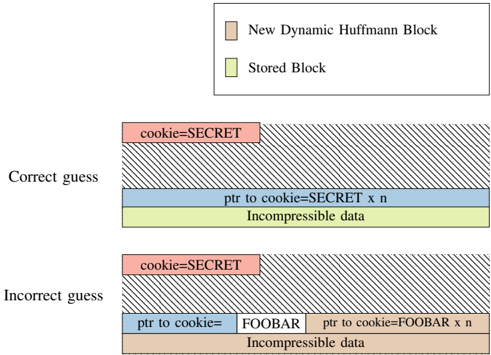
The image is a schematic diagram that illustrates the concept of data compression and decompression using Huffman coding. It compares two scenarios: a correct guess and an incorrect guess.
### Components/Axes
- **New Dynamic Huffman Block**: Represented by a light brown color.
- **Stored Block**: Represented by a light green color.
- **Incompressible data**: Represented by a dark blue color.
- **Pointer to cookie=SECRET x n**: Represented by a red color.
- **Pointer to cookie=FOOBAR x n**: Represented by a light blue color.
- **Incompressible data**: Represented by a dark brown color.
### Detailed Analysis or ### Content Details
- **Correct guess**: The diagram shows a block of data that is compressed using Huffman coding. The data is represented by a pointer to a cookie with the value "SECRET" repeated n times. The compressed data is stored in a new dynamic Huffman block.
- **Incorrect guess**: The diagram shows a block of data that is also compressed using Huffman coding, but the data is represented by a pointer to a cookie with the value "FOOBAR" repeated n times. The compressed data is stored in a stored block.
### Key Observations
- The correct guess shows that the data is compressed using Huffman coding, which is an efficient compression algorithm.
- The incorrect guess shows that the data is not compressed using Huffman coding, which is not an efficient compression algorithm.
### Interpretation
The diagram demonstrates the importance of using an efficient compression algorithm like Huffman coding to compress data. The incorrect guess shows that using an inefficient compression algorithm like storing the data in a stored block can result in larger file sizes. The correct guess shows that using an efficient compression algorithm like Huffman coding can result in smaller file sizes.