## Diagram Type: Flowchart
### Overview
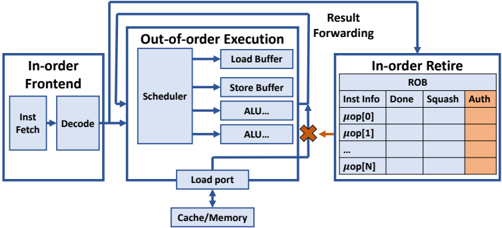
The image is a flowchart that illustrates the architecture of a computer processor. It shows the different components and their interactions in the execution of instructions.
### Components/Axes
- **In-order Frontend**: This section includes the "Inst Fetch" and "Decode" processes.
- **Out-of-order Execution**: This section includes the "Load Buffer," "Store Buffer," and "ALU..." processes.
- **Scheduler**: This component is responsible for managing the execution of instructions.
- **Load port**: This is where data is loaded into the processor.
- **Cache/Memory**: This is where data is stored for quick access.
- **In-order Retire**: This section includes the "ROB" (Register-Read-Back) and "Inst Info" processes.
### Detailed Analysis or ### Content Details
- The "Inst Fetch" process retrieves instructions from memory.
- The "Decode" process decodes the instructions into a format that the processor can understand.
- The "Load Buffer" and "Store Buffer" are used to hold data temporarily while it is being processed.
- The "ALU..." processes perform arithmetic and logical operations.
- The "Scheduler" manages the execution of instructions in the correct order.
- The "Load port" is used to load data into the processor.
- The "Cache/Memory" is used to store data for quick access.
- The "ROB" (Register-Read-Back) processes ensure that instructions are executed in the correct order.
- The "Inst Info" processes provide information about the instructions being executed.
### Key Observations
- The flowchart shows that instructions can be executed out of order, which can improve performance.
- The "Load Buffer" and "Store Buffer" are used to hold data temporarily while it is being processed.
- The "ALU..." processes perform arithmetic and logical operations.
- The "Scheduler" manages the execution of instructions in the correct order.
- The "Load port" is used to load data into the processor.
- The "Cache/Memory" is used to store data for quick access.
- The "ROB" (Register-Read-Back) processes ensure that instructions are executed in the correct order.
- The "Inst Info" processes provide information about the instructions being executed.
### Interpretation
The flowchart illustrates the architecture of a computer processor and how it executes instructions. It shows that instructions can be executed out of order, which can improve performance. The "Load Buffer" and "Store Buffer" are used to hold data temporarily while it is being processed. The "ALU..." processes perform arithmetic and logical operations. The "Scheduler" manages the execution of instructions in the correct order. The "Load port" is used to load data into the processor. The "Cache/Memory" is used to store data for quick access. The "ROB" (Register-Read-Back) processes ensure that instructions are executed in the correct order. The "Inst Info" processes provide information about the instructions being executed.