## Screenshot: Simulation Environment Interface
### Overview
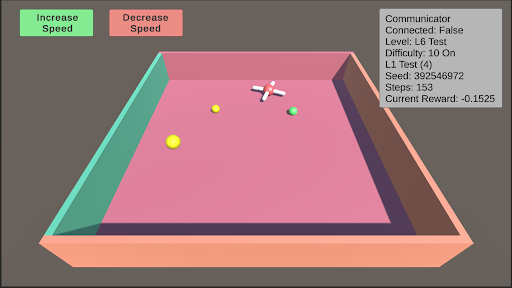
The image is a screenshot of a 3D simulation environment, likely for testing an AI agent or robotic navigation. It features an isometric view of a bounded platform with various objects and a heads-up display (HUD) containing control buttons and status information.
### Components/Axes
**1. Control Interface (Top-Left):**
* Two rectangular buttons with rounded corners.
* **Left Button:** Green background, black text: "Increase Speed".
* **Right Button:** Red background, black text: "Decrease Speed".
**2. Status HUD (Top-Right):**
A semi-transparent grey text box containing the following labeled data fields:
* **Communicator**
* **Connected:** False
* **Level:** L6 Test
* **Difficulty:** 10 On
* **L2:** 100
* **Seed:** 392546972
* **Steps:** 153
* **Current Reward:** -0.1525
**3. Simulation Environment (Main View):**
* **Platform:** A large, flat, pink rectangular surface.
* **Walls:** The platform is bounded by walls of different colors.
* **Left Wall:** Teal/greenish-blue.
* **Right Wall:** Brown.
* **Front Wall:** Peach/light orange.
* **Objects on Platform:**
* **Three Yellow Spheres:** One large sphere in the front-left quadrant, one medium sphere in the center-left, and one small sphere in the center-right.
* **One White Cross:** A white, cross-shaped object (resembling a plus sign or a drone marker) located in the center-right area, slightly behind the small yellow sphere.
* **One Green Sphere:** A small green sphere located to the right of the white cross.
### Detailed Analysis
* **Spatial Layout:** The HUD elements are anchored to the top corners of the screen. The simulation view occupies the entire frame below them. The objects on the platform are scattered without a clear geometric pattern.
* **Data Values:** The status HUD provides precise numerical and categorical data about the simulation state. The "Current Reward" value is negative, indicating a penalty state. The "Seed" value suggests the simulation is procedurally generated and reproducible.
* **Visual Style:** The graphics are simple, using flat shading and basic geometric primitives (spheres, cross, rectangular prism for the platform). This is typical of a development or testing environment focused on function over visual fidelity.
### Key Observations
1. **Disconnected State:** The "Connected: False" status is a critical piece of information, suggesting the simulation or agent is not currently linked to a controlling system or communicator.
2. **Negative Reward:** The agent or system is currently in a state of negative reward (-0.1525), which in reinforcement learning contexts typically means it is performing a sub-optimal or penalized action.
3. **Object Hierarchy:** There is a clear size hierarchy among the yellow spheres (large > medium > small), which may correspond to different target values, distances, or object types within the simulation's logic.
4. **Isolated Green Object:** The single green sphere is spatially separated from the cluster of yellow spheres and the cross, potentially marking it as a different class of object (e.g., a goal, an obstacle, or a different type of target).
### Interpretation
This image captures a snapshot of a reinforcement learning or AI agent testing scenario. The environment is a simple, bounded arena ("L6 Test") with a high difficulty setting ("10 On"). The agent's task likely involves navigating to or interacting with the objects on the platform.
The **negative reward** and **disconnected communicator** are the most significant data points. They suggest the current test episode is not going well—the agent may be failing to reach targets, colliding with walls, or otherwise violating the task's success criteria. The disconnected state could be the cause of this poor performance (the agent is acting autonomously with a flawed policy) or a result of it (the system halted the connection due to failure).
The variety of objects (different-sized yellow spheres, a green sphere, a cross) implies a multi-objective or complex task. The agent might need to prioritize targets, avoid certain objects, or reach a specific sequence. The "Seed" value allows developers to recreate this exact scenario for debugging. Overall, the screenshot documents a moment of sub-optimal performance within a controlled, reproducible AI experiment.