## Screenshot: Simulation Interface
### Overview
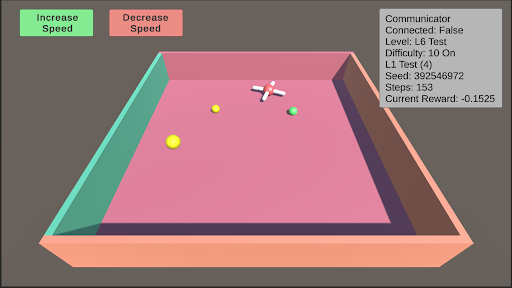
The image depicts a 3D simulation environment interface with interactive controls and real-time status metrics. The scene includes a cubic arena with colored walls, floating objects, and a crosshair cursor. Textual elements provide system status, configuration parameters, and performance metrics.
### Components/Axes
1. **Header Section (Top)**
- **Buttons**:
- Green button labeled "Increase Speed"
- Red button labeled "Decrease Speed"
- **Status Panel (Top-Right)**:
- Textual metadata in black font on gray background:
- `Communicator Connected: False`
- `Level: L6 Test`
- `Difficulty: 10 On`
- `L1 Test (4)`
- `Seed: 392546972`
- `Steps: 153`
- `Current Reward: -0.1525`
2. **Main Simulation Arena (Center)**
- **3D Box**:
- Floor: Pink
- Left Wall: Teal
- Back Wall: Green
- Right Wall: Orange
- **Objects**:
- Red crosshair (centered, likely the active agent)
- Yellow sphere (left-center)
- Green sphere (right-center)
- Smaller yellow sphere (near back wall)
3. **Legend/Color Coding**
- No explicit legend present, but color associations are inferred:
- Red: Crosshair (agent)
- Yellow: Primary target/object
- Green: Secondary object
- Button colors: Green (increase), Red (decrease)
### Detailed Analysis
- **UI Layout**:
- Buttons positioned in top-left corner for speed control.
- Status panel occupies top-right quadrant with critical system data.
- 3D arena dominates the central workspace with distinct wall colors for spatial orientation.
- **Object Dynamics**:
- Crosshair (agent) positioned centrally, suggesting active control.
- Spheres distributed asymmetrically, possibly representing environmental elements or goals.
- No visible motion trails or velocity indicators, implying static or paused simulation state.
- **Textual Metadata**:
- `Seed: 392546972` ensures reproducibility of the simulation.
- `Steps: 153` indicates the simulation has progressed through 153 discrete time steps.
- `Current Reward: -0.1525` suggests a negative feedback signal, potentially indicating suboptimal agent performance.
### Key Observations
1. **Negative Reward**: The agent's current reward is negative, implying it may be failing to meet objectives or incurring penalties.
2. **Unconnected Communicator**: The system is operating in a disconnected state, possibly during local testing or offline mode.
3. **Difficulty Setting**: "Difficulty: 10 On" suggests a high challenge level, which may correlate with the negative reward.
4. **Object Distribution**: The placement of spheres (yellow, green, smaller yellow) could represent varying reward structures or obstacles.
### Interpretation
This interface appears to be a reinforcement learning (RL) environment where an agent (crosshair) interacts with objects to maximize reward. The negative reward (-0.1525) indicates the agent is underperforming relative to the difficulty level (10). The lack of communicator connection suggests this is a local test rather than a networked deployment. The seed value allows for reproducibility, while the step count (153) provides context for the simulation's progression. The color-coded walls and objects likely serve to aid spatial navigation for the agent, with yellow/green spheres potentially representing targets or hazards. The difficulty setting of 10 may introduce environmental complexity (e.g., dynamic obstacles, delayed rewards) that the agent must navigate to achieve positive outcomes.