## Screenshot: ImandraX Automated Reasoning Engine
### Overview
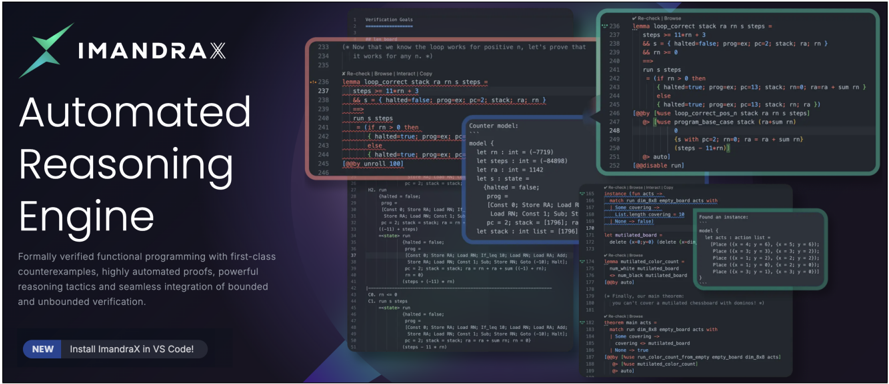
The image is a promotional screenshot for ImandraX, an "Automated Reasoning Engine". It showcases the software's capabilities through code snippets and interface elements. The screenshot highlights features like formal verification, counterexample generation, automated proofs, and integration with VS Code.
### Components/Axes
The image is divided into several regions:
1. **Header (Left):** Contains the ImandraX logo and the title "Automated Reasoning Engine". It also includes a brief description of the software's capabilities and a call to action to install ImandraX in VS Code.
2. **Code Snippets (Center & Right):** Displays various code snippets, likely demonstrating the ImandraX's functionality. These snippets are annotated with callouts and highlights.
3. **Interface Elements (Overlaid):** Shows pop-up windows and interface elements, providing a glimpse into the user experience.
### Detailed Analysis or ### Content Details
**1. Header (Left):**
* **Logo:** The ImandraX logo is present at the top-left.
* **Title:** "Automated Reasoning Engine" is prominently displayed.
* **Description:** "Formally verified functional programming with first-class counterexamples, highly automated proofs, powerful reasoning tactics and seamless integration of bounded and unbounded verification."
* **Call to Action:** "NEW Install ImandraX in VS Code!"
**2. Code Snippets (Center):**
* **Verification Goals:** The code snippet starts with a comment indicating "Verification Goals".
* **Loop Correctness:** A section of code focuses on verifying the correctness of a loop.
* Line 233: `(* Now that we know the loop works for positive n, let's prove that it works for any n. *)`
* Line 236: `@Re-check | Browse | Interact | Copy`
* Line 237: `lemma loop_correct stack ra rn s steps =`
* Line 238: `steps == 11*rn + 3`
* Line 239: `&& s == {halted=false; prog_ex: pc=2; stack; ra; rn}`
* Line 240: `&& rn >= 0`
* Line 241: `run s steps`
* Line 242: `(if rn > 0 then`
* Line 243: `{halted=true; prog_ex: pc`
* Line 244: `else`
* Line 245: `{halted=true; prog_ex: pc`
* Line 246: `(by unroll 100)`
* **Counter Model:** A section defines a counter model.
* Line 248: `Counter model:`
* Line 249: `model {`
* Line 250: `let rn : int = (-7719)`
* Line 251: `let steps : int = (-84898)`
* Line 252: `let ra : int = 1142`
* Line 253: `let s : state =`
* Line 254: `(halted = false;`
* Line 255: `prog =`
* Line 256: `[Const 0; Store RA; Load RN;`
* Line 257: `Load RN; Const 1; Sub; St`
* Line 258: `pc = 2; stack = [1796]; ra`
* Line 259: `let stack : int list = [1796]`
**3. Code Snippets (Right):**
* **More Code:**
* Line 236: `@Re-check`
* Line 237: `lemma loop_correct stack ra rn s steps`
* Line 238: `steps == 11*rn + 3`
* Line 239: `&& s == {halted=false; prog_ex: pc=2; stack; ra; rn}`
* Line 241: `run s steps`
* Line 242: `(if rn > 0 then`
* Line 243: `{halted=true; prog_ex: pc=13; stack; rn@; ra@ra = sum rn}`
* Line 244: `else`
* Line 245: `{halted=true; prog_ex: pc=13; stack; rn; ra}`
* Line 246: `(by Nuse loop_correct_pos_n stack ra rn s steps)`
* Line 247: `Nuse program_base_case stack (ra=sum rn)`
* Line 248: `{s with pc=2; rn=0; ra = ra + sum rn}`
* Line 249: `(steps = -11+rn)}`
* Line 251: `@auto`
* Line 252: `@disable run`
**4. Interface Elements (Overlaid):**
* **Instance Search:** A pop-up window shows search results for instances.
* `Re-check | Browse | Interact | Copy`
* `match run dim_8x8 empty_board acts with`
* `Some covering ->`
* `List. length covering = 18`
* `None = false`
* **Mutilated Board:** A section related to a "mutilated board".
* `let mutilated_board =`
* `delete (x-y: x-y-0) (delete`
* **Theorem Main Acts:**
* `Re-check | Browse | Interact | Copy`
* `match run dim_8x8 empty_board acts with`
* `Some covering ->`
* `covering -> mutilated_board`
* `None -> true`
* `(by Nuse run_color_count_from_empty_empty_board acts)`
* **Found an Instance:** Another pop-up window shows a found instance.
* `Found an instance:`
* `model {`
* `let acts : action list =`
* `Place ((x = 4; y = 0), (x = 5; y = 6));`
* `Place ((x = 3; y = 3), (x = 3; y = 2));`
* `Place ((x = 1; y = 2), (x = 2; y = 2));`
* `Place ((x = 1; y = 0), (x = 2; y = 1));`
* `Place ((x = 3; y = 1), (x = 3; y = 0));`
* `}`
### Key Observations
* The code snippets use a functional programming style.
* The interface elements suggest a user-friendly environment for interacting with the reasoning engine.
* The examples focus on loop verification, counter model generation, and board-related problems.
### Interpretation
The screenshot aims to convey the power and ease of use of the ImandraX Automated Reasoning Engine. It highlights the software's ability to formally verify code, generate counterexamples, and automate proofs. The code snippets and interface elements demonstrate the practical application of these features. The focus on specific examples, such as loop verification and board-related problems, suggests the software's versatility. The call to action encourages users to try ImandraX in VS Code, indicating a seamless integration with a popular development environment. Overall, the screenshot presents ImandraX as a valuable tool for developers seeking to improve the reliability and correctness of their code.