## Screenshot Analysis: Task Execution Workflow with Annotations
### Overview
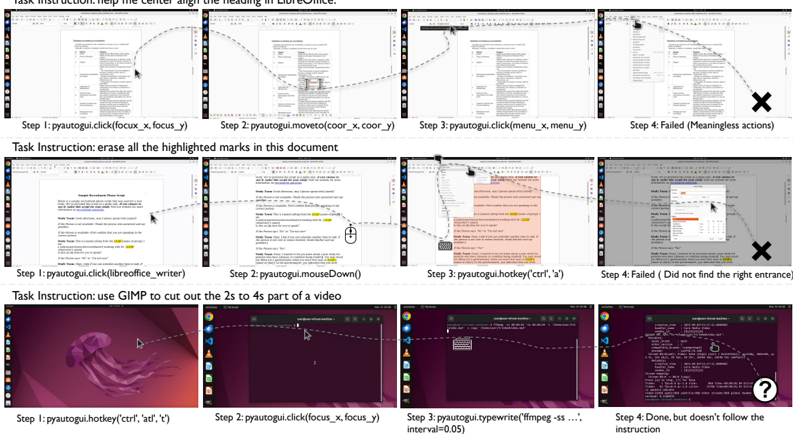
The image displays three distinct task execution workflows, each demonstrating a sequence of user actions (steps 1-4) with annotations indicating success/failure. Each workflow includes:
1. Task instructions
2. Step-by-step action descriptions
3. Visual annotations (arrows, X marks, question marks)
4. UI elements (menus, dialogs, text editors)
### Components/Axes
**Task Structure:**
- **Task Instructions**: Positioned at the top of each workflow
- **Steps**: Numbered 1-4 with action descriptions
- **Annotations**:
- ✗ (X mark): Indicates failed steps
- ❓ (Question mark): Indicates uncertainty
- Arrows: Show cursor movement/selection paths
**UI Elements:**
- Text editors (LibreOffice Writer, GIMP)
- Menu dialogs (File > Save As, Edit > Cut)
- System tray icons (Windows taskbar visible)
### Detailed Analysis
**Workflow 1: LibreOffice Heading Alignment**
1. **Instruction**: "help the center align the heading in LibreOffice"
2. **Step 1**: `pyautogui.click(focus_x, focus_y)` - Successful selection
3. **Step 2**: `pyautogui.moveTo(coor_x, coor_y)` - Cursor movement
4. **Step 3**: `pyautogui.click(menu_x, menu_y)` - Menu interaction
5. **Step 4**: ✗ "Failed (Meaningless actions)" - Incorrect menu selection
**Workflow 2: Document Highlight Erasure**
1. **Instruction**: "erase all the highlighted marks in this document"
2. **Step 1**: `pyautogui.click(libreoffice_writer)` - Document selection
3. **Step 2**: `pyautogui.mouseDown()` - Highlight initiation
4. **Step 3**: `pyautogui.hotkey('ctrl', 'x')` - Cut operation
5. **Step 4**: ✗ "Failed (Did not find right entrance)" - Incomplete selection
**Workflow 3: Video Editing with GIMP**
1. **Instruction**: "use GIMP to cut out the 2s to 4s part of a video"
2. **Step 1**: `pyautogui.hotkey('ctrl', 'alt', 't')` - Terminal activation
3. **Step 2**: `pyautogui.click(focus_x, focus_y)` - File selection
4. **Step 3**: `pyautogui.typewrite('ffmpeg -ss ... interval=0.05')` - Command input
5. **Step 4**: ❓ "Done, but doesn't follow the instruction" - Partial success
### Key Observations
1. **Failure Patterns**:
- Menu navigation errors (Workflow 1)
- Selection boundary issues (Workflow 2)
- Command syntax ambiguity (Workflow 3)
2. **Annotation Placement**:
- X marks consistently in top-right quadrant of failed steps
- Question mark in bottom-right of partial success
- Arrows show cursor movement trajectories
3. **UI State**:
- Workflow 2 shows document grayed-out after failed step
- Workflow 3 displays terminal command history
### Interpretation
The workflows demonstrate challenges in:
1. **Automated UI Interaction**:
- Pixel-based coordinates (`focus_x`, `focus_y`) may lack precision
- Menu navigation requires exact positional awareness
2. **Command-Line Ambiguity**:
- FFmpeg command lacks complete syntax (`-i input.mp4 -to 4 -ss 2 ...`)
- Interval parameter (`0.05`) suggests frame rate considerations
3. **Human-Machine Interface Gaps**:
- Visual cues (annotations) reveal where automated actions diverge from expected paths
- Success criteria appear context-dependent rather than rule-based
The data suggests that while basic UI automation is achievable, complex tasks require:
- Context-aware selection algorithms
- Natural language processing for command generation
- Error recovery mechanisms for partial successes