# Technical Document Extraction: GUI Automation Task Analysis
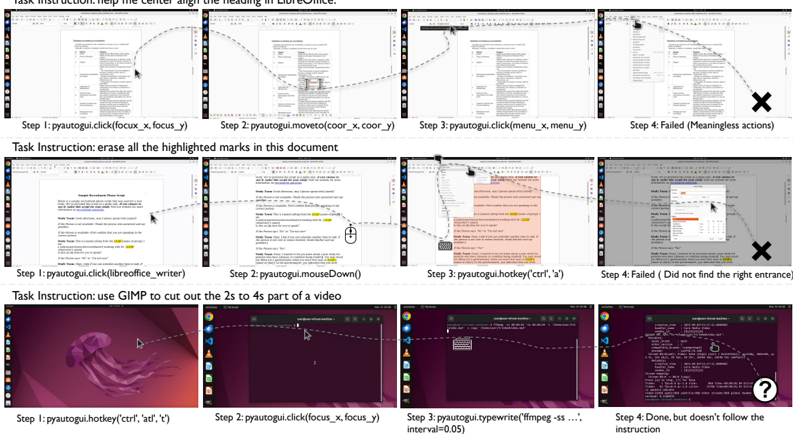
This document provides a detailed technical extraction of an image depicting three distinct task execution sequences for a GUI automation agent. Each sequence consists of four steps, illustrating the agent's interaction with a Linux-based desktop environment (Ubuntu).
---
## Task Sequence 1: LibreOffice Alignment
**Task Instruction:** help the center align the heading in LibreOffice.
### Component Isolation
* **Environment:** LibreOffice Writer on Ubuntu.
* **Visual Flow:** A dashed line tracks the cursor movement across four screenshots.
### Step-by-Step Analysis
1. **Step 1:** `pyautogui.click(focus_x, focus_y)`
* **Action:** The cursor clicks on the right margin of a document titled "Questions to consider in a contribution".
2. **Step 2:** `pyautogui.moveto(coor_x, coor_y)`
* **Action:** The cursor moves to the center of a table within the document.
3. **Step 3:** `pyautogui.click(menu_x, menu_y)`
* **Action:** The cursor moves to the top-left menu bar (near "File" or "Edit").
4. **Step 4:** **Failed (Meaningless actions)**
* **Status:** Marked with a large black **X**.
* **Observation:** The cursor is hovering over a dropdown menu that is irrelevant to text alignment, and the task of center-aligning the heading was not completed.
---
## Task Sequence 2: Document Editing (Highlight Removal)
**Task Instruction:** erase all the highlighted marks in this document
### Component Isolation
* **Environment:** LibreOffice Writer.
* **Visual Flow:** Dashed line tracks cursor and keyboard interactions.
### Step-by-Step Analysis
1. **Step 1:** `pyautogui.click(libreoffice_writer)`
* **Action:** Focuses the application window. The document "Sample Recruitment Phone Script" is visible with yellow highlights.
2. **Step 2:** `pyautogui.mouseDown()`
* **Action:** A mouse icon indicates a click-and-drag attempt within the text body.
3. **Step 3:** `pyautogui.hotkey('ctrl', 'a')`
* **Action:** A keyboard icon indicates the "Select All" command. A context menu is also visible.
4. **Step 4:** **Failed (Did not find the right entrance)**
* **Status:** Marked with a large black **X**.
* **Observation:** A "Character" formatting dialog box is open, but the cursor is moving away toward the right. The highlights remain in the document.
---
## Task Sequence 3: Video Editing via Terminal
**Task Instruction:** use GIMP to cut out the 2s to 4s part of a video
### Component Isolation
* **Environment:** Ubuntu Desktop, transitioning to GNOME Terminal.
* **Visual Flow:** Dashed line tracks the transition from desktop to command line.
### Step-by-Step Analysis
1. **Step 1:** `pyautogui.hotkey('ctrl', 'alt', 't')`
* **Action:** Opens the terminal from the desktop (Jellyfish wallpaper).
2. **Step 2:** `pyautogui.click(focus_x, focus_y)`
* **Action:** Clicks inside the newly opened terminal window to ensure focus.
3. **Step 3:** `pyautogui.typewrite('ffmpeg -ss ...', interval=0.05)`
* **Action:** A keyboard icon indicates typing a command. Note: The agent is using `ffmpeg` despite the instruction specifying `GIMP`.
4. **Step 4:** **Done, but doesn't follow the instruction**
* **Status:** Marked with a white **?** inside a black circle.
* **Observation:** The terminal shows the output of an `ffmpeg` command. While a video clip may have been created, the agent failed to use the requested software (GIMP).
---
## Summary of Extracted Data
| Task | Target Software | Intended Action | Result | Failure Reason |
| :--- | :--- | :--- | :--- | :--- |
| 1 | LibreOffice | Center align heading | **Fail** | Meaningless/Irrelevant actions |
| 2 | LibreOffice | Erase highlights | **Fail** | Could not find correct menu/setting |
| 3 | GIMP | Cut video (2s-4s) | **Partial/Incorrect** | Used `ffmpeg` instead of `GIMP` |
### Technical Labels & Markers
* **Input Method Library:** `pyautogui` (Python-based GUI automation).
* **Operating System:** Linux (Ubuntu distribution).
* **Visual Indicators:**
* Dashed lines = Cursor path.
* Mouse/Keyboard icons = Input events.
* **X** = Critical failure.
* **?** = Logic/Instructional failure.