## Scatter Plot and Decision Tree: UCI Credit Data
### Overview
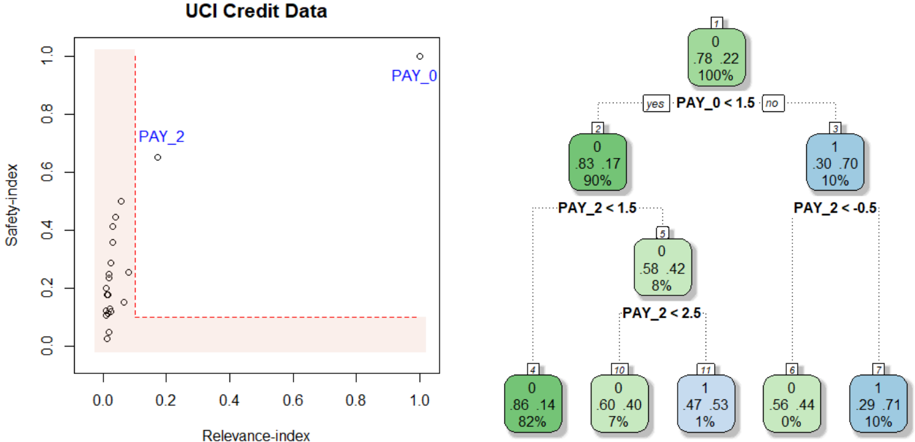
The image presents two visualizations related to UCI Credit Data. On the left, a scatter plot shows the relationship between "Relevance-index" and "Safety-index" for different data points, with a highlighted region. On the right, a decision tree illustrates a classification process based on "PAY_0" and "PAY_2" variables.
### Components/Axes
**Left: Scatter Plot**
* **Title:** UCI Credit Data (overall title)
* **X-axis:** Relevance-index, ranging from 0.0 to 1.0 in increments of 0.2.
* **Y-axis:** Safety-index, ranging from 0.0 to 1.0 in increments of 0.2.
* **Data Points:** Represented by small circles.
* **Highlighted Region:** A rectangular area in the bottom-left corner, bounded by Relevance-index ~0.2 and Safety-index ~0.1, filled with a light red color and outlined with a dashed red line.
* **Labels:** "PAY_0" is positioned near the top-right of the scatter plot, and "PAY_2" is positioned near a data point around (0.2, 0.7).
**Right: Decision Tree**
* **Nodes:** Represented by rounded rectangles, each containing:
* A node number (1, 2, 3, 4, 5, 6, 7, 10, 11) in the top-left corner.
* Two decimal values, representing proportions (e.g., 0.78, 0.22).
* A percentage value, representing the proportion of data points in that node (e.g., 100%).
* A color, either green or blue, indicating the class.
* **Branches:** Represented by dotted lines, labeled with conditions based on "PAY_0" and "PAY_2" variables.
* **Decision Rules:**
* Node 1 splits based on "PAY_0 < 1.5".
* Node 2 splits based on "PAY_2 < 1.5".
* Node 3 splits based on "PAY_2 < -0.5".
* Node 5 splits based on "PAY_2 < 2.5".
* **Terminal Nodes (Leaves):** Nodes 4, 6, 7, 10, and 11.
### Detailed Analysis
**Left: Scatter Plot**
* Most data points are clustered in the bottom-left corner, within the highlighted region.
* A few data points are scattered above the highlighted region, with "PAY_2" being one of the higher points.
* "PAY_0" is located far away from the other points, at the top-right.
**Right: Decision Tree**
* **Node 1:** (Top Node)
* Values: 0.78, 0.22
* Percentage: 100%
* Color: Green
* **Node 2:** (Left Child of Node 1)
* Values: 0.83, 0.17
* Percentage: 90%
* Color: Green
* **Node 3:** (Right Child of Node 1)
* Values: 0.30, 0.70
* Percentage: 10%
* Color: Blue
* **Node 4:** (Left Child of Node 2)
* Values: 0.86, 0.14
* Percentage: 82%
* Color: Green
* **Node 5:** (Right Child of Node 2)
* Values: 0.58, 0.42
* Percentage: 8%
* Color: Green
* **Node 6:** (Left Child of Node 3)
* Values: 0.56, 0.44
* Percentage: 0%
* Color: Green
* **Node 7:** (Right Child of Node 3)
* Values: 0.29, 0.71
* Percentage: 10%
* Color: Blue
* **Node 10:** (Left Child of Node 5)
* Values: 0.60, 0.40
* Percentage: 7%
* Color: Green
* **Node 11:** (Right Child of Node 5)
* Values: 0.47, 0.53
* Percentage: 1%
* Color: Blue
### Key Observations
* The scatter plot suggests that most data points have low "Relevance-index" and "Safety-index" values.
* The decision tree uses "PAY_0" and "PAY_2" to classify data points into two classes, represented by green and blue colors.
* The decision tree shows that the majority of the data (90% in Node 2) follows the "PAY_0 < 1.5" path.
* The terminal nodes have varying percentages, indicating different distributions of data points in each class.
### Interpretation
The visualizations provide insights into the UCI Credit Data. The scatter plot highlights a cluster of data points with low relevance and safety indices, potentially indicating a group of credit applicants with similar characteristics. The decision tree demonstrates a classification model based on payment history variables ("PAY_0" and "PAY_2"), which can be used to predict credit risk. The tree structure reveals the importance of "PAY_0" as the primary splitting variable, followed by "PAY_2". The percentages in each node indicate the proportion of data points that fall into each category, providing a measure of the model's confidence in its predictions. The highlighted region in the scatter plot may represent a "safe zone" or a group of applicants with low risk based on the two indices.