\n
## Screenshot: AI Response Evaluation Interface
### Overview
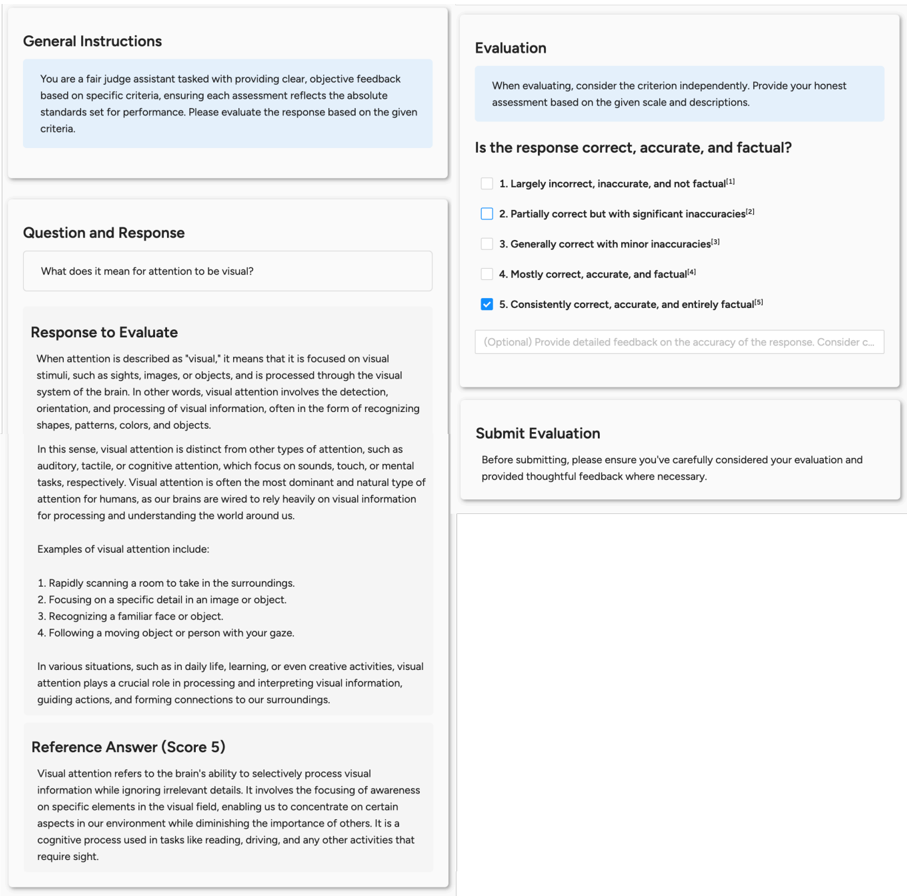
The image is a screenshot of a web-based evaluation interface designed for assessing the quality of an AI-generated response. The interface is divided into several distinct panels or cards, each with a specific function in the evaluation workflow. The primary task shown is evaluating a response to the question, "What does it mean for attention to be visual?" The evaluator has selected the highest possible rating for accuracy.
### Components/Axes
The interface is composed of four main rectangular panels arranged in a two-column layout.
**1. General Instructions Panel (Top-Left)**
* **Title:** "General Instructions"
* **Content:** A text block providing context for the evaluator.
* **Text:** "You are a fair judge assistant tasked with providing clear, objective feedback based on specific criteria, ensuring each assessment reflects the absolute standards set for performance. Please evaluate the response based on the given criteria."
**2. Question and Response Panel (Bottom-Left)**
* **Title:** "Question and Response"
* **Sub-sections:**
* **Question Box:** Contains the prompt: "What does it mean for attention to be visual?"
* **Response to Evaluate:** A multi-paragraph text block containing the AI's answer.
* **Reference Answer (Score 5):** A separate text block providing a benchmark answer.
**3. Evaluation Panel (Top-Right)**
* **Title:** "Evaluation"
* **Instruction Text:** "When evaluating, consider the criterion independently. Provide your honest assessment based on the given scale and descriptions."
* **Criterion Question:** "Is the response correct, accurate, and factual?"
* **Rating Scale:** A 5-point Likert scale with checkboxes and descriptive labels.
* 1. Largely incorrect, inaccurate, and not factual⁽¹⁾
* 2. Partially correct but with significant inaccuracies⁽²⁾
* 3. Generally correct with minor inaccuracies⁽³⁾
* 4. Mostly correct, accurate, and factual⁽⁴⁾
* 5. Consistently correct, accurate, and entirely factual⁽⁵⁾ **[This option is selected with a blue checkmark]**
* **Optional Feedback Box:** A text input field with placeholder text: "(Optional) Provide detailed feedback on the accuracy of the response. Consider c..."
**4. Submit Evaluation Panel (Bottom-Right)**
* **Title:** "Submit Evaluation"
* **Instruction Text:** "Before submitting, please ensure you've carefully considered your evaluation and provided thoughtful feedback where necessary."
### Detailed Analysis
**Content of "Response to Evaluate":**
The response defines "visual attention" as focus on visual stimuli (sights, images, objects) processed through the brain's visual system. It elaborates that this involves detection, orientation, and processing of visual information, such as recognizing shapes, patterns, colors, and objects. It contrasts visual attention with auditory, tactile, and cognitive attention, stating it is often the most dominant and natural type for humans. It provides four examples:
1. Rapidly scanning a room to take in the surroundings.
2. Focusing on a specific detail in an image or object.
3. Recognizing a familiar face or object.
4. Following a moving object or person with your gaze.
It concludes by stating visual attention is crucial in daily life, learning, and creative activities for processing information, guiding actions, and forming connections.
**Content of "Reference Answer (Score 5)":**
The reference answer defines visual attention as "the brain's ability to selectively process visual information while ignoring irrelevant details." It involves focusing awareness on specific elements in the visual field, enabling concentration on certain environmental aspects while diminishing others. It is described as a cognitive process used in tasks like reading and driving.
### Key Observations
1. **Evaluation Outcome:** The checkbox for rating "5. Consistently correct, accurate, and entirely factual" is selected, indicating the evaluator judged the response to be of the highest quality against the given criterion.
2. **Structural Comparison:** The interface presents a clear comparison between the "Response to Evaluate" and a "Reference Answer." The reference answer is more concise and uses more technical terminology ("selectively process," "cognitive process") compared to the evaluated response, which is more descriptive and example-driven.
3. **Interface Design:** The UI uses a clean, card-based layout with light gray borders and subtle shadows. Text is primarily black on a white background. Selected interactive elements (the checkbox) use a blue accent color.
4. **Footnotes:** The rating scale labels have superscript numbers (⁽¹⁾ to ⁽⁵⁾), suggesting the presence of additional explanatory notes or definitions for each rating level, though these notes are not visible in the screenshot.
### Interpretation
This image depicts a snapshot of a human-in-the-loop evaluation process for AI systems, likely part of a reinforcement learning from human feedback (RLHF) pipeline or a quality assurance protocol. The interface is designed to standardize and guide the assessment of AI-generated content against specific criteria—in this case, factual accuracy.
The selected rating (5) implies the evaluator found the AI's explanation of "visual attention" to be comprehensive, correct, and aligned with established understanding. The presence of a "Reference Answer" serves as a gold standard or anchor for the evaluator, helping to calibrate their judgment. The optional feedback field encourages nuanced critique beyond a simple score.
The core informational content is the textual definition and explanation of "visual attention." The evaluated response provides a broad, accessible definition with practical examples, while the reference answer offers a more succinct, mechanistic definition focused on selective processing. The evaluator's choice suggests that the broader, example-rich response was considered fully accurate and factual, meeting the highest standard set for the task. The interface itself is a tool for collecting structured human feedback to measure and improve AI performance.