## File System Diagram: sample_simple_math_lib
### Overview
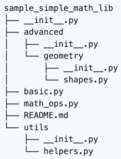
The image depicts a file system directory structure for a Python library named "sample_simple_math_lib". It shows the hierarchical arrangement of files and subdirectories within the library.
### Components/Axes
The diagram uses a tree-like structure to represent the file system. Each line represents a file or directory. Indentation indicates the level of nesting.
### Detailed Analysis
The root directory is "sample_simple_math_lib".
- Inside the root directory, there are several files and subdirectories:
- `__init__.py`
- `advanced` (subdirectory)
- Inside `advanced`:
- `__init__.py`
- `geometry` (subdirectory)
- Inside `geometry`:
- `__init__.py`
- `shapes.py`
- `basic.py`
- `math_ops.py`
- `README.md`
- `utils` (subdirectory)
- Inside `utils`:
- `__init__.py`
- `helpers.py`
### Key Observations
- The library is organized into modules such as "advanced", "basic", "math_ops", and "utils".
- The "advanced" module further contains a "geometry" submodule.
- Each module and submodule contains an `__init__.py` file, indicating that they are Python packages.
- A `README.md` file is present at the root level, likely containing documentation for the library.
### Interpretation
The diagram illustrates the structure of a simple Python math library. The use of `__init__.py` files indicates that the subdirectories are intended to be treated as Python packages, allowing for modular organization and import of functions and classes within the library. The presence of modules like "advanced", "basic", "math_ops", and "utils" suggests a categorization of mathematical functions based on their complexity or purpose. The `README.md` file is a standard practice for providing information about the library's usage and functionality.