## Image Grid with Rule Sets
### Overview
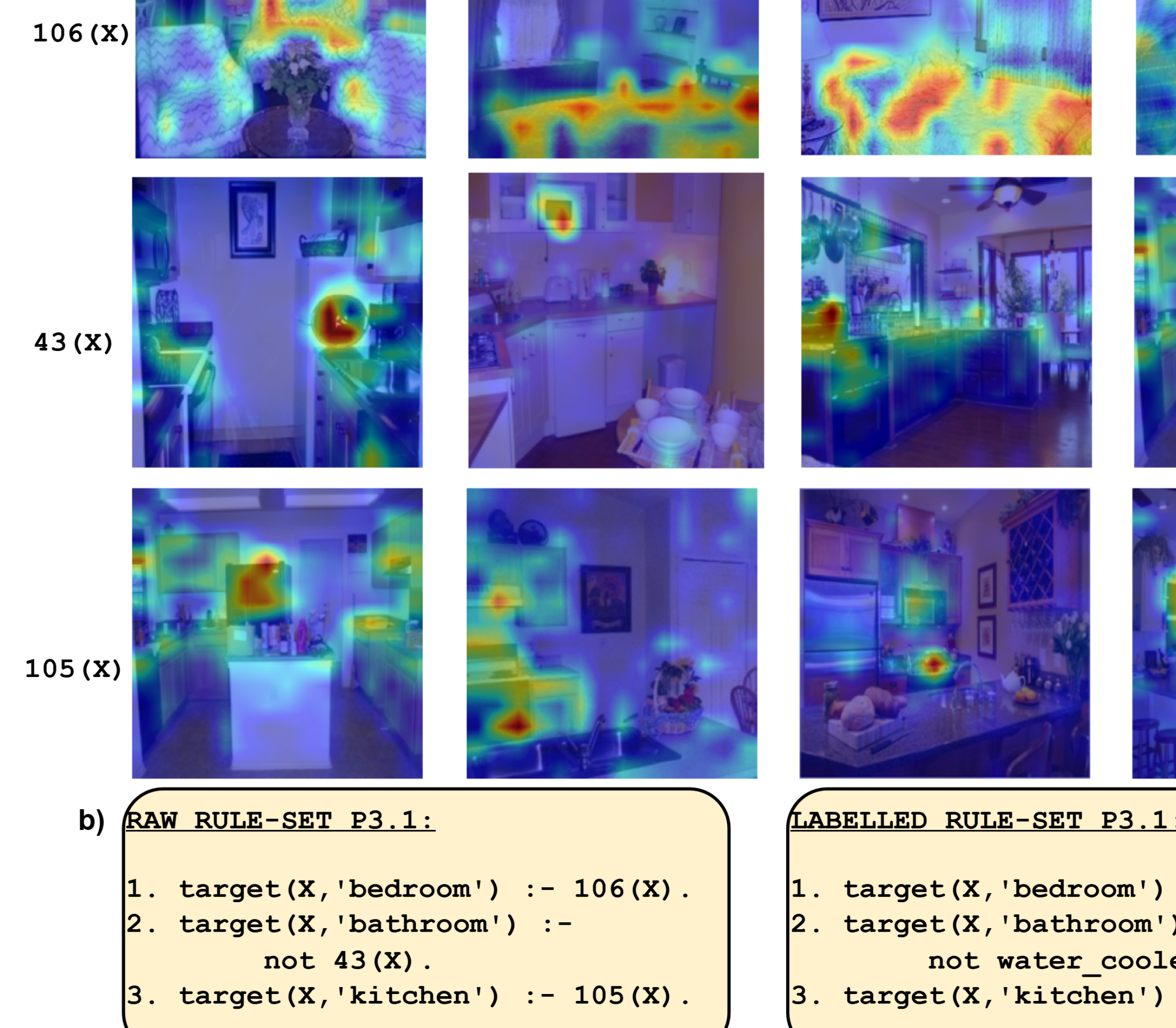
The image presents a 3x4 grid of images, each overlaid with a heatmap. The heatmaps highlight areas of interest within each image. To the left of the second and third rows are labels "43 (X)" and "105 (X)" respectively. Above the first row is the label "106 (X)". Below the grid are two blocks of text, labeled "RAW RULE-SET P3.1" and "LABELLED RULE-SET P3.1".
### Components/Axes
* **Image Grid:** A 3x4 grid of images, each with a heatmap overlay. The heatmaps use a color gradient, likely indicating the intensity or importance of different regions within the image.
* **Labels:** "106 (X)", "43 (X)", and "105 (X)" are placed to the left of the corresponding rows.
* **Rule Sets:** Two text blocks labeled "RAW RULE-SET P3.1" and "LABELLED RULE-SET P3.1" contain logical rules.
### Detailed Analysis or ### Content Details
**Image Grid:**
* **Row 1, Column 1:** Image of a living room with a vase of flowers on a table. The heatmap is concentrated on the flowers and the surrounding area.
* **Row 1, Column 2:** Image of a room with a bed. The heatmap is concentrated on the bed.
* **Row 1, Column 3:** Image of a living room with a couch. The heatmap is concentrated on the couch.
* **Row 1, Column 4:** Image of a room with a bed. The heatmap is concentrated on the bed.
* **Row 2, Column 1:** Image of a kitchen counter with a sink. The heatmap is concentrated on the sink area.
* **Row 2, Column 2:** Image of a kitchen with a table set for a meal. The heatmap is concentrated on the table.
* **Row 2, Column 3:** Image of a kitchen with hanging pots and pans. The heatmap is concentrated on the pots and pans.
* **Row 2, Column 4:** Image of a kitchen with a stove. The heatmap is concentrated on the stove.
* **Row 3, Column 1:** Image of a kitchen with cabinets. The heatmap is concentrated on the cabinets.
* **Row 3, Column 2:** Image of a kitchen sink. The heatmap is concentrated on the sink.
* **Row 3, Column 3:** Image of a kitchen island. The heatmap is concentrated on the island.
* **Row 3, Column 4:** Image of a kitchen with a refrigerator. The heatmap is concentrated on the refrigerator.
**Rule Sets:**
* **RAW RULE-SET P3.1:**
1. `target(X, 'bedroom') :- 106(X).`
2. `target(X, 'bathroom') :- not 43(X).`
3. `target(X, 'kitchen') :- 105(X).`
* **LABELLED RULE-SET P3.1:**
1. `target(X, 'bedroom') :- 106(X).`
2. `target(X, 'bathroom') :- not water_cooler.`
3. `target(X, 'kitchen') :- 105(X).`
### Key Observations
* The heatmaps highlight different areas of interest in each image, potentially indicating regions that are most relevant for identifying the scene category.
* The rule sets define logical rules for classifying scenes based on the presence or absence of certain features or identifiers.
* The "RAW" and "LABELLED" rule sets differ in the second rule, where "43(X)" is replaced by "water\_cooler".
### Interpretation
The image likely represents a system for scene recognition or classification. The heatmaps visualize the areas of the image that the system focuses on when making a classification. The rule sets provide a logical framework for classifying scenes based on these features. The difference between the "RAW" and "LABELLED" rule sets suggests an attempt to refine the classification rules by replacing a numerical identifier ("43(X)") with a more descriptive label ("water\_cooler"). This could improve the interpretability and generalizability of the rules. The numbers 106, 43, and 105 likely correspond to specific image features or categories that are used in the classification process.