## Audio Mixer Interface
### Overview
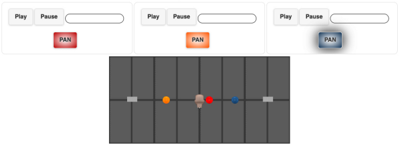
The image depicts a simplified audio mixer interface with three channels, each featuring Play/Pause buttons, a pan control, and a visual representation of the pan position. The pan position is shown using colored dots on a horizontal slider.
### Components/Axes
* **Channel Controls (Top Row):**
* Each channel has a "Play" button and a "Pause" button.
* Each channel has a horizontal slider.
* Each channel has a "PAN" button, colored differently for each channel (red, orange, blue).
* **Pan Position Slider (Bottom):**
* A horizontal slider divided into 7 segments.
* The slider has a handle in the center.
* Colored dots (red, orange, blue) indicate the pan position for each channel.
* The slider has a gray handle on the left and right ends.
### Detailed Analysis
* **Channel 1 (Left):**
* "Play" and "Pause" buttons are present.
* "PAN" button is red.
* Red dot on the pan position slider is slightly to the right of the center.
* **Channel 2 (Middle):**
* "Play" and "Pause" buttons are present.
* "PAN" button is orange.
* Orange dot on the pan position slider is slightly to the left of the center.
* **Channel 3 (Right):**
* "Play" and "Pause" buttons are present.
* "PAN" button is blue.
* Blue dot on the pan position slider is to the right of the center.
* **Pan Position Slider:**
* The slider is divided into 7 vertical segments.
* The slider handle is in the center.
* The red dot is positioned slightly to the right of the center segment.
* The orange dot is positioned slightly to the left of the center segment.
* The blue dot is positioned to the right of the center segment.
* The gray handles are at the extreme left and right ends of the slider.
### Key Observations
* Each channel has identical controls (Play, Pause, Pan).
* The pan positions for the three channels are different, with red slightly right, orange slightly left, and blue further right.
* The slider handle is centered, suggesting a neutral pan position.
### Interpretation
The image represents a basic audio mixer interface where the user can control the playback and pan position of three audio channels. The colored dots on the pan position slider provide a visual representation of the audio signal's placement in the stereo field. The different positions of the red, orange, and blue dots indicate that the audio signals from the three channels are panned to different locations in the stereo image. The centered slider handle likely represents the default or neutral pan position.