# Technical Document: Evolution of Retrieval-Augmented Generation (RAG) Architectures
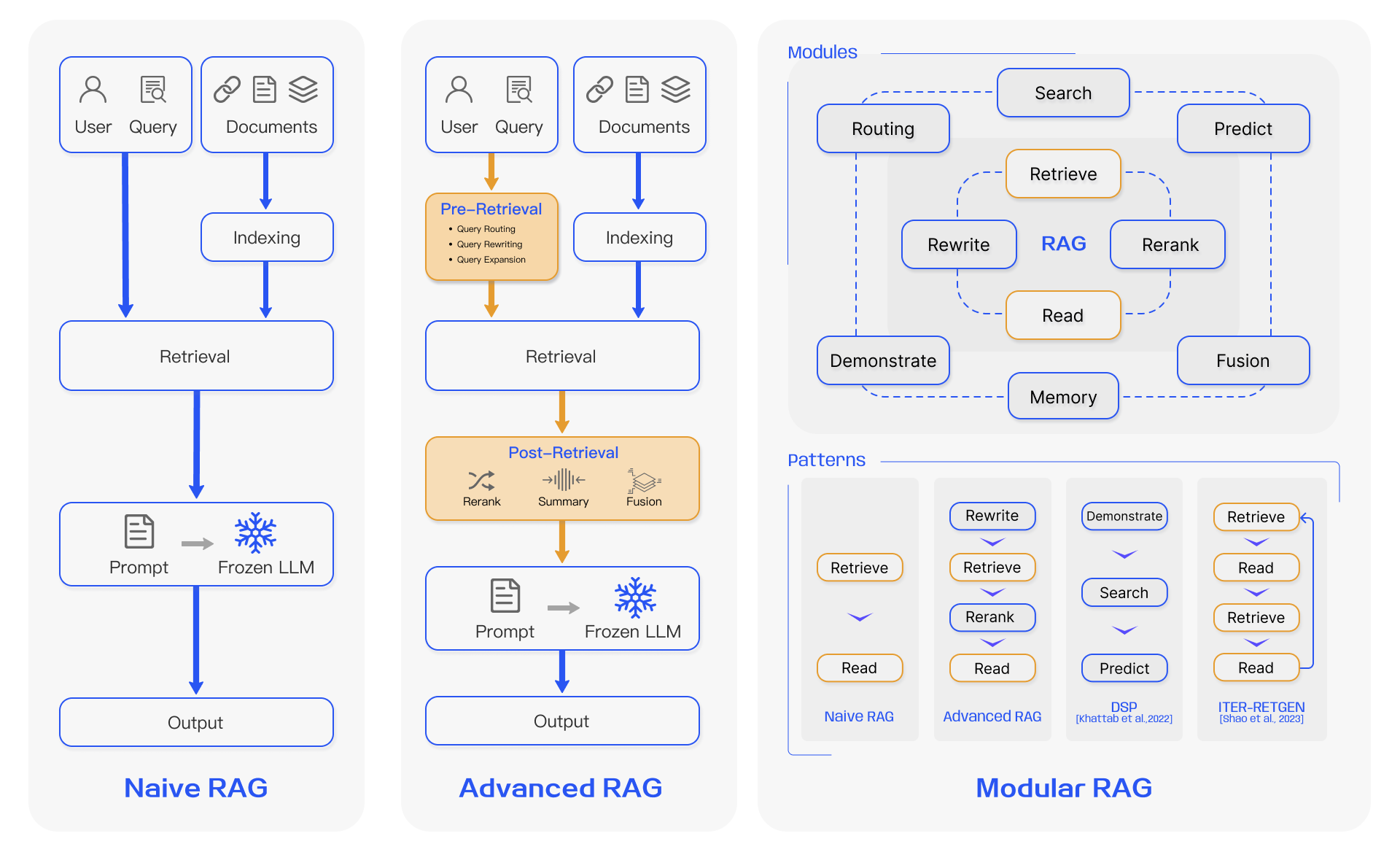
This document provides a comprehensive technical breakdown of the provided diagram, which illustrates the architectural evolution from Naive RAG to Advanced and Modular RAG systems.
---
## 1. Naive RAG Architecture
The first panel depicts the foundational RAG workflow, characterized by a linear, sequential process.
### Components and Flow:
* **Input Sources:**
* **User & Query:** Represented by icons of a person and a magnifying glass on a document.
* **Documents:** Represented by icons of a link, a document, and a stack of layers.
* **Data Preparation:**
* **Indexing:** Documents flow into an "Indexing" module.
* **Core Process:**
* The **Query** and the **Indexed Documents** both feed into the **Retrieval** module.
* The output of Retrieval flows into a **Prompt** (document icon).
* The Prompt is sent to a **Frozen LLM** (represented by a snowflake icon).
* **Final Output:**
* The LLM generates the final **Output**.
---
## 2. Advanced RAG Architecture
The second panel introduces optimization layers before and after the retrieval phase to improve accuracy and relevance.
### Components and Flow:
* **Input Sources:** Identical to Naive RAG (User/Query and Documents).
* **Pre-Retrieval Phase (Highlighted in Orange):**
* Located between the Query and Retrieval.
* **Functions listed:**
* Query Routing
* Query Rewriting
* Query Expansion
* **Data Preparation:** Documents undergo **Indexing** before Retrieval.
* **Retrieval Phase:** The optimized query and indexed data meet in the **Retrieval** module.
* **Post-Retrieval Phase (Highlighted in Orange):**
* Located between Retrieval and the Prompt.
* **Sub-modules:**
* **Rerank:** (Icon of crossing arrows) Re-ordering retrieved documents by relevance.
* **Summary:** (Icon of converging lines) Condensing retrieved information.
* **Fusion:** (Icon of stacked layers) Combining multiple search results.
* **Generation Phase:**
* The processed data enters the **Prompt** -> **Frozen LLM** pipeline.
* **Final Output:** The LLM generates the final **Output**.
---
## 3. Modular RAG Architecture
The third panel describes a non-linear, highly configurable framework consisting of discrete modules and specific implementation patterns.
### Section A: Modules
This section shows a decentralized network of capabilities surrounding a central **RAG** core.
* **Core:** **RAG**
* **Inner Ring (Orange/Light Blue):**
* **Retrieve** (Orange)
* **Read** (Orange)
* **Rewrite** (Light Blue)
* **Rerank** (Light Blue)
* **Outer Ring (Darker Blue):**
* **Search**
* **Predict**
* **Fusion**
* **Memory**
* **Demonstrate**
* **Routing**
### Section B: Patterns
This section illustrates how the modules are sequenced in specific industry-standard patterns.
| Pattern Name | Sequence of Operations | Reference Note |
| :--- | :--- | :--- |
| **Naive RAG** | Retrieve $\rightarrow$ Read | - |
| **Advanced RAG** | Rewrite $\rightarrow$ Retrieve $\rightarrow$ Rerank $\rightarrow$ Read | - |
| **DSP** | Demonstrate $\rightarrow$ Search $\rightarrow$ Predict | [Khattab et al., 2022] |
| **ITER-RETGEN** | Retrieve $\rightarrow$ Read $\rightarrow$ Retrieve $\rightarrow$ Read (Iterative Loop) | [Shao et al., 2023] |
---
## Summary of Visual Encoding
* **Blue Boxes/Lines:** Standard components and flow.
* **Orange Boxes:** Specialized optimization steps (Pre/Post-Retrieval or core RAG functions).
* **Snowflake Icon:** Indicates a "Frozen" Large Language Model (no weights are updated during the process).
* **Arrows:** Indicate the direction of data flow. In **ITER-RETGEN**, a return arrow from "Read" back to "Retrieve" indicates a recursive or iterative loop.