## Form: Observation and Indication Task
### Overview
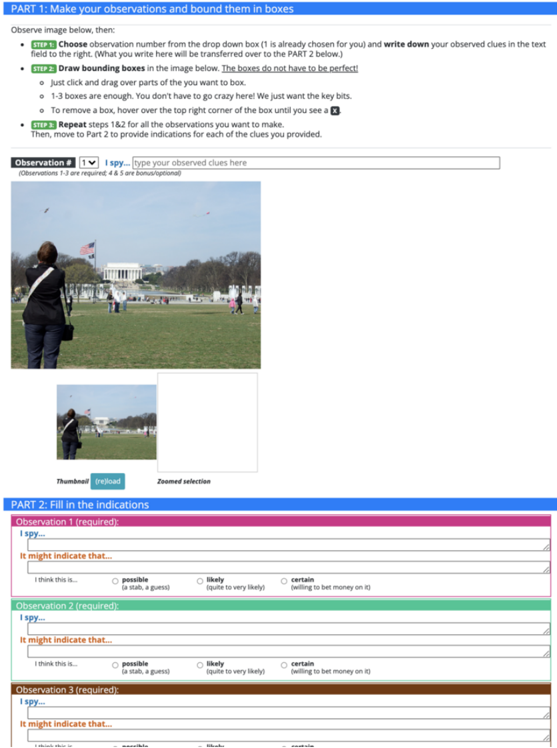
The image shows a form divided into two parts. Part 1 involves observing an image and marking specific elements within it. Part 2 requires filling in indications based on the observations made in Part 1. The form includes instructions, input fields, and radio button selections.
### Components/Axes
**Part 1: Make your observations and bound them in boxes**
* **Instructions:**
* Step 1: Choose observation number from the drop-down box (1 is already chosen for you) and write down your observed clues in the text field to the right. (What you write here will be transferred over to the PART 2 below.)
* Step 2: Draw bounding boxes in the image below. The boxes do not have to be perfect!
* Just click and drag over parts of the you want to box.
* 1-3 boxes are enough. You don't have to go crazy here! We just want the key bits.
* To remove a box, hover over the top right corner of the box until you see a X.
* Step 3: Repeat steps 1&2 for all the observations you want to make. Then, move to Part 2 to provide indications for each of the clues you provided.
* **Observation Input:**
* Dropdown menu labeled "Observation #" with the value "1" selected.
* Text input field labeled "I spy..." with the prompt "type your observed clues here".
* Note: "(Observations 1-3 are required: 4 & 5 are bonus/optional)"
* **Image:**
* A photograph showing a person with their back to the viewer, taking a picture of the Lincoln Memorial in Washington D.C.
* A smaller thumbnail of the same image with a "Thumbnail (reload)" label below it.
* A "Zoomed selection" area, which is currently blank.
**Part 2: Fill in the indications**
* **Observation 1 (required):**
* "I spy..." - Text input field.
* "It might indicate that..." - Text input field.
* Radio button options:
* "I think this is..."
* "possible (a stab, a guess)"
* "likely (quite to very likely)"
* "certain (willing to bet money on it)"
* **Observation 2 (required):**
* "I spy..." - Text input field.
* "It might indicate that..." - Text input field.
* Radio button options:
* "I think this is..."
* "possible (a stab, a guess)"
* "likely (quite to very likely)"
* "certain (willing to bet money on it)"
* **Observation 3 (required):**
* "I spy..." - Text input field.
* "It might indicate that..." - Text input field.
* Radio button options:
* "I think this is..."
* "possible (a stab, a guess)"
* "likely (quite to very likely)"
* "certain (willing to bet money on it)"
### Detailed Analysis or ### Content Details
* The form is designed to guide users through a process of observation and inference.
* Part 1 focuses on identifying and marking specific elements in an image.
* Part 2 requires users to interpret the significance of their observations and express their level of confidence in their interpretations.
* The radio button options in Part 2 provide a structured way for users to indicate their certainty, ranging from "possible" to "certain."
* Observations 1-3 are required, while 4 and 5 are optional.
### Key Observations
* The image in Part 1 shows a common tourist scene, suggesting that the observations might relate to landmarks, people, or activities.
* The "Zoomed selection" area in Part 1 is currently empty, indicating that the user has not yet selected a specific area of the image to zoom in on.
* The form uses clear and concise language to guide users through the task.
### Interpretation
The form is designed to elicit critical thinking and analytical skills. By requiring users to make observations, interpret their significance, and express their level of confidence, the form encourages a systematic approach to understanding visual information. The task could be used in various contexts, such as training intelligence analysts, improving observational skills, or assessing cognitive abilities. The form's structure promotes a clear and logical thought process, making it a valuable tool for enhancing analytical reasoning.