## Screenshot: AI Navigation Simulation Environment
### Overview
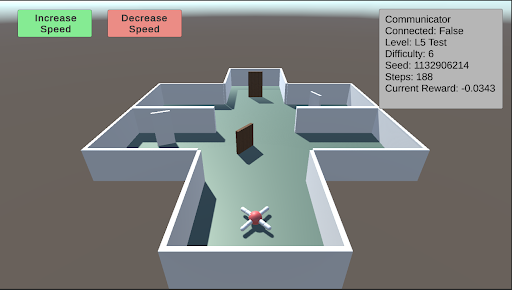
This image is a screenshot of a 3D simulation environment, likely used for training or testing an autonomous agent (e.g., a drone or robot) in a navigation task. The scene displays a top-down, isometric view of a simple maze structure with an agent positioned at the entrance. Overlaid on the 3D view are user interface (UI) elements for control and status monitoring.
### Components/Axes
The image can be segmented into three primary regions:
1. **Header/UI Overlay (Top of Screen):**
* **Top-Left:** Two rectangular buttons.
* Left button: Green background, white text reading "Increase Speed".
* Right button: Red background, white text reading "Decrease Speed".
* **Top-Right:** A semi-transparent grey data panel with white text, displaying simulation metrics.
2. **Main 3D View (Central Area):**
* **Environment:** A simple, grey-walled maze or building floor plan on a light teal floor. The structure has multiple rectangular rooms connected by open doorways. Two brown, rectangular doors are visible within the central corridor.
* **Agent:** A small, stylized drone or robot model is positioned at the bottom-center of the maze, near the entrance. It has a white body with red and blue accents, possibly indicating orientation or sensor arrays.
* **Background:** A solid, muted brownish-grey color fills the space outside the maze walls.
3. **Data Panel (Top-Right Corner):**
* **Title:** "Communicator"
* **Metrics Listed (Line by Line):**
* `Connected: False`
* `Level: L5 Test`
* `Difficulty: 6`
* `Seed: 12906214`
* `Steps: 188`
* `Current Reward: -0.0343`
### Detailed Analysis
* **Agent State:** The agent is stationary at the starting point of the maze. The "Steps: 188" indicates the simulation has been running for 188 time steps, but the agent's position suggests it may be stuck, resetting, or the step count includes planning phases.
* **Simulation Parameters:**
* The task is identified as "L5 Test" with a "Difficulty" level of 6.
* The "Seed: 12906214" is a random seed value, ensuring the maze layout and any stochastic elements are reproducible.
* **Performance Metric:** The "Current Reward: -0.0343" is a negative value. In reinforcement learning contexts, this typically indicates the agent is incurring a small penalty per time step, often for not reaching a goal or for energy consumption.
* **Control Interface:** The "Increase Speed" and "Decrease Speed" buttons suggest the user can control the simulation's playback or execution speed in real-time.
### Key Observations
1. **Disconnected State:** The "Connected: False" status is a critical observation. It implies the control interface (the buttons) or the data panel is not currently linked to the active simulation agent or backend process. This could mean the displayed data is stale, or the user is in an observation/setup mode.
2. **Negative Reward:** The agent has a slightly negative cumulative reward after 188 steps, suggesting it has not yet accomplished a positive goal and is likely being penalized for time or distance from a target.
3. **Maze Layout:** The environment is a simple, structured maze with clear corridors and rooms. The presence of closed doors (brown rectangles) may represent obstacles that require specific actions to open or bypass.
4. **Visual Design:** The graphics are low-poly and utilitarian, typical of research or development simulation environments where function is prioritized over visual fidelity.
### Interpretation
This screenshot captures a moment in a reinforcement learning or AI robotics development workflow. The environment is a standardized testbed ("L5 Test") for evaluating an agent's navigation policy. The agent appears to be initialized but not actively progressing, as evidenced by its starting position and the negative reward.
The "Connected: False" status is the most significant operational detail. It suggests the viewer is looking at a monitoring dashboard that is not live-linked to the running agent, or the agent's communication module is disabled. This could be a setup phase, a paused state, or a diagnostic view.
The negative reward value, while small, indicates the agent's current policy is suboptimal—it is not efficiently moving toward a goal. The seed number allows developers to recreate this exact maze configuration for debugging. The speed control buttons are a practical tool for developers to observe agent behavior at a manageable pace or to accelerate training/inference cycles.
Overall, the image depicts a controlled, reproducible experiment in artificial intelligence, focusing on the challenges of autonomous navigation in a simple but structured environment. The disconnect between the UI and the agent highlights a common stage in development: separating the simulation core from the monitoring and control interfaces.