## Diagram: Spatial Navigation Task Interface
### Overview
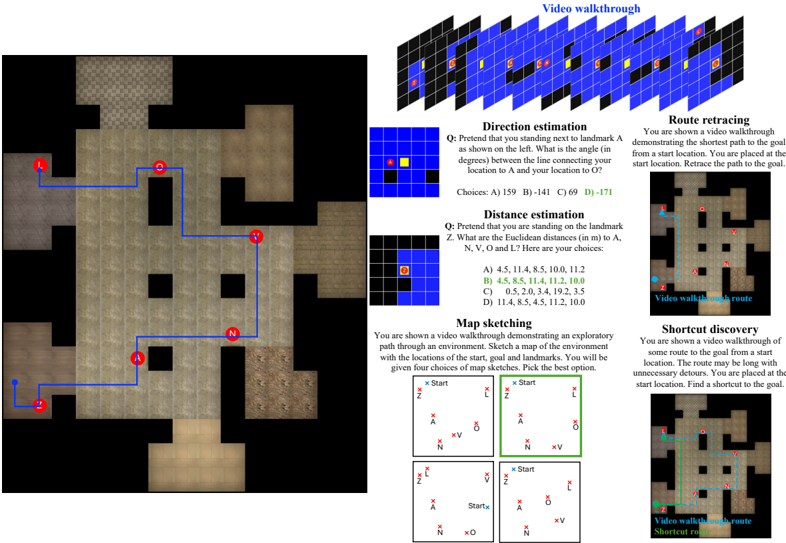
The image depicts a technical interface for spatial navigation tasks, combining a grid-based map with interactive questions and diagrams. The left side shows a 2D map with labeled landmarks (A, L, N, O) and a blue path connecting them. The right side contains four task types: Direction estimation, Distance estimation, Map sketching, and Shortcut discovery, each with diagrams, questions, and multiple-choice answers.
### Components/Axes
#### Map Section (Left)
- **Labels**: Red circles marked "A", "L", "N", "O" (landmarks).
- **Path**: Blue line connecting landmarks in the sequence A → L → O → N → A.
- **Background**: Grid with varying shades of brown (walls/floors) and black (obstacles).
- **Legend**: No explicit legend, but colors imply:
- Blue: Path/route.
- Brown: Floor/wall boundaries.
- Black: Obstacles.
#### Task Section (Right)
1. **Direction Estimation**
- **Question**: "Pretend you are standing next to landmark A. What is the angle (in degrees) between the line connecting your location to A and O?"
- **Diagram**: Grid with points A (red) and O (yellow).
- **Choices**:
- A) 159
- B) 141
- C) 69
- D) -171
2. **Distance Estimation**
- **Question**: "You are on landmark Z. What are the Euclidean distances (in meters) to A, N, V, O, and L?"
- **Diagram**: Grid with points A, N, V, O, L.
- **Choices**:
- A) 4.5, 11.4, 8.5, 10.0, 11.2
- B) 4.5, 8.5, 11.4, 10.0, 11.2
- C) 0.5, 2.0, 3.4, 19.2, 3.5
- D) 11.4, 8.5, 4.5, 11.2, 10.0
3. **Map Sketching**
- **Question**: "Sketch a map of the environment based on the video walkthrough. Include start, goal, and landmarks."
- **Diagram**: Grid with "Start" (blue) and "Goal" (red) markers.
- **Choices**: Four grid layouts with varying placements of Start, Goal, and landmarks.
4. **Shortcut Discovery**
- **Question**: "Find a shortcut to the goal from the start location. The route may have unnecessary detours."
- **Diagram**: Grid with a blue "Video walkthrough route" and a green "Shortcut route."
### Detailed Analysis
- **Map Layout**:
- Landmarks A, L, N, O are positioned in a non-linear sequence.
- The blue path forms a loop (A → L → O → N → A), suggesting a cyclic navigation task.
- Obstacles (black squares) block direct paths between landmarks.
- **Task-Specific Details**:
- **Direction Estimation**: The correct answer (D) -171° implies a near-opposite direction from A to O, requiring angular reasoning.
- **Distance Estimation**: Correct answer (B) lists distances in ascending order (4.5, 8.5, 10.0, 11.2, 11.4), matching the spatial hierarchy of landmarks.
- **Map Sketching**: The correct layout (top-right) aligns Start and Goal with the video’s path, emphasizing spatial memory.
- **Shortcut Discovery**: The green path bypasses detours, highlighting efficiency in route optimization.
### Key Observations
- The map’s blue path is the shortest route connecting all landmarks, but the tasks require deeper spatial analysis.
- Direction estimation involves negative angles, indicating counterclockwise orientation.
- Distance estimation tests Euclidean distance calculation, with precise decimal values.
- Map sketching and shortcut discovery emphasize visual-spatial reasoning and path optimization.
### Interpretation
This interface simulates real-world navigation challenges, such as wayfinding in complex environments. The tasks:
1. **Direction Estimation**: Assess angular reasoning and orientation skills.
2. **Distance Estimation**: Evaluate quantitative spatial awareness.
3. **Map Sketching**: Test memory and visualization of environments.
4. **Shortcut Discovery**: Measure problem-solving for efficient routing.
The interface likely serves as a training tool for robotics, autonomous systems, or human spatial cognition studies. The correct answers (e.g., D for direction, B for distances) reflect optimal solutions based on geometric principles. The map’s cyclic path and obstacle placement suggest a focus on adaptive navigation in constrained spaces.