## Security Architecture Diagrams: Intel SGX, AMD SEV, Arm TrustZone-A, Arm TrustZone-M
### Overview
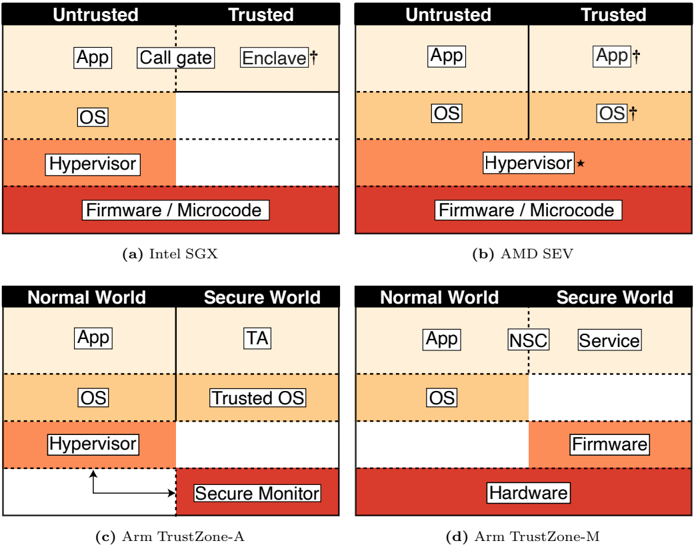
The image presents four diagrams illustrating different security architectures: Intel SGX, AMD SEV, Arm TrustZone-A, and Arm TrustZone-M. Each diagram depicts a layered system, divided into trusted and untrusted domains (or normal and secure worlds), showing the placement of various components like applications, operating systems, hypervisors, and firmware. The diagrams use color-coding to represent the level of trust, with darker shades indicating higher trust levels.
### Components/Axes
Each diagram is structured with the following common elements:
* **Vertical Division:** Each diagram is split vertically into two domains:
* Intel SGX and AMD SEV: "Untrusted" and "Trusted"
* Arm TrustZone-A and Arm TrustZone-M: "Normal World" and "Secure World"
* **Layered Architecture:** Each domain contains layers representing different system components.
* **Color Gradient:** A color gradient is used to indicate the level of trust, ranging from light orange (least trusted) to dark red (most trusted).
* **Component Labels:** Each layer is labeled with the name of the component it represents (e.g., "App," "OS," "Hypervisor," "Firmware").
Specific components and annotations:
* **Intel SGX (a):**
* Untrusted: App, OS, Hypervisor
* Trusted: Call gate, Enclave†
* Firmware/Microcode (shared between trusted and untrusted)
* **AMD SEV (b):**
* Untrusted: App, OS, Hypervisor
* Trusted: App†, OS†
* Hypervisor\*
* Firmware/Microcode (shared between trusted and untrusted)
* **Arm TrustZone-A (c):**
* Normal World: App, OS, Hypervisor
* Secure World: TA (Trusted Application), Trusted OS, Secure Monitor
* **Arm TrustZone-M (d):**
* Normal World: App, OS
* Secure World: NSC, Service, Firmware
* Hardware (shared between normal and secure worlds)
### Detailed Analysis or Content Details
**1. Intel SGX (a):**
* **Untrusted App:** Located in the "Untrusted" domain, top layer, light orange.
* **Call gate:** Located in the "Trusted" domain, top layer, light orange.
* **Enclave†:** Located in the "Trusted" domain, top layer, light orange.
* **Untrusted OS:** Located below the "App" layer in the "Untrusted" domain, orange.
* **Untrusted Hypervisor:** Located below the "OS" layer in the "Untrusted" domain, orange-red.
* **Firmware / Microcode:** Located at the bottom, spanning both "Untrusted" and "Trusted" domains, dark red.
**2. AMD SEV (b):**
* **Untrusted App:** Located in the "Untrusted" domain, top layer, light orange.
* **Trusted App†:** Located in the "Trusted" domain, top layer, light orange.
* **Untrusted OS:** Located below the "App" layer in the "Untrusted" domain, orange.
* **Trusted OS†:** Located below the "App" layer in the "Trusted" domain, orange.
* **Hypervisor\*:** Located below the "OS" layer, spanning both "Untrusted" and "Trusted" domains, orange-red.
* **Firmware / Microcode:** Located at the bottom, spanning both "Untrusted" and "Trusted" domains, dark red.
**3. Arm TrustZone-A (c):**
* **Normal World App:** Located in the "Normal World" domain, top layer, light orange.
* **Secure World TA:** Located in the "Secure World" domain, top layer, light orange.
* **Normal World OS:** Located below the "App" layer in the "Normal World" domain, orange.
* **Secure World Trusted OS:** Located below the "TA" layer in the "Secure World" domain, orange.
* **Normal World Hypervisor:** Located below the "OS" layer in the "Normal World" domain, orange-red.
* **Secure Monitor:** Located at the bottom, in the "Secure World" domain, dark red. An arrow points from the "Hypervisor" layer to the "Secure Monitor" layer.
**4. Arm TrustZone-M (d):**
* **Normal World App:** Located in the "Normal World" domain, top layer, light orange.
* **Secure World NSC:** Located in the "Secure World" domain, top layer, light orange.
* **Secure World Service:** Located in the "Secure World" domain, top layer, light orange.
* **Normal World OS:** Located below the "App" layer in the "Normal World" domain, orange.
* **Secure World Firmware:** Located below the "NSC" and "Service" layers in the "Secure World" domain, orange-red.
* **Hardware:** Located at the bottom, spanning both "Normal World" and "Secure World" domains, dark red.
### Key Observations
* **Trust Boundaries:** The diagrams clearly delineate the boundaries between trusted and untrusted domains, highlighting which components are responsible for maintaining security.
* **Layered Security:** All architectures employ a layered approach, with the most critical components (e.g., firmware, secure monitor) residing at the lowest levels and having the highest level of trust.
* **Component Placement:** The placement of components varies across architectures, reflecting different design choices and security models. For example, in Intel SGX, the "Enclave" resides in the trusted domain, while in Arm TrustZone-A, the "Secure Monitor" handles security.
* **Color Gradient:** The color gradient consistently represents the level of trust, with darker shades indicating higher trust.
### Interpretation
The diagrams illustrate different approaches to hardware-based security. Intel SGX and AMD SEV focus on isolating sensitive computations within enclaves or secure VMs. Arm TrustZone-A and Arm TrustZone-M provide a more comprehensive separation between normal and secure worlds, allowing for the execution of trusted applications and services in a protected environment.
The placement of components and the trust boundaries reflect the specific security goals and design constraints of each architecture. For example, the presence of a "Secure Monitor" in Arm TrustZone-A indicates a strong emphasis on isolation and control over access to secure resources. The use of a "Call gate" in Intel SGX suggests a mechanism for controlled transitions between untrusted and trusted code.
The diagrams highlight the importance of hardware-based security in modern systems, providing a foundation for building secure applications and protecting sensitive data. The variations in architecture reflect the ongoing evolution of security technologies and the need to adapt to different threat models and use cases.