## Diagrams: Security Architecture Models for Trusted Execution Environments (TEEs)
### Overview
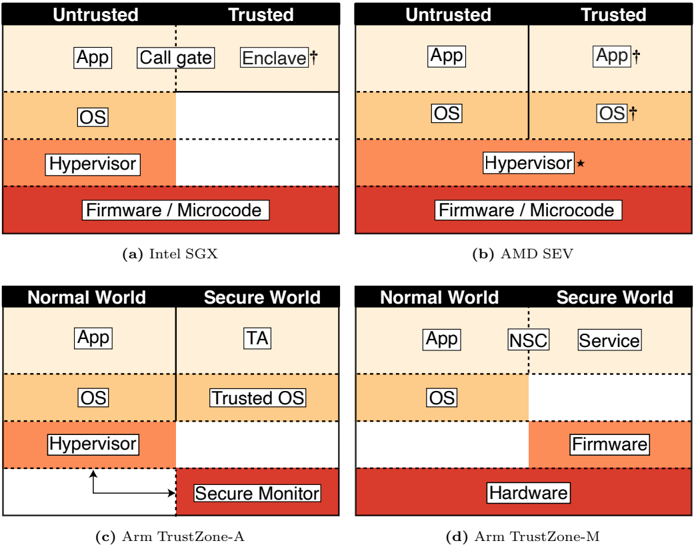
The image presents four diagrams (a-d) illustrating security architectures for Trusted Execution Environments (TEEs) across different hardware platforms. Each diagram contrasts **Untrusted** and **Trusted** components or **Normal World** vs. **Secure World** zones, highlighting isolation mechanisms and component placement.
---
### Components/Axes
#### Diagram (a): Intel SGX
- **Sections**:
- **Untrusted**: App, Call gate, Enclave, OS, Hypervisor, Firmware/Microcode.
- **Trusted**: Empty (no components listed).
- **Structure**: Vertical stacking of components with dashed horizontal lines separating layers.
#### Diagram (b): AMD SEV
- **Sections**:
- **Untrusted**: App.
- **Trusted**: App†, OS†.
- **Shared**: Hypervisor*, Firmware/Microcode.
- **Structure**: Similar vertical stacking, with Trusted components marked with † and shared components with *.
#### Diagram (c): Arm TrustZone-A
- **Sections**:
- **Normal World**: App, OS, Hypervisor.
- **Secure World**: Secure Monitor.
- **Trusted**: TA (Trusted Application).
- **Structure**: Dashed vertical line separates Normal and Secure Worlds. Arrows indicate communication between zones.
#### Diagram (d): Arm TrustZone-M
- **Sections**:
- **Normal World**: App.
- **Secure World**: NSC (Non-Secure Call), Service, Firmware.
- **Shared**: OS, Hardware.
- **Structure**: Vertical stacking with dashed lines. Firmware and Hardware are in the Secure World.
---
### Detailed Analysis
1. **Intel SGX (a)**:
- Trusted components are isolated in enclaves (labeled "Enclave"), while OS, Hypervisor, and Firmware/Microcode reside in the Untrusted zone.
- No Trusted components are explicitly listed, suggesting reliance on enclave isolation.
2. **AMD SEV (b)**:
- Trusted components include App and OS (marked with †), while Hypervisor and Firmware/Microcode are shared.
- The asterisk (*) on Hypervisor implies a shared or hybrid role.
3. **Arm TrustZone-A (c)**:
- Normal World hosts App, OS, and Hypervisor, while Secure World contains Secure Monitor.
- Trusted Applications (TA) are isolated in the Secure World, with communication via dashed arrows.
4. **Arm TrustZone-M (d)**:
- Normal World is limited to App, while Secure World includes NSC, Service, and Firmware.
- OS and Hardware are shared across both worlds, emphasizing hardware-level isolation.
---
### Key Observations
- **Trusted Components**:
- Intel SGX relies on enclaves for Trusted execution.
- AMD SEV and Arm TrustZone explicitly label Trusted components (e.g., App†, OS†).
- **Isolation Mechanisms**:
- Dashed lines visually represent boundaries between zones (e.g., Normal/Secure Worlds).
- Shared components (e.g., Hypervisor, Firmware) suggest hybrid trust models.
- **Platform Differences**:
- Arm TrustZone-A and M differ in Secure World composition (Secure Monitor vs. NSC/Service/Firmware).
---
### Interpretation
These diagrams demonstrate how TEEs partition system resources to protect sensitive operations:
- **Intel SGX** focuses on application-level enclaves, leaving OS and firmware in the Untrusted zone.
- **AMD SEV** extends trust to the OS layer but shares critical components like the Hypervisor.
- **Arm TrustZone** architectures (A and M) emphasize hardware-enforced isolation, with Secure Worlds managing critical functions like Secure Monitor or Firmware.
The diagrams highlight trade-offs between isolation depth and component sharing. For example, Arm TrustZone-M’s inclusion of Firmware in the Secure World suggests stronger hardware-rooted trust compared to Intel SGX’s enclave-centric approach. The use of shared components (e.g., OS in AMD SEV) may introduce attack surfaces but enables broader functionality.