## Diagram: Planning Agent Workflow
### Overview
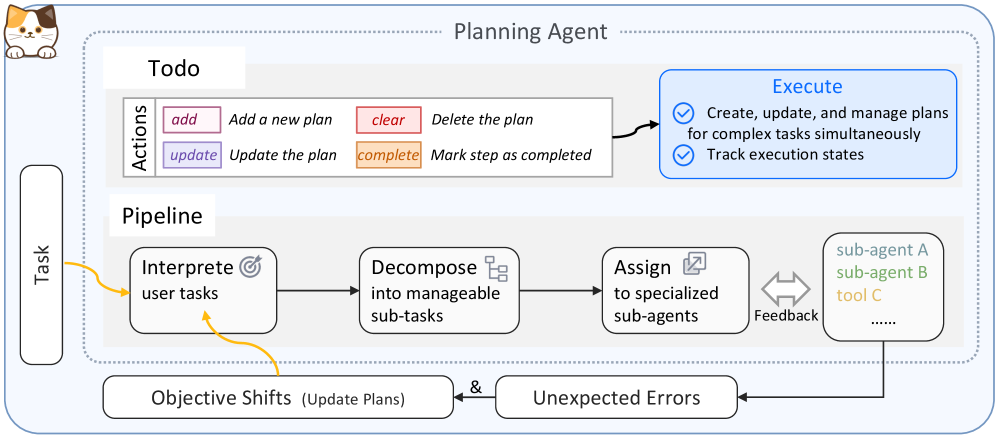
The image is a diagram illustrating the workflow of a Planning Agent. It outlines the process from receiving a task to executing it, including steps for interpreting, decomposing, and assigning sub-tasks. The diagram also incorporates feedback loops and considerations for objective shifts and unexpected errors.
### Components/Axes
* **Title:** Planning Agent
* **Elements:**
* Task (Left side, vertical rectangle)
* Todo (Top section)
* Actions (Table within Todo)
* add: Add a new plan (Pink)
* clear: Delete the plan (Red)
* update: Update the plan (Purple)
* complete: Mark step as completed (Orange)
* Pipeline (Middle section)
* Interpret user tasks (Rounded rectangle with target icon)
* Decompose into manageable sub-tasks (Rounded rectangle with stacked box icon)
* Assign to specialized sub-agents (Rounded rectangle with assign icon)
* Sub-agent A (Light blue)
* Sub-agent B (Light green)
* Tool C (Light orange)
* Feedback (Double arrow between "Assign" and sub-agents)
* Execute (Top-right, blue rounded rectangle)
* Create, update, and manage plans for complex tasks simultaneously
* Track execution states
* Objective Shifts (Update Plans) (Bottom-left rounded rectangle)
* Unexpected Errors (Bottom-right rounded rectangle)
* **Flow:** The primary flow is from left to right through the "Pipeline." Arrows indicate the direction of the process.
* **Connections:**
* Task -> Interpret user tasks (Yellow arrow)
* Interpret user tasks -> Decompose into manageable sub-tasks (Black arrow)
* Decompose into manageable sub-tasks -> Assign to specialized sub-agents (Black arrow)
* Assign to specialized sub-agents <-> sub-agents (Feedback loop)
* Interpret user tasks -> Objective Shifts (Yellow arrow)
* sub-agents -> Unexpected Errors (Black arrow)
* Objective Shifts & Unexpected Errors -> Assign to specialized sub-agents (Black arrow)
### Detailed Analysis or Content Details
The diagram presents a structured approach to task management. The "Todo" section outlines actions related to planning, while the "Pipeline" details the steps involved in processing a task. The "Execute" section describes the actions performed on the plans.
* **Task:** Represents the initial input or goal.
* **Todo:** Manages the planning actions. The actions are:
* Add a new plan (Pink)
* Delete the plan (Red)
* Update the plan (Purple)
* Mark step as completed (Orange)
* **Pipeline:**
1. **Interpret user tasks:** Understands the task requirements.
2. **Decompose into manageable sub-tasks:** Breaks down the task into smaller, actionable units.
3. **Assign to specialized sub-agents:** Distributes sub-tasks to appropriate agents or tools.
4. **Feedback:** Allows for iterative adjustments based on the performance of sub-agents.
* **Execute:** Involves creating, updating, and managing plans, as well as tracking execution states.
* **Objective Shifts & Unexpected Errors:** Represents potential changes or issues that may arise during the process, requiring adjustments to the plan.
### Key Observations
* The diagram emphasizes a modular and iterative approach to task management.
* Feedback loops and error handling are integrated into the workflow.
* The use of specialized sub-agents suggests a distributed or parallel processing architecture.
### Interpretation
The diagram illustrates a sophisticated planning and execution system. The "Planning Agent" is designed to handle complex tasks by breaking them down into smaller, manageable units and assigning them to specialized agents. The inclusion of feedback loops and error handling mechanisms ensures adaptability and robustness. The "Todo" section provides a clear set of actions for managing plans, while the "Pipeline" outlines the steps involved in processing a task. The diagram suggests a system capable of handling dynamic and unpredictable environments.