\n
## Diagram: Planning Agent Architecture
### Overview
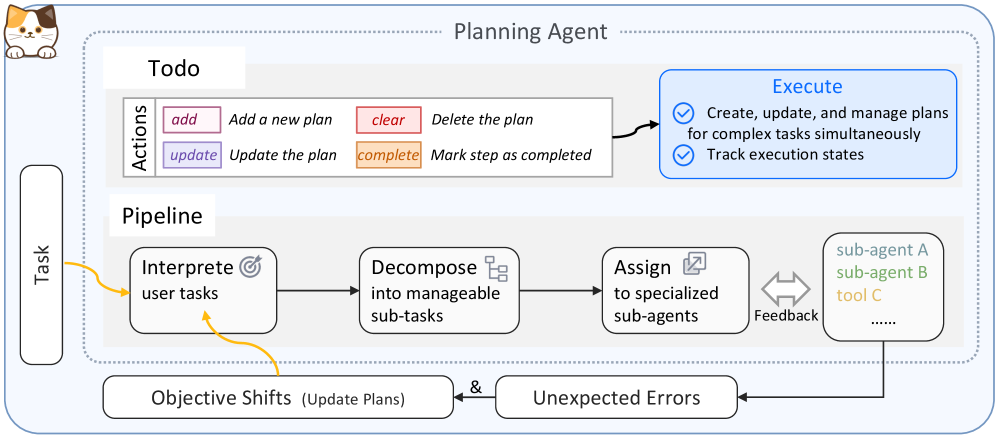
This diagram illustrates the architecture of a "Planning Agent," outlining its components, actions, and pipeline for task management. The agent handles tasks, decomposes them into sub-tasks, assigns them to specialized sub-agents, and manages execution while adapting to objective shifts and unexpected errors.
### Components/Axes
The diagram is structured into three main sections: a "Todo" section, an "Execute" section, and a "Pipeline" section. There are also input and output elements representing "Task", "Objective Shifts", and "Unexpected Errors".
* **Todo:** Contains actions: "add", "update", "clear", "complete".
* **Execute:** Describes functionalities: "Create, update, and manage plans for complex tasks simultaneously" and "Track execution states".
* **Pipeline:** Consists of three stages: "Interpret user tasks", "Decompose into manageable sub-tasks", and "Assign to specialized sub-agents".
* **Input:** "Task" (left side)
* **Outputs:** "Objective Shifts (Update Plans)" and "Unexpected Errors" (bottom side).
* **Sub-agents:** "sub-agent A", "sub-agent B", "tool C", and "......" (right side).
### Detailed Analysis or Content Details
The diagram depicts a workflow.
1. **Task Input:** A "Task" enters the system from the left.
2. **Pipeline - Interpret:** The task is first "Interpreted" (represented by a rounded rectangle with a magnifying glass icon).
3. **Pipeline - Decompose:** The interpreted task is then "Decomposed" into smaller, manageable sub-tasks (represented by a rounded rectangle with a grid icon).
4. **Pipeline - Assign:** These sub-tasks are "Assigned" to specialized sub-agents (represented by a rounded rectangle with a number "2" inside a square icon).
5. **Sub-agents:** The assigned sub-tasks are handled by various sub-agents and tools, including "sub-agent A", "sub-agent B", and "tool C", with an ellipsis indicating more possibilities.
6. **Feedback Loop:** A bidirectional arrow labeled "Feedback" connects the sub-agents back to the "Assign" stage, indicating a feedback mechanism.
7. **Error & Shift Handling:** "Objective Shifts" (requiring plan updates) and "Unexpected Errors" feed back into the pipeline, suggesting a dynamic adaptation process.
8. **Todo Actions:** The "Todo" section lists actions that can be performed on the plan:
* "add": Add a new plan.
* "update": Update the plan.
* "clear": Delete the plan.
* "complete": Mark step as completed.
9. **Execute Functionality:** The "Execute" section describes the agent's capabilities:
* "Create, update, and manage plans for complex tasks simultaneously".
* "Track execution states".
### Key Observations
The diagram emphasizes a cyclical process of task interpretation, decomposition, assignment, execution, and adaptation. The feedback loop and error/shift handling mechanisms highlight the agent's robustness and ability to respond to changing conditions. The "Todo" section suggests a user interface or control panel for managing plans.
### Interpretation
This diagram represents a sophisticated agent-based system for task management. The architecture is designed to handle complex tasks by breaking them down into smaller, manageable units and distributing them to specialized agents. The feedback loop and error handling mechanisms suggest a learning and adaptive system. The "Planning Agent" is not a static planner but a dynamic system that can adjust to changing objectives and unexpected events. The inclusion of "sub-agent A", "sub-agent B", and "tool C" suggests a modular design, allowing for easy integration of new capabilities. The diagram is a high-level overview and doesn't delve into the specifics of the algorithms or data structures used within each component. The cat icon in the top-left corner is likely a branding element and doesn't contribute to the technical understanding of the system.