TECHNICAL ASSET FINGERPRINT
9812a975ff8dc9022d0b6ba2
Click to view fullscreen
Press ESC or click to close
FOUND IN PAPERS
EXPERT: healer-alpha-free VERSION 1
RUNTIME: free/openrouter/healer-alpha
INTEL_VERIFIED
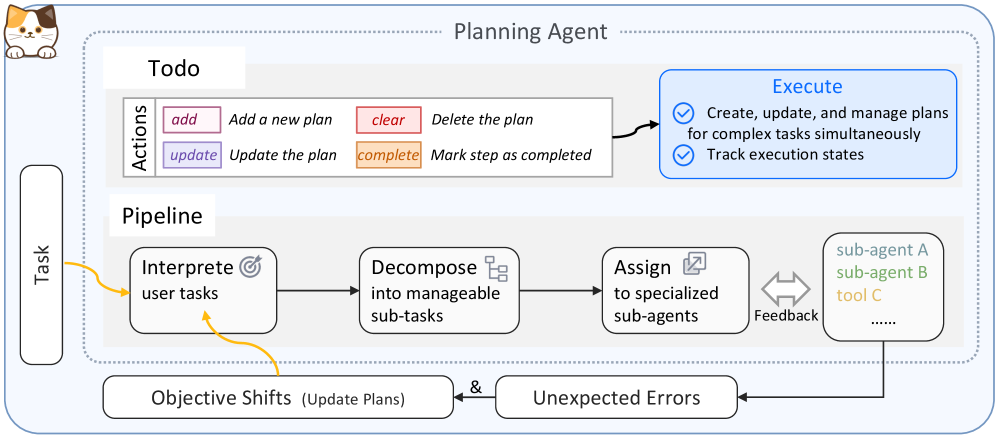
## System Architecture Diagram: Planning Agent
### Overview
The image is a technical system architecture diagram illustrating the components and workflow of a "Planning Agent." The agent is designed to manage complex tasks through a structured pipeline involving interpretation, decomposition, assignment, and execution, with built-in feedback and error-handling loops. The diagram uses a combination of labeled boxes, icons, arrows, and color-coding to depict the flow of information and control.
### Components/Axes
The diagram is organized into several distinct regions and components:
1. **Header/Title Region:**
* **Top Center:** The title "Planning Agent" is displayed in a large, dark font.
* **Top Left:** A small, stylized icon of a cat's head is present.
2. **Main Container:**
* A large, light-blue dashed rectangle encloses the core components of the Planning Agent, labeled "Planning Agent" at the top.
3. **Todo Module (Top-Left within container):**
* A white box labeled "Todo".
* Contains a sub-section titled "Actions" with four color-coded action buttons:
* **add** (Pink background): "Add a new plan"
* **update** (Purple background): "Update the plan"
* **clear** (Red background): "Delete the plan"
* **complete** (Orange background): "Mark step as completed"
4. **Execute Module (Top-Right within container):**
* A blue-outlined box labeled "Execute" in blue text.
* Contains two bullet points:
* "Create, update, and manage plans for complex tasks simultaneously"
* "Track execution states"
* A black arrow points from the "Todo" module to the "Execute" module.
5. **Pipeline Module (Center within container):**
* A white box labeled "Pipeline".
* Contains a linear flow of four process steps, connected by black arrows:
1. **Interpret user tasks** (Icon: A target/bullseye)
2. **Decompose into manageable sub-tasks** (Icon: A flowchart/hierarchy)
3. **Assign to specialized sub-agents** (Icon: A document with a pencil)
4. A final box listing resources: **sub-agent A** (light blue), **sub-agent B** (green), **tool C** (orange), followed by "......" (ellipsis).
6. **Feedback & External Factors (Bottom):**
* A double-headed arrow labeled "Feedback" connects the "Assign" step and the resource list (sub-agents/tools).
* Two rounded rectangles are positioned below the main container:
* **Left:** "Objective Shifts (Update Plans)"
* **Right:** "Unexpected Errors"
* An ampersand ("&") connects these two boxes.
* A black arrow points from "Unexpected Errors" back to the resource list (sub-agents/tools).
* A curved, yellow arrow points from "Objective Shifts" back to the first step of the Pipeline ("Interpret user tasks").
7. **External Input (Far Left):**
* A vertical, rounded rectangle labeled "Task" is positioned to the left of the main container.
* A curved, yellow arrow points from "Task" into the first step of the Pipeline ("Interpret user tasks").
### Detailed Analysis
The diagram outlines a closed-loop system for autonomous task management.
* **Input:** The process begins with an external "Task" input.
* **Core Pipeline:** The task enters the "Pipeline" where it is sequentially processed:
1. **Interpretation:** The agent first interprets the user's task.
2. **Decomposition:** The interpreted task is broken down into smaller, manageable sub-tasks.
3. **Assignment:** These sub-tasks are assigned to appropriate specialized resources.
4. **Resources:** The available resources include "sub-agent A," "sub-agent B," and "tool C," with an ellipsis indicating others may exist.
* **Execution & Planning:** The "Todo" module provides actions (`add`, `update`, `clear`, `complete`) to manage the plan, which directly feeds into the "Execute" module responsible for plan management and state tracking.
* **Feedback Loops:**
* A direct "Feedback" loop exists between the assignment step and the executing resources.
* A higher-level adaptive loop is triggered by "Objective Shifts," which sends information back to the initial interpretation stage to update plans.
* A resilience loop handles "Unexpected Errors," which feed back to the resource layer, likely for reassignment or recovery.
### Key Observations
1. **Color-Coding Consistency:** The colors of the action buttons in the "Todo" module (pink, purple, red, orange) are distinct and likely correspond to different function types within the system's UI or logic.
2. **Dual Feedback Mechanisms:** The system has both a low-level, immediate feedback loop (between assignment and execution) and a high-level, strategic feedback loop (for objective shifts), indicating robustness.
3. **Error Handling as a First-Class Component:** "Unexpected Errors" is explicitly modeled as a system input that triggers a corrective action loop, not just an exception.
4. **Spelling Note:** The first pipeline step is labeled "Interprete user tasks." The standard English spelling is "Interpret." This may be a typo or a stylistic choice.
### Interpretation
This diagram represents a sophisticated, self-correcting AI agent architecture designed for complex, multi-step task completion. It embodies several key software engineering and AI principles:
* **Modular Design:** Separation of planning (Todo), execution (Execute), and processing (Pipeline) allows for independent development and scaling of components.
* **Hierarchical Task Management:** The decomposition of tasks into sub-tasks assigned to specialized agents is a classic "divide and conquer" strategy, enabling parallel processing and expertise utilization.
* **Closed-Loop Control:** The system is not a simple linear pipeline. The multiple feedback loops make it adaptive. It can adjust to new information ("Objective Shifts") and recover from failures ("Unexpected Errors"), moving towards goal-oriented autonomy.
* **Human-in-the-Loop Potential:** While autonomous, the "Todo" actions (`add`, `update`, etc.) suggest interfaces for human oversight or intervention in the planning process.
The overall purpose is to create an agent that can take a vague or complex user task, formulate a plan, execute it using available tools and sub-agents, and dynamically adapt to changes and problems without requiring constant human re-instruction. The cat icon may be a branding element or a metaphor for an agile, observant agent.
DECODING INTELLIGENCE...