## Diagram: Foundation Model Training and Applications
### Overview
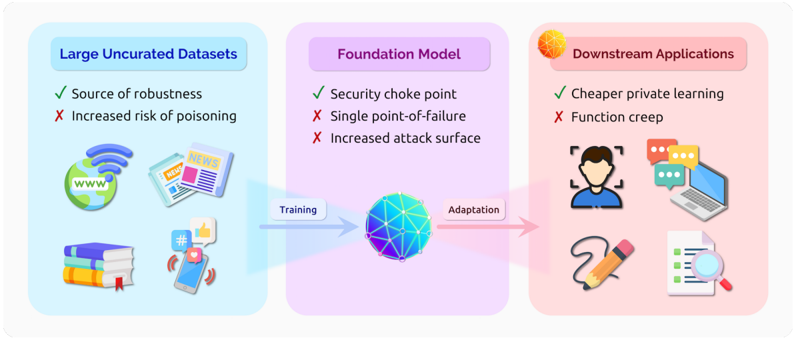
The image is a diagram illustrating the process of training a foundation model using large uncurated datasets and its subsequent application in downstream tasks. It highlights the advantages and disadvantages associated with each stage.
### Components/Axes
The diagram is divided into three main sections, arranged horizontally from left to right:
1. **Large Uncurated Datasets** (left, light blue background): This section represents the input data used for training the foundation model. It includes icons representing various data sources such as the internet (globe with "www"), news articles ("NEWS"), books, and social media (smartphone with hashtag and like icons).
* **Advantages:**
* Green checkmark: Source of robustness
* **Disadvantages:**
* Red X: Increased risk of poisoning
2. **Foundation Model** (center, light purple background): This section represents the core model being trained. It is depicted as a blue and purple sphere with interconnected nodes.
* **Advantages:**
* Green checkmark: Security choke point
* **Disadvantages:**
* Red X: Single point-of-failure
* Red X: Increased attack surface
3. **Downstream Applications** (right, light red background): This section represents the various applications that can be built using the trained foundation model. It includes icons representing tasks such as facial recognition, communication (chat bubbles), document processing (checklist with magnifying glass), and creative tasks (pencil).
* **Advantages:**
* Green checkmark: Cheaper private learning
* **Disadvantages:**
* Red X: Function creep
Arrows indicate the flow of information:
* "Training" arrow: Points from "Large Uncurated Datasets" to "Foundation Model".
* "Adaptation" arrow: Points from "Foundation Model" to "Downstream Applications".
### Detailed Analysis or Content Details
* **Large Uncurated Datasets:** The icons represent diverse data sources. The text indicates that while these datasets provide robustness, they also increase the risk of data poisoning.
* **Foundation Model:** The sphere represents the complex model. The text highlights that it acts as a security choke point but is also vulnerable as a single point of failure and has an increased attack surface.
* **Downstream Applications:** The icons represent various applications. The text indicates that the model enables cheaper private learning but also introduces the risk of function creep.
### Key Observations
* The diagram presents a simplified view of the foundation model training and application pipeline.
* It highlights the trade-offs between the benefits and risks associated with each stage.
* The use of checkmarks and crosses clearly indicates the advantages and disadvantages.
### Interpretation
The diagram illustrates the lifecycle of a foundation model, from its training on large, diverse datasets to its deployment in various downstream applications. It emphasizes the importance of considering both the benefits and risks associated with each stage. The use of uncurated datasets provides robustness but introduces the risk of poisoning. The foundation model itself acts as a central point for security but is also a potential point of failure and attack. Finally, while the model enables cheaper private learning, it also introduces the risk of function creep, where the model's capabilities expand beyond its intended purpose. The diagram suggests that careful consideration and mitigation strategies are needed to address these risks and maximize the benefits of foundation models.